page 34 www.CentSys.com
SECTION 9
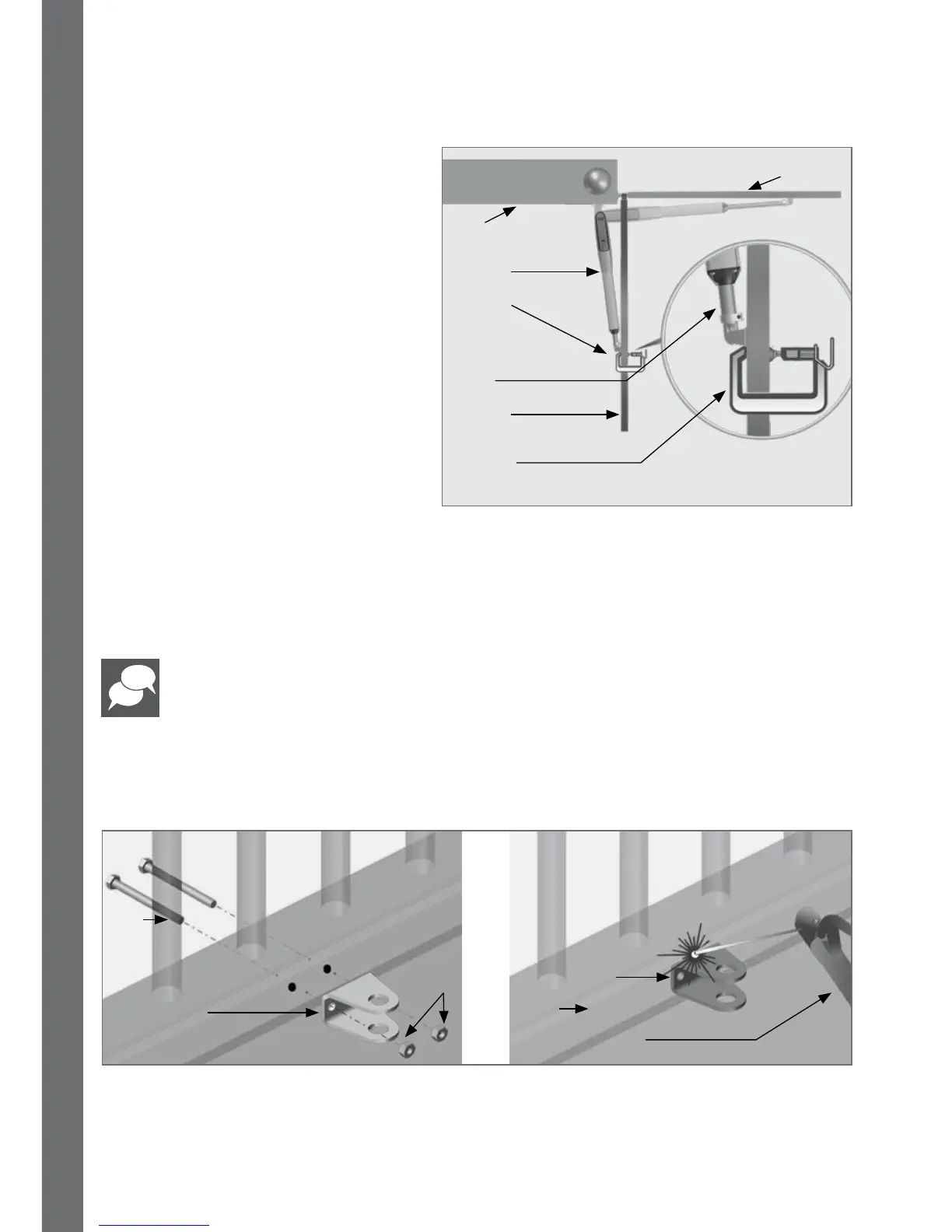
FIGURE 24
Gate in closed
position
Set the
origin clamp
to the open
limit
VANTAGE
operator
G-clamp
G-clamp
Gate in open
position
Wall
9.9. Step 9
If the gate opening angle is sucient and the operator is utilising the majority of its
stroke, then secure the Gate Bracket using the most appropriate means.
Remove the operator before welding, if welding is required.
If this is not the case or the operator does not have enough stroke for the gate to open
fully, re-check the A- and B-Values from Table 10 on page 29 to Table 15 on page 31.
FIGURE 25
Gate Bracket
Welding machine
Bolt
Nuts
9.8. Step 8
Manually release the operator using
the key provided with the kit, and
swing the gate to the desired open
position.
Slide the origin clamp along the
piston tube, right up to the end to
the operator.
Secure origin clamp in place, and
tighten properly with an Allen Key.
Gate
Gate Bracket
OR
OPERATOR INSTALLATION - INWARD OPENING GATES



 To Next Page