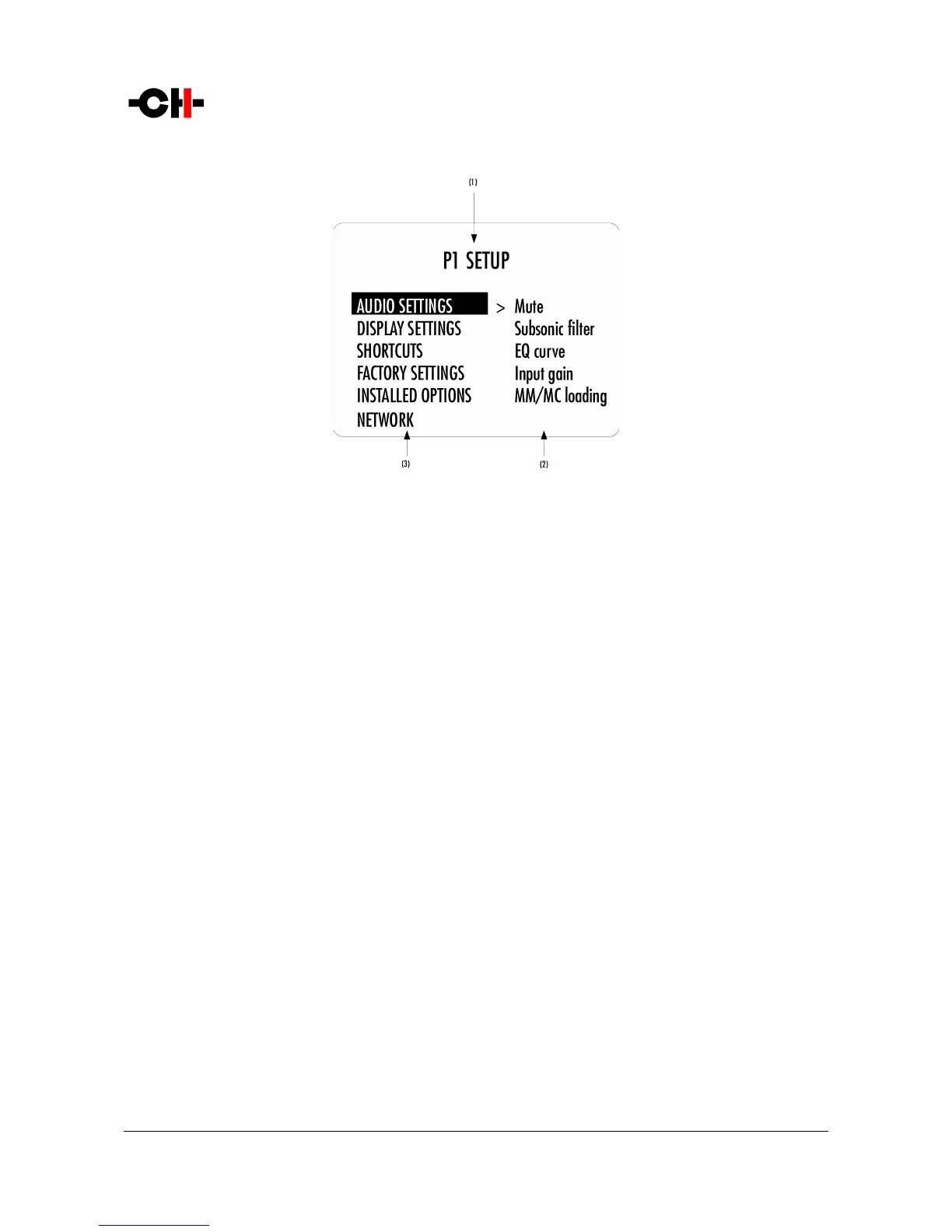
Following illustration shows the elements of a the P1 SETUP Menu page, the entry point to the P1 menu structure.
P1 SETUP screen items
(1) Menu title. When entering a menu item, the title also shows the parent menu. If the AUDIO SETTINGS menu is entered, the title line would display
P1 SETUP >> AUDIO SETTINGS.
(2) Shows the available parameters when entering the currently highlighted menu item. In this example, AUDIO SETTINGS is highlighted and the
second column shows the parameters available in the AUDIO SETTINGS menu.
(3) The list of items in the current menu. Navigate from one item to the other by pressing the UP [N] and DOWN [O] buttons. To enter the
highlighted menu item, press the OK [R] button. To return to the previous menu level press the CANCEL [Q] button. In this example, the CANCEL
[Q] button exits the Menu mode and sets the unit back to Normal mode.
Once a menu item is selected by a push of the OK [R] button, parameters for the corresponding menu item can be navigated and
accessed. As an example, the following drawing shows the display elements of the P1 SETUP >> AUDIO SETTINGS sub-menu.
Rev 1.1 P1 User Manual 23



 To Next Page