77
Commissioning
ARIANEXT COMPACT
LED indications
(1) BLUE LED
Light off power supply OFF
Light fi xed power supply ON
Light fl ashing powered ON, board in manual mode
(2) BLUE LED
Light off Bus communication absent or not-OK.
Light fi xed Bus communication present.
Light fl ashing Scanning or initialisation of Bus communication
(3) RED LED
Light off no operation error
Light fi xed presence of one or more operation errors
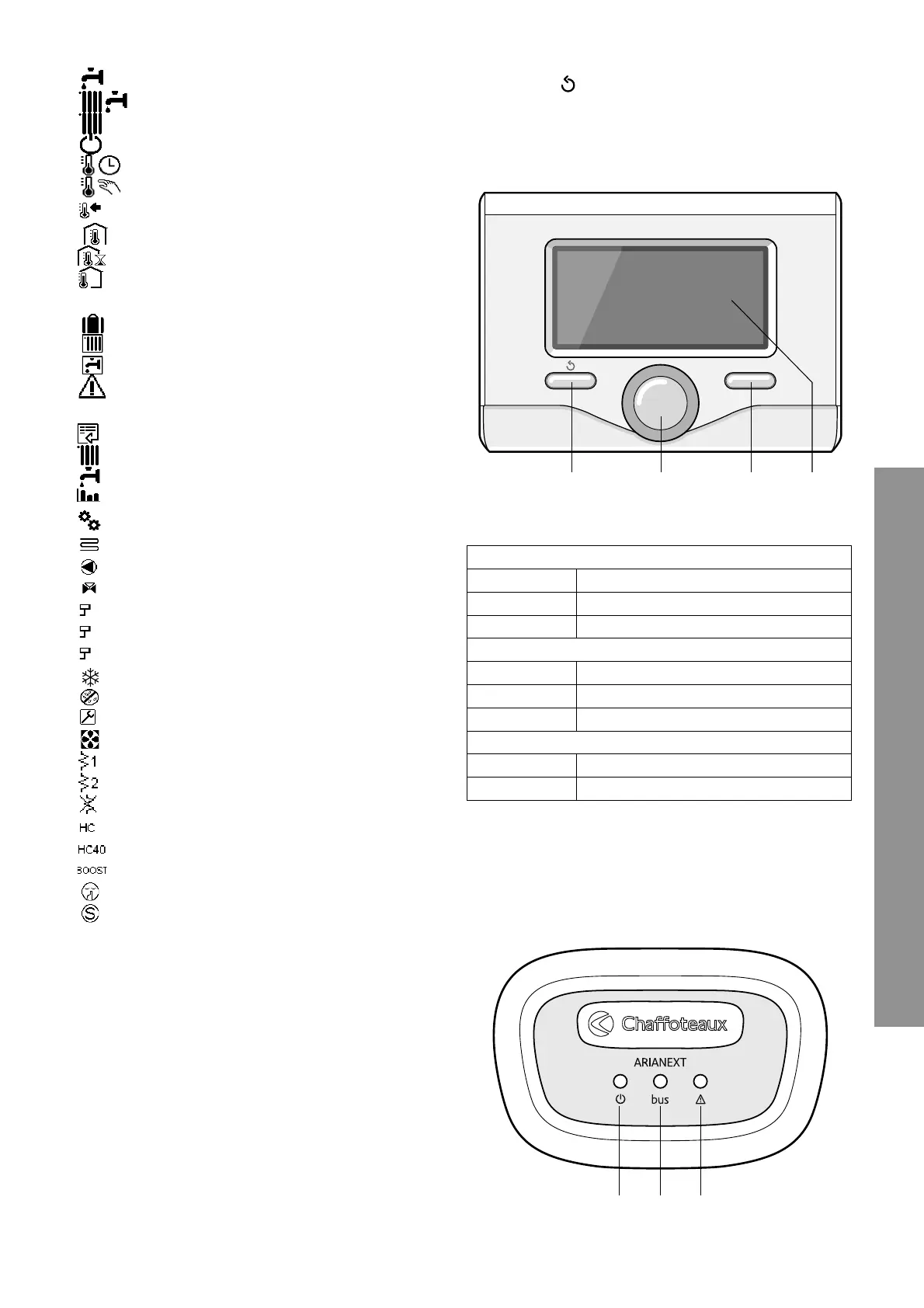
Display symbols
:
- ( ) Summer
- (
) Winter
- (
) Only Winter
- (
) OFF, system off
- (
) Time program
- (
) Manual operation
- (
) Desired room temperature
- ( Room temperature detected
- (
) Desired room temperature override
- (
) Outdoor temperature
- (SRA) SRA function enabled
- ( ) HOLIDAY function enabled
- (
) Central heating active
- (
) Domestic hot water active
- (
) Error indication
- (COMFORT)
Comfort function enabled
- (
) Menu
- (
) CH settings
- (
) DHW settings
- (
) System performance
- (
) Screen setting
- (
) Floor Heating
- (
) Circulation pump
- (
) Valvola deviatrice
- (
S2) Low indirect cylinder sensor
- (
S3) High indirect cylinder sensor
- (
S4) Under-fl oor heating system thermostat
- (
) Anti-frost function
- (
) Thermal Cleanse Function
- (
) Confi gurable device
- (
) Heat pump
- (
) Heating element 1
- (
) Heating element 2
- (
) Heating element excluded
- (
) Manual mode HC
- (
) Manual mode HC 40
- (
) BOOST mode
- (
) Silent mode
- (
) Special function
OK
1
1
2
2
3
3
4
Buttons and Display:
1. back button
(previous screen)
2. knob
3.
OK
button
(to confi rm operation or access main menu)
4. DISPLAY


 To Next Page