17
B
Troubleshooting
Industrial Duty Logic Operators
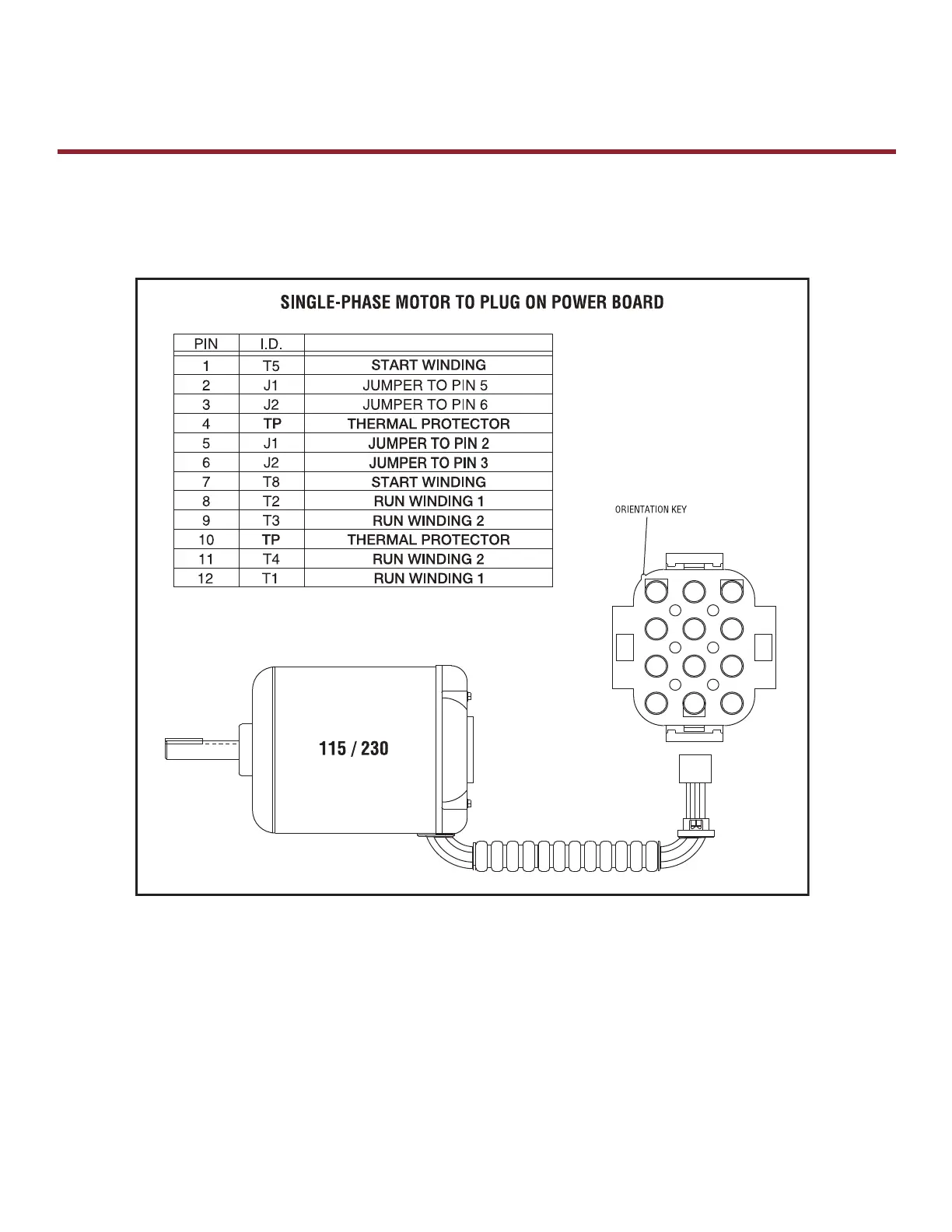
Advanced Troubleshooting: Checking Logic 5.0 Single Phase Motor
The following tests should be performed by a qualifi ed technician. A multimeter will be required.
1) Turn power off to the operator.
2) Locate the motor plug on the POWER BOARD and unplug.
3) Set the multimeter to continuity/ohms. Ω *Certain meters have a setting that beeps when a closed circuit is
detected. This setting is preferred for the test.
4) Using the guide below, check for continuity across the following pins on the motor harness:
a. Place probe between Thermal Protector, Pins 4 and 10. Continuity should be present.
b. Place probe between Run Winding 1, Pins 12 and 8. Continuity should be present.
c. Place probe between Run Winding 2, Pins 11 and 9. Continuity should be present.
d. Place probe between Start Winding, Pins 1 and 7. Continuity should NOT be present.
5) If the readings are different than the results expected above, the motor will have to be replaced.
123
456
789
10 11 12









 To Next Page