21
Car Dealer Mode
Feature: The car dealer mode uses the SBC (Single Button Control input)
to bring the door from a closed position to the programmed Open Mid-Stop
position and keep it at that location even with multiple inputs.
Benefi t: Provides energy cost savings by limiting the door opening height.
Requirements: This feature works in conjunction with the programmable
Timer-To-Close feature. To enable this feature you must fi rst connect a treadle,
photoelectric sensor or loop detector accessory to the SBC input and must
have at least one LiftMaster Monitored Entrapment Protection (LMEP)
device installed (refer to the installation manual). Wiring type must be
set to TS or T.
TO PROGRAM:
1) Start with the door in the closed position.
2) Turn the SELECTOR DIAL to PROG.
3) Push the TTC button and release (Green Timer LED will
be lit).
4) Push the MID button and release. This turns on the Car Dealer Mode.
(The Green Timer LED will fl ash 6 times indicating the Car Dealer Mode
is turned on.)
5) Push the TTC button and release.
6) Turn the SELECTOR DIAL to the desired wiring type (TS or T).
NOTE: To disable the Dealer Mode follow steps 2 and 3, then press the MRT button and release. (The Green Timer LED
will fl ash 3 times indicating that the Car Dealer Mode is off.)
Life Of Operator (Odometer/Cycle Counter)
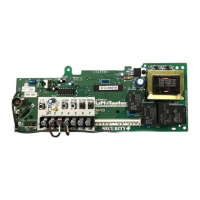
The operator is equipped with an odometer to show how many months and cycles the operator has performed from
the time it was installed. This feature can help determine how long the operator has been in service.
1) Start with the door in the closed position.
2) Turn the SELECTOR DIAL to DIAG (diagnostic mode).
3) Press and release the MAS button on the logic board.
4) Press and release the MRT button on the logic board.
5) The open and close lights will fl ash. OPEN for every 5,000 cycles and CLOSE for every 3 months.
6) Return the SELECTOR DIAL to the desired wiring type.
NOTE: If operator has not reached 5,000 cycles or 3 months, there will be no indications.
Thermal Overload
The Logic operators have been equipped with a thermal motor overload. The thermal overload has replaced the need
for a manual overload on the operator electrical box. The thermal overload works by shutting down the operator until
the operator can cool off and reset automatically. After the overload resets, the operator must be cycled with constant
pressure. The operator must be opened and closed fully to reset the operator to normal operation. This feature saves
the installer from having to physically reset the operator manually.
Motor Direction Jumper
This feature is designed to save the installer from having to rewire the limit switches and motor when unique
applications require reversing the open and close limits. This would typically be seen on an auxiliary trolley
modifi cation, through-wall application, or when mounting the operator upside down. By removing the jumper from the
motor direction pins, the door can be set to either a standard or reversed direction. The factory default is the standard
direction. The logic board automatically changes the motor direction and reverses the Open Limit Switch (OLS) and
the Close Limit Switch (CLS). The only limit switch requiring movement is the Sensing Limit Switch (SLS) to the close
side of the operator. This feature is provided for ease of install.
NOTE: Not for use when a 3PH operator is reverse phased, for 3PH two of the incoming legs of power should be reversed.
B
Selected Features
Industrial Duty Logic Operators
Operation will
vary depending
on wiring type
SELECTOR DIAL





 To Next Page