23
B
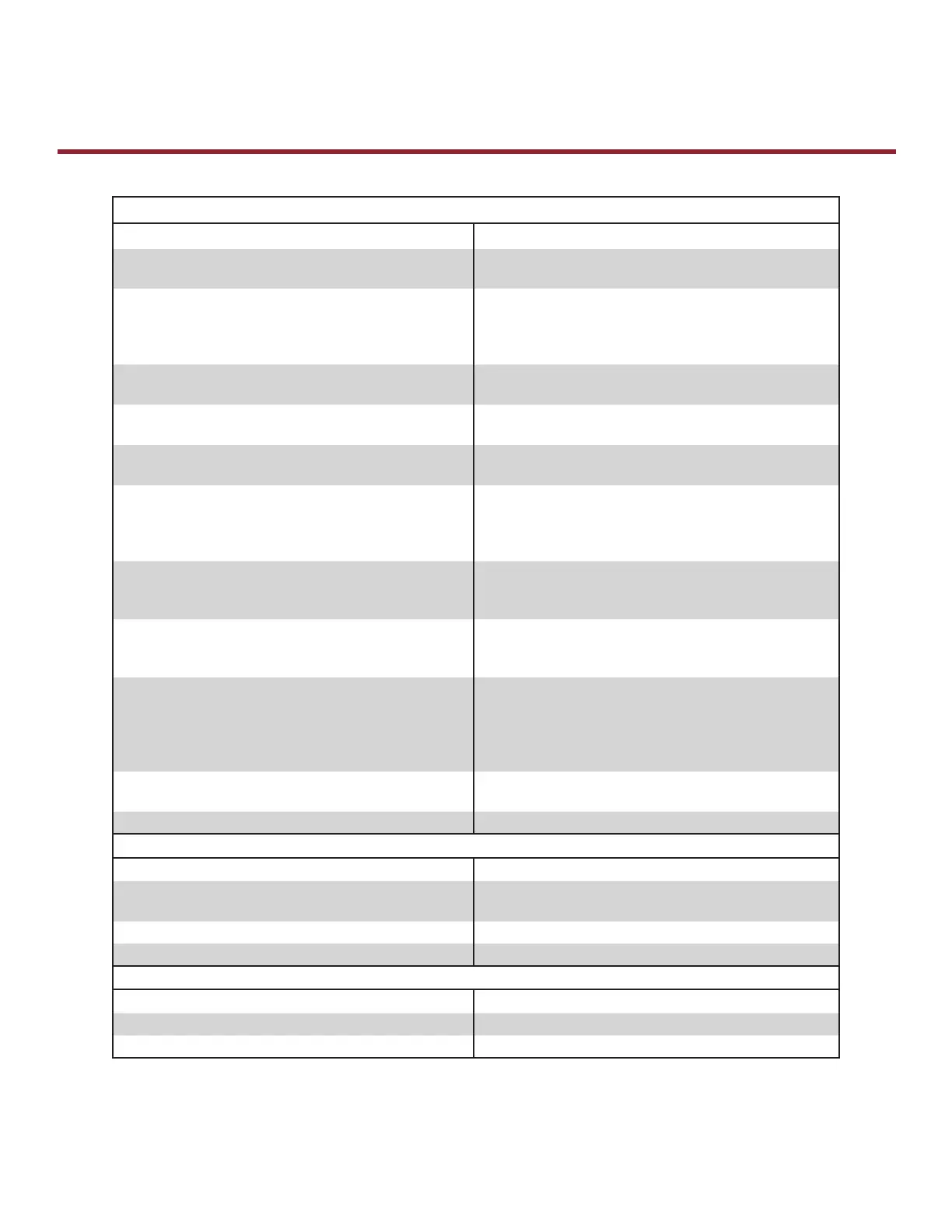
Symptoms and Solutions
SYMPTOM: The Operator Will Not Respond To Any Commands
POSSIBLE CAUSE: SOLUTION:
No power supply Verify primary line voltage from power source. Green
POWER LED must be on.
Operator 3-button control station is miswired Use the OPEN, CLOSE and STOP LEDs to help check
correct wiring. Verify the logic board is accepting
commands by using the on-board 3-button control
station. Green light next to the STOP button must be on.
Interlock switch is activated Check interlock(s). If more than one external interlock is
present they must be wired in series.
Dial still in programming or diagnostic mode Set dial to desired wiring type.
Motor is malfunctioning Verify proper voltage getting to the motor.
Motor thermal overload tripped Check for obstructions and verify the door moves freely.
Cycle operator in constant pressure one full cycle open
and close to reset fault. Check to see if motor is hot.
Allow motor to cool before attempting to move door.
Failsafe switch is activated requiring photoelectric
sensors (Logic 3.0 only)
Move switch to non-failsafe or connect a failsafe sensing
device.
LiftMaster Monitored Entrapment Protection (LMEP) not
installed (Logic 4.0 and 5.0)
Move selector dial to C2 for constant pressure to close
or add a LiftMaster Monitored Entrapment Protection
(LMEP).
A relay or the power board (Logic 5.0 ONLY) may need
to be replaced
When the OPEN or CLOSE button is pressed, Relay A or
B LED should turn on and the door should move in the
corresponding direction. If Relay A or B lights and the
door does not move, the relay or Power Board (Logic 5.0
ONLY) may need to be replaced.
Possible accessory malfunction Disconnect all devices; reattach them one at a time
testing for a failure after each one is replaced.
Possible logic board failure Replace logic board.
SYMPTOM: Power LED Is Not On
POSSIBLE CAUSE: SOLUTION:
Loose secondary wiring connections or a faulty control
transformer
Repair or replace connections or control transformer.
Logic board failure Replace logic board.
Interlock switch Check interlock(s).
SYMPTOM: Stop Button LED Is Not On
POSSIBLE CAUSE: SOLUTION:
Control station miswired or not connected Check wiring to control station.
Interlock switch Check interlock switch(es) for continuity.
Industrial Duty Logic Operators









 To Next Page