31
B
Medium Duty Logic Operators
Programming
Requires LiftMaster Monitored Entrapment Protection (LMEP) device. See installation manual for selection and
installation of LiftMaster Monitored Entrapment Protection (LMEP) devices.
REMOTE CONTROLS
Built in 315 MHz radio receiver permits as many as 20 Security+
®
remote controls or dip switch remote controls in any
combination.
Single Button Remote Control
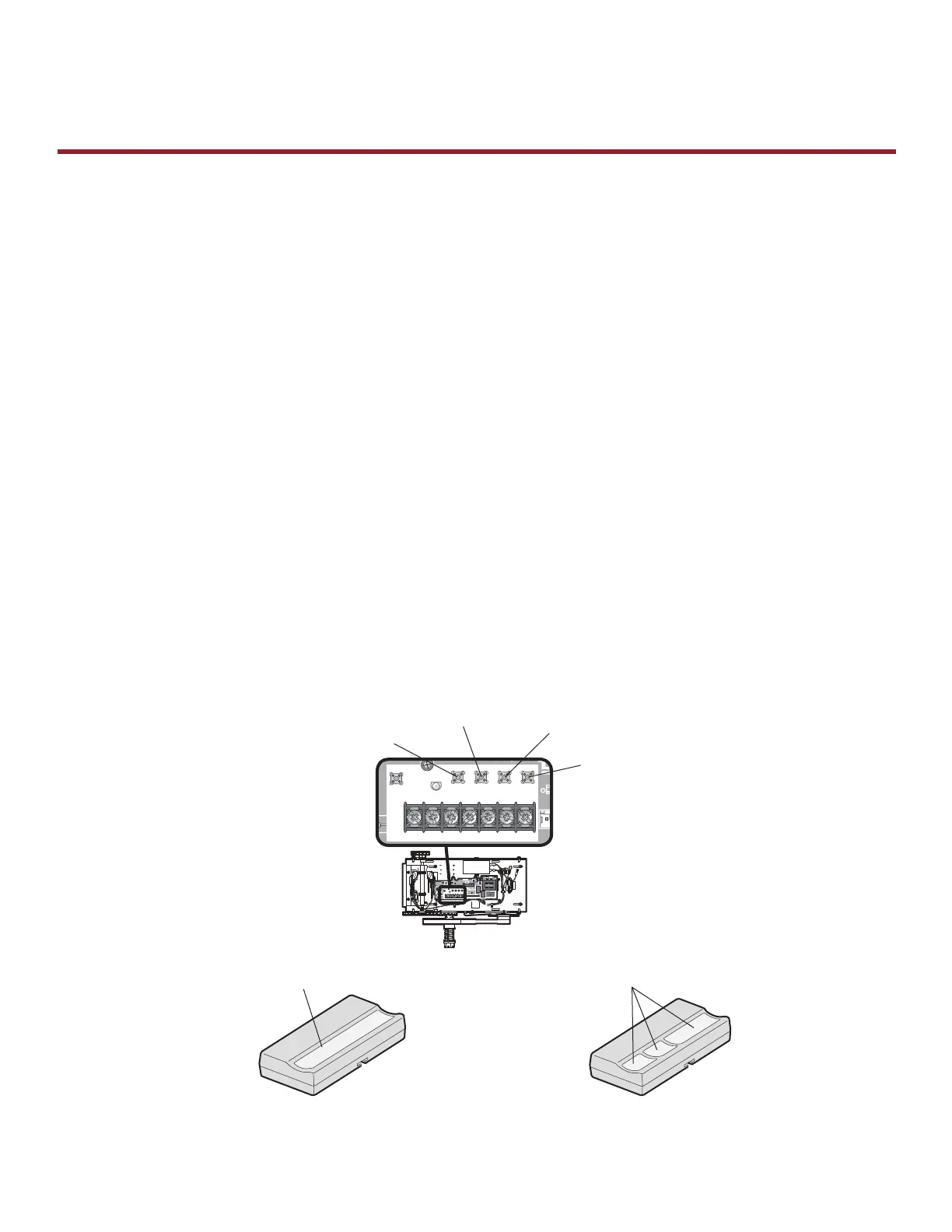
1) Press and release the LEARN button (LED will light).
2) Press and hold the button on the remote control until the LED fl ashes rapidly, then release to complete
programming (LED will go out).
Repeat steps 1 and 2 for additional remote controls.
3-Button Remote Control To Operate As A Wireless 3-Button Control Station
NOTE: The feature will use 3 of the 20 memory channels in the operator.
1) Press and release the LEARN button (LED will light).
2) Press and release the desired button on the logic board (OPEN, CLOSE or STOP).
3) Press and hold the desired button of the remote control until the LED fl ashes rapidly, then release to complete
programming (LED will go out).
Repeat steps 1 through 3 to program additional buttons.
To Erase All Remote Controls
1) Press and hold the LEARN button (over 5 seconds) until the LED goes out. All programmed remote controls will be
erased.
D14
COM INTRLK STOP
LED
OPENCLOSE
TTC
LEARN
1
LMEP1 LMEP2
234567
STOP CLOSE OPEN
R27
AUX ANT
^^^^
AUX ANT
AUX ANT
D14
COM INTRLK STOP
LED
OPENCLOSE
TTC
LEARN
1
LMEP1LMEP2
234567
STOP CLOSE OPEN
LEARN Button
STOP Button
OPEN Button
CLOSE Button
Single Button Remote Control 3-Button Remote Control
Press and hold button to program Press and hold button to program









 To Next Page