19
B
Troubleshooting
Industrial Duty Logic Operators
Advanced Troubleshooting: Checking Logic 5.0 Single Phase Brake And Power Board
The following tests should be performed by a qualifi ed technician. A multimeter is required.
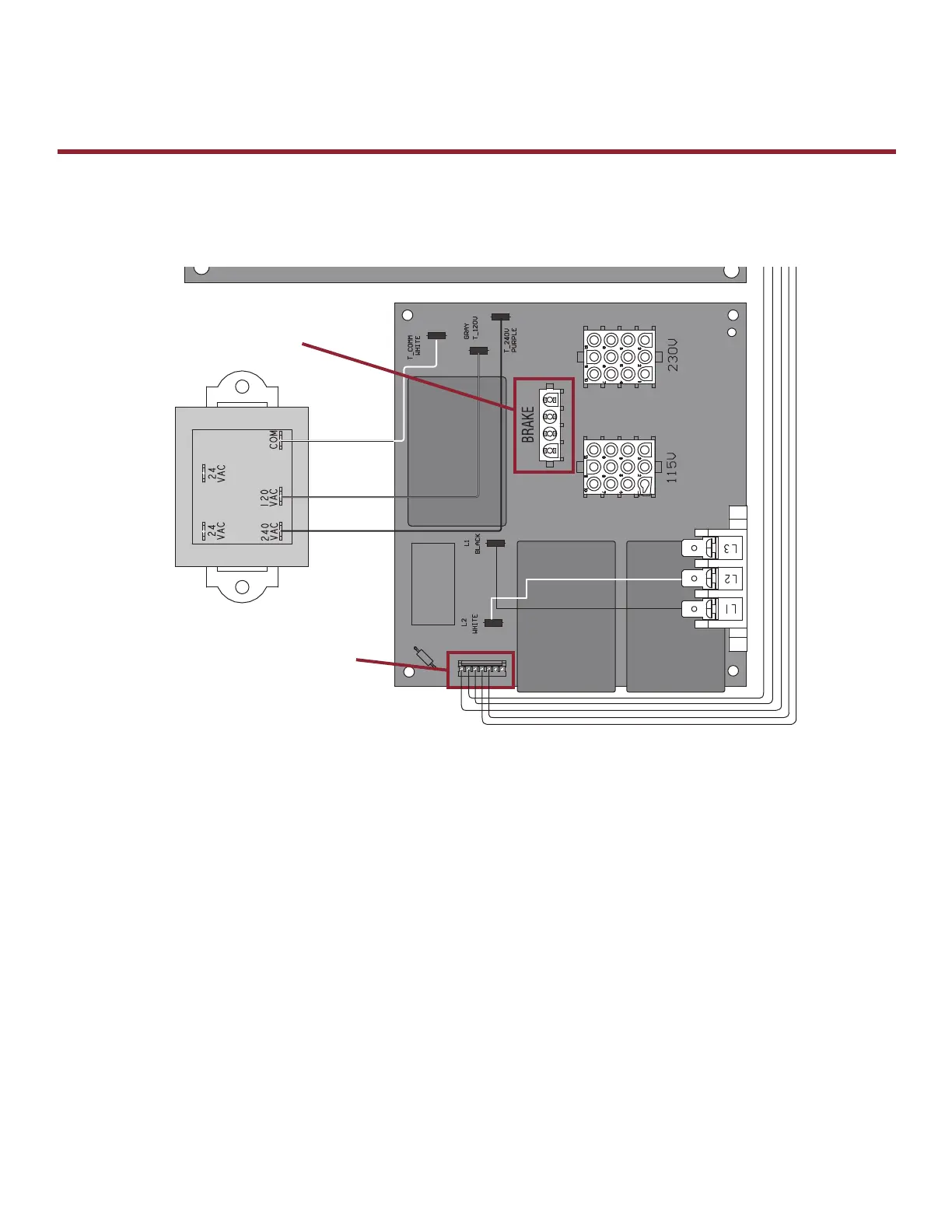
To Check Brake (When Present)
1) Turn power off to the operator.
2) Locate the brake plug on the POWER BOARD and unplug.
3) Set the multimeter to continuity/ohms. Ω *Certain meters have a setting that beeps when a closed circuit is
detected. This setting is preferred for the test.
4) Using the guide below, check for continuity across the following pins on the brake harness:
a. On 115v operators, place probe between the White and Yellow wires on the brake
harness. Continuity should be present.
b. On 208/230v operators, place probe between the Blue and Black on the brake
harness. Continuity should be present.
5) If the readings are different than the results expected above, the brake solenoid will have to be replaced.
To Check Power Board
This measurement is done with power removed from the operator and the low voltage harness plugged in to the
Power Board. Set meter to ohms(Ω) and check :
Orange to Gray should read 335 ohms
Orange to Purple should read 648 ohms
Orange to Black should read 335 ohms
Orange to Yellow should read 648 ohms
* Readings are to allow +/- 10% deviation If the readings are different than the results expected above, the Power
Board will have to be replaced.
To Check Brake
(when present)
To Check Power Board









 To Next Page