10
STEP 1
ATTACH BRACKETS TO OPERATOR
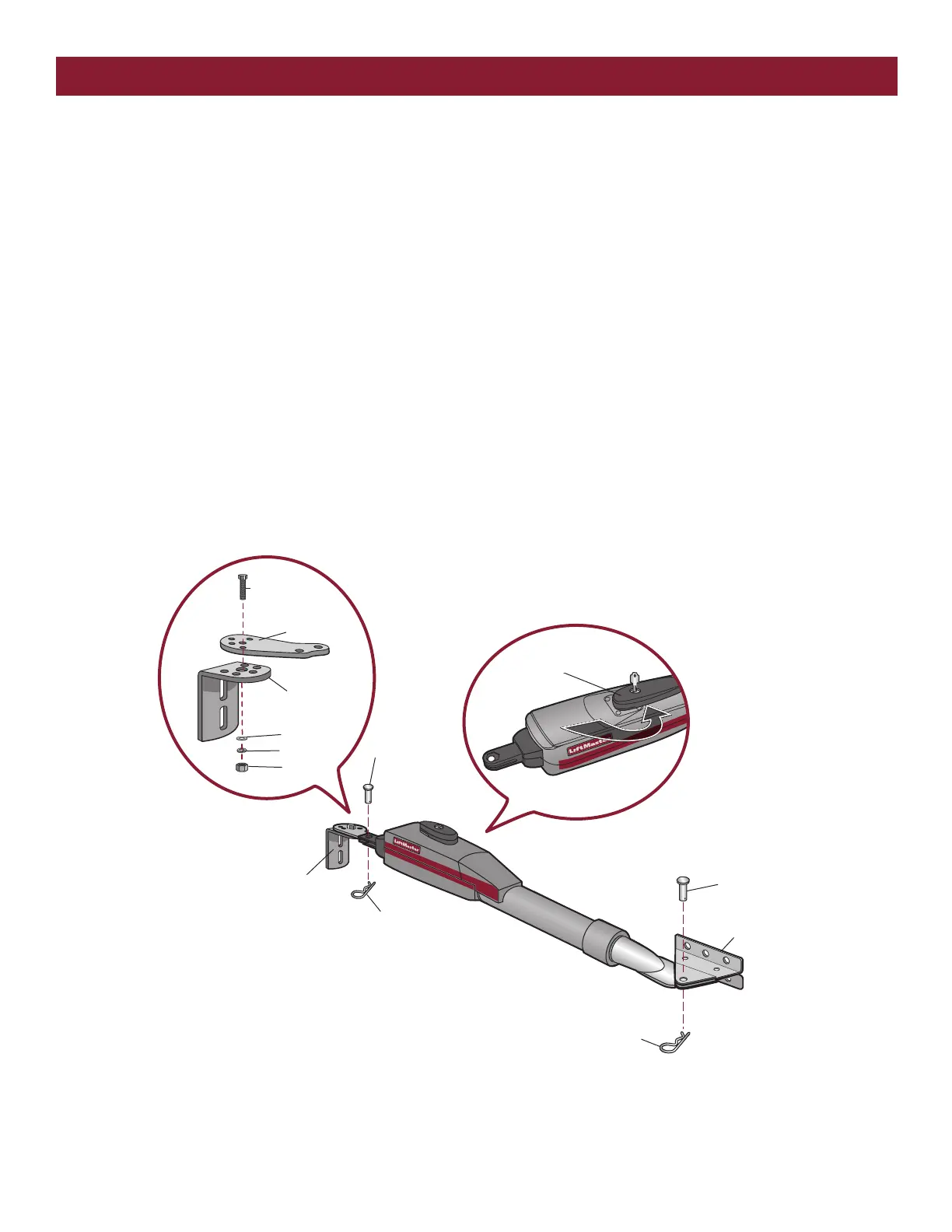
1. Insert the key into the lock on the release lever and turn it 180°
counterclockwise.
2. Turn the release lever 180° counterclockwise. The operator is now in
manual mode.
3. Assemble gate post bracket by placing pull-to-open bracket on top of
post bracket.
4. Insert the bolt through both brackets and secure with washer, lock
washer and nut.
5. Attach post bracket assembly to operator using pins and hairpin clips.
6. Attach gate bracket to operator using pins and hairpin clips.
INSTALLATION
Lock Washer
Nut
Hex Bolt 3/8"
Extension
Bracket
Post Bracket
Washer
Pin
Pin
Gate Bracket
Hairpin Clip
Hairpin Clip
Post Bracket Assembly
Release Lever













 To Next Page