13
STEP 4
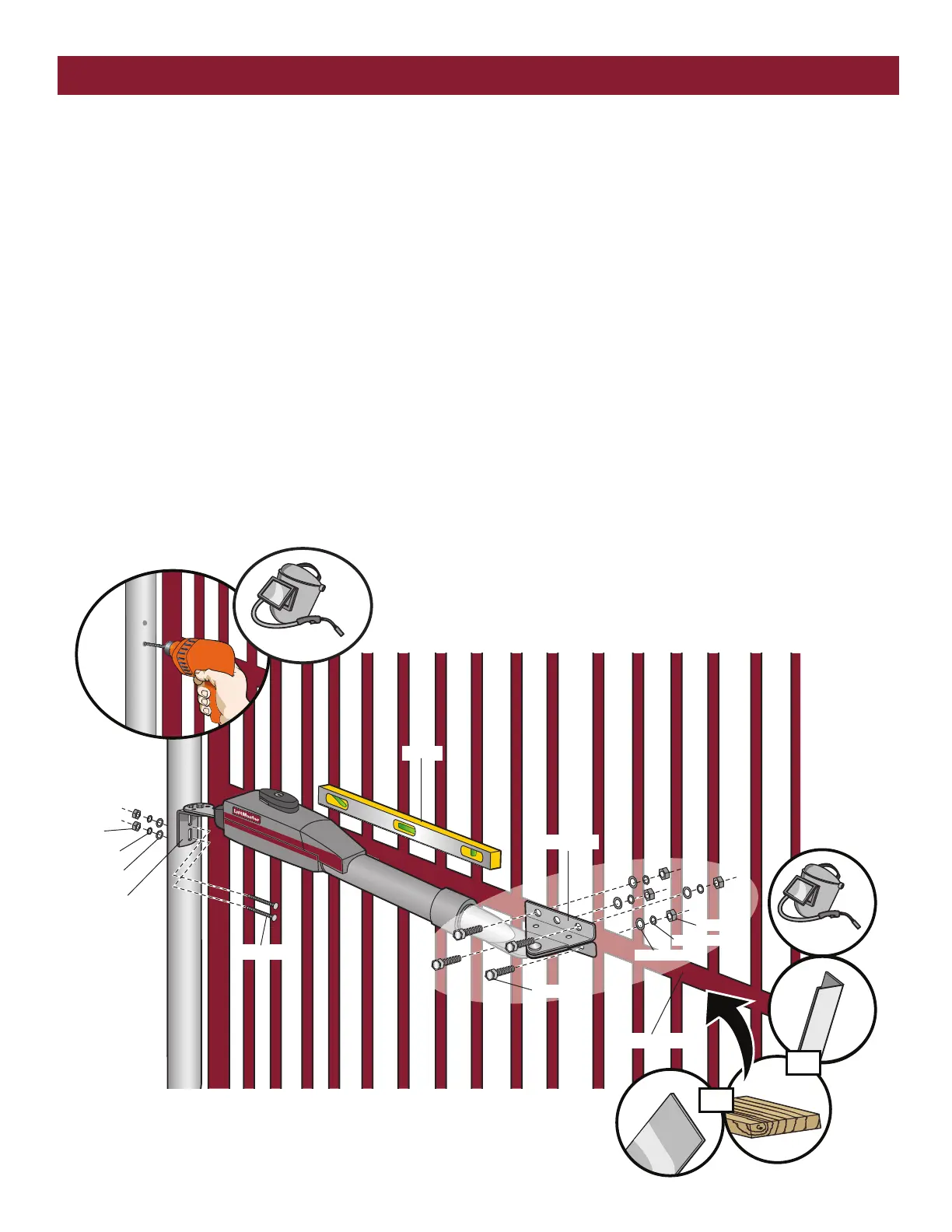
SECURE THE BRACKETS
POST BRACKET
The gate operator (arm) must be level.
1. Mark holes for the post bracket. Remove the clamp and the operator,
set aside.
2. Drill adequate holes in the gate post.
3. Secure the post bracket to the gate post using hardware.
GATE BRACKET
The gate operator (arm) must be level.
Some installations may require additional reinforcement be installed on
the gate.
1. Drill holes in gate (or reinforcement, if necessary) that are large
enough for the gate bracket mounting hardware.
2. Secure the gate operator to the gate using hardware (not provided).
3. Manually move the gate to verify that it opens and closes fully.
INSTALLATION
Flat Washers
Hex Nuts
Lock Washers
Carriage Bolts
Gate Bracket
Level
Welder (Optional)
Hex Nut
Lock Washer
Flat Washer
Hex Bolt
Reinforcement Area
Angle
Iron
Wood
Flat Bar
Welder (Optional)
OR
OR
Post Bracket













 To Next Page