23
INSTALLATION
STEP 7 (continued)
ADJUST THE HANDING AND LIMITS
ERASE THE HANDING
1. To erase the handing, press and hold the OPEN LEFT and OPEN RIGHT buttons simultaneously (5 seconds) until both the OPEN LEFT and OPEN
RIGHT LEDs blink rapidly and the operator beeps.
2. Release the buttons and the OPEN LEFT and OPEN RIGHT LEDs will blink slowly indicating the handing will need to be set.
HANDING LEDS
OPEN LEFT LED OPEN RIGHT LED OPERATOR MODE EXPLANATION
OFF OFF NORMAL MODE Control board not powered.
BLINKING BLINKING HANDING SETUP MODE Handing not set.
BLINKING ON HANDING SETUP MODE Handing set to the direction of the solid LED
ON BLINKING HANDING SETUP MODE Handing set to the direction of the solid LED
ON OFF NORMAL MODE Open left handing is set.
OFF ON NORMAL MODE Open right handing is set.
STEP 8
ADJUST THE CLUTCH
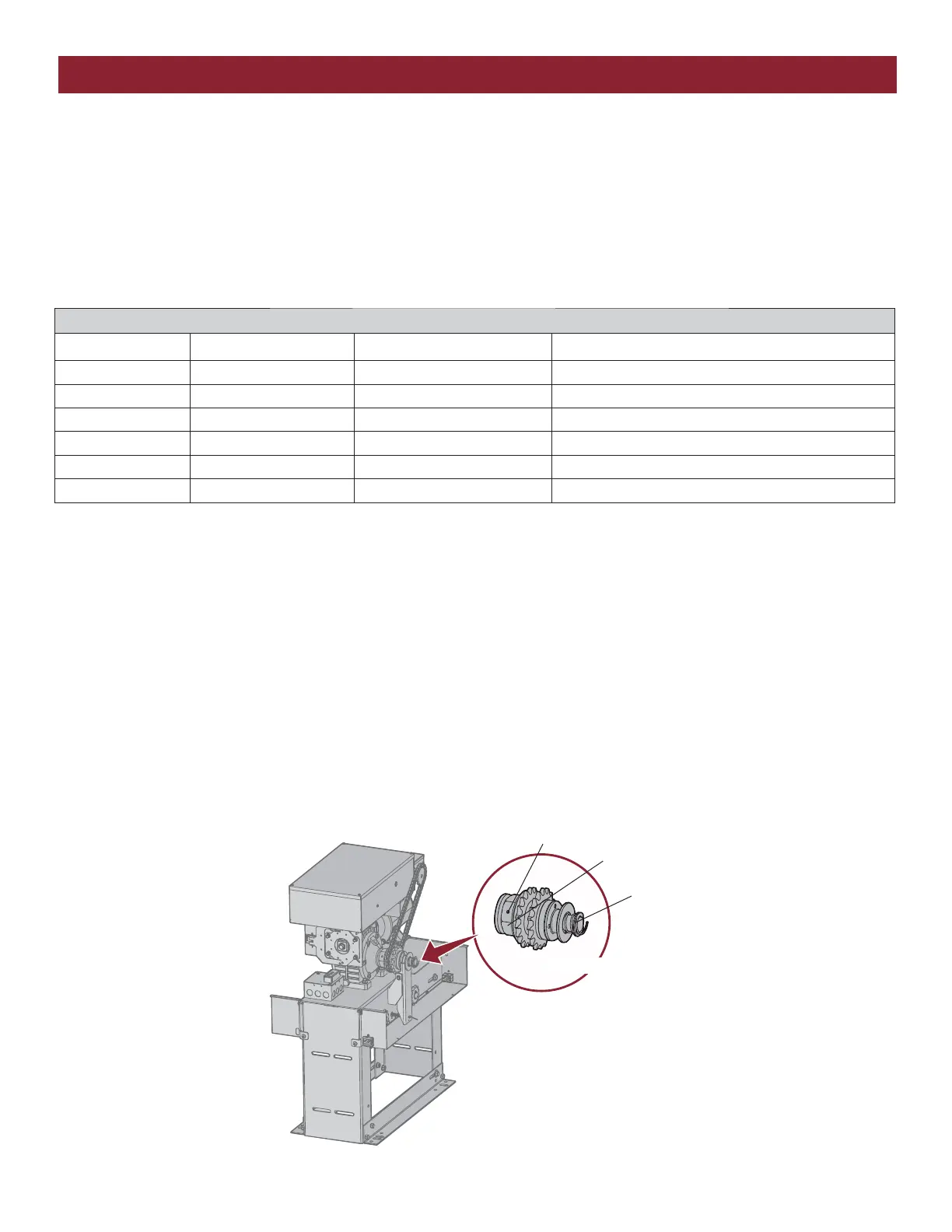
The friction clutch system is not an automatic obstruction sensing device. It only serves to minimize damage to the gate operator and gate, and to help
minimize vehicle damage. The clutch mechanism must be adjusted properly. During the installation of the operator, you must tighten the clutch spring
lock nut so it is tight enough to operate the gate, yet loose enough so that if the gate meets an obstruction, the clutch will slip.
1. Loosen set screws of torque adjustment nut on the gear reducer output shaft.
2. Back off torque nut until there is very little tension on the Belleville washers.
3. Tighten torque nut gradually until there is just enough tension to permit the operator to move the gate smoothly through a complete open/close
cycle, but to allow the clutch to slip if the gate is obstructed.
4. Re-tighten the set screw that is directly over the flat portion of the shaft.
Friction Clutch
Torque Nut
Set Screws
Gear Reducer Output Shaft



 To Next Page