43
TROUBLESHOOTING
DIAGNOSTIC CODES continued...
Some codes are saved in the code history and some are not. If a code is not saved it will briefly appear on the display as it occurs, then disappear.
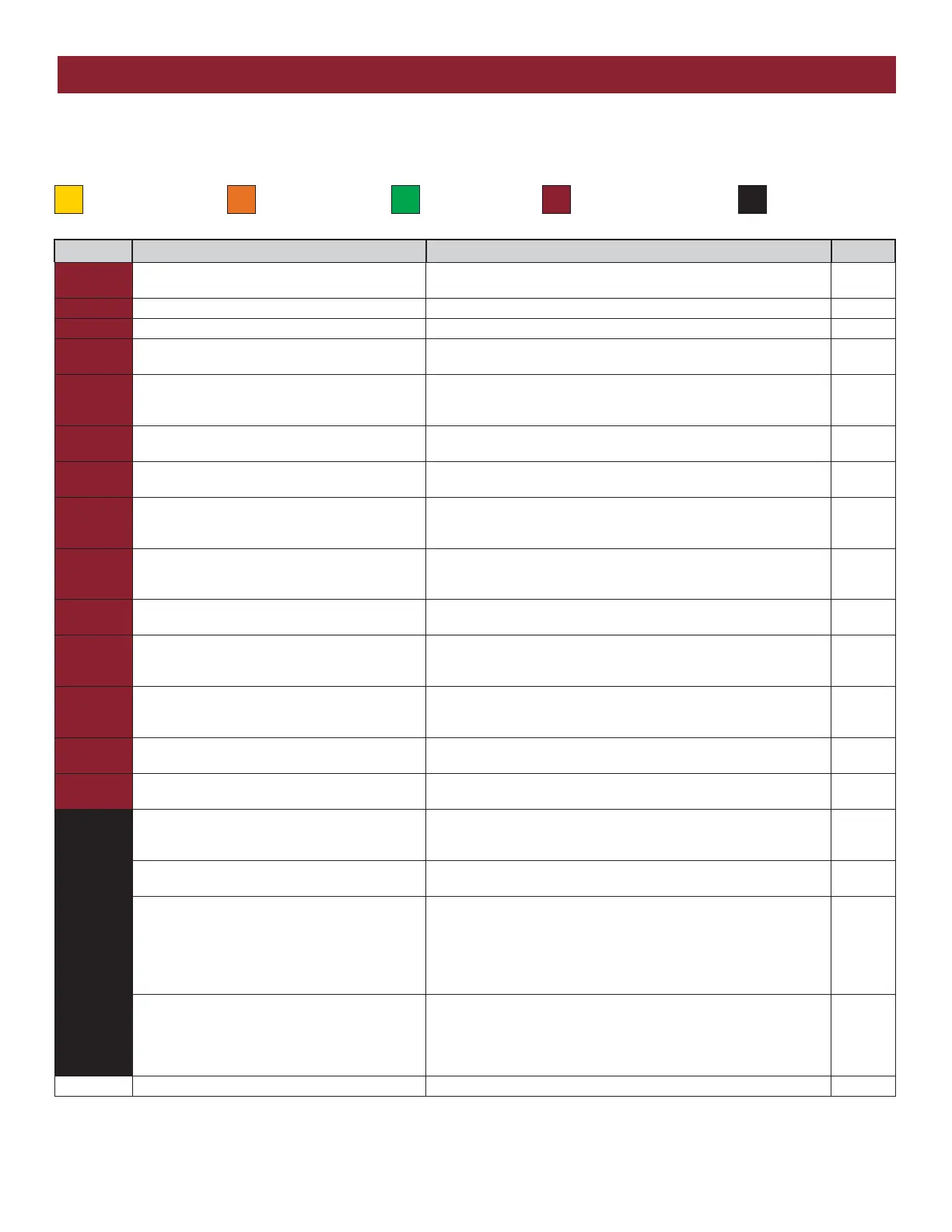
Code Meaning Solution Saved
66
OPEN EYE/EDGE held more than 3 minutes
(expansion board)
Check wired input on expansion board; check for alignment or
obstruction. The photoelectric sensors may be installed too far apart.
YES
67 Wireless edge triggered more than 3 minutes Check wired input for wiring issue or obstruction. YES
68 Wireless edge loss of monitoring Check wireless edge inputs. YES
69
Wireless edge triggered IF an obstruction occurred, no action required. If an obstruction did
NOT occur, check inputs and wiring.
NO
70
CLOSE EYE/INTERRUPT triggered, causing
reversal, preventing close, or resetting TTC (main
board)
IF an obstruction occurred, no action required. If an obstruction did
NOT occur, check alignment, inputs, and wiring.
NO
71
CLOSE EDGE triggered, causing reversal,
preventing close, or canceling TTC (main board)
IF an obstruction occurred, no action required. If an obstruction did
NOT occur, check alignment, inputs, and wiring.
NO
72
OPEN EYE/EDGE triggered, causing reversal or
preventing opening (main board)
IF an obstruction occurred, no action required. If an obstruction did
NOT occur, check alignment, inputs, and wiring.
NO
73
CLOSE EYE/INTERRUPT triggered, causing
reversal, preventing close, or resetting TTC
(expansion board)
IF an obstruction occurred, no action required. If an obstruction did
NOT occur, check alignment, inputs, and wiring.
NO
74
CLOSE EYE/EDGE triggered, causing reversal and
preventing close or canceling TTC (expansion
board)
IF an obstruction occurred, no action required. If an obstruction did
NOT occur, check alignment, inputs, and wiring.
NO
75
OPEN EYE/EDGE triggered, causing reversal or
preventing opening (expansion board)
IF an obstruction occurred, no action required. If an obstruction did
NOT occur, check alignment, inputs, and wiring.
NO
80
Close input (EYE/EDGE) communication fault from
other operator
Check inputs and communication method between operators, either
wired bus or radio. Ensure operator is powered. May have to erase the
wireless communication and reprogram the two operators.
YES
81
Open input (EYE/EDGE) communication fault from
other operator
Check inputs and communication method between operators, either
wired bus or radio. Ensure operator is powered. May have to erase the
wireless communication and reprogram the two operators.
YES
82
Close input (EYE/EDGE) communication fault
(expansion board)
Check the connections between the main board and the expansion
board.
YES
83
Open input (EYE/EDGE) communication fault
(expansion board)
Check the connections between the main board and the expansion
board.
YES
91
Force Reversal Look for obstruction, if no obstruction, check that the mechanical
assembly is engaged and free to move. See section on Limit and Force
Adjustment, and Obstruction Test.
YES
93
RPM / STALL Reversal Check for obstruction. If no obstruction, check the encoder wiring and
that the operator is engaged and free to move. Replace RPM assembly.
YES
95
AC motor no start condition Motor start sequence failed. If the gate and motor are NOT moving, or
moving too slow, check for an obstructed gate, binding in the
mechanism, and relay board and start capacitor connections. If the
gate and motor ARE moving, failure is due to loss of the encoder
signal. Check the encoder cup and sensor on the limit shaft, and
wiring.
YES
96
Current Sensor Fault A fault was detected on the current sensor. Make sure the current
sensor is connected to the main control board. Check the current
sensor harness for an open or short. The operator will need a power
cycle to resume operation after correcting the fault. If the fault
continues, replace the power board.
YES
99 Normal Operation
No action required YES
LiftMaster System Installed System Informational
External Entrapment
Protection
Inherent Entrapment
Protection





 To Next Page