RSR-000886-000 (1) Page 10 of 40
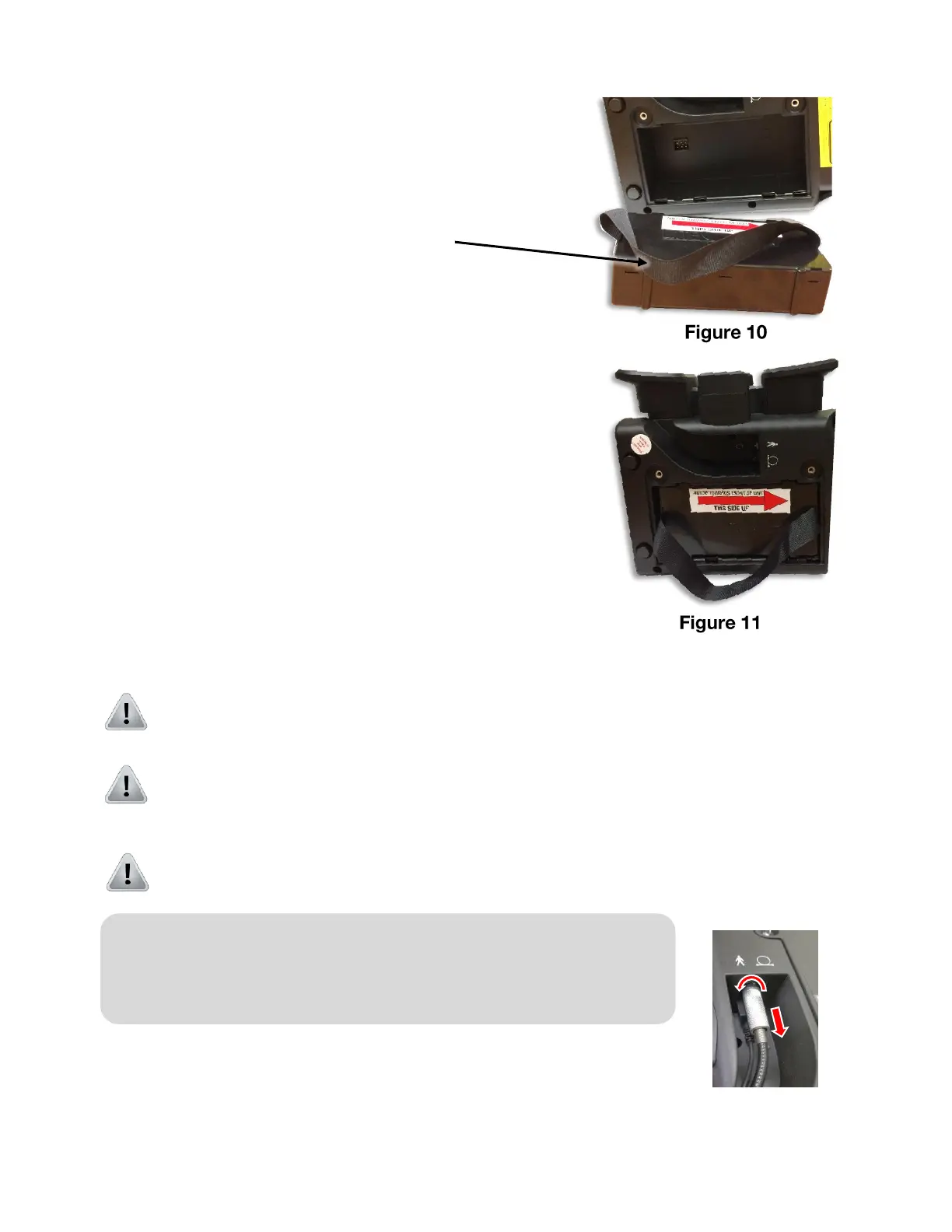
Step 2. To remove the old battery, grab the removal
strap and pull straight up. (Figure 10)
Step 3. With the arrow on the battery pointing to the
front of the unit (Figure 11), insert the new
battery into the battery compartment.
Step 4. With even pressure, fully seat the battery into
the battery compartment.
Step 5. Replace the battery cover and secure the finger
locks. The battery cover will fit tightly to hold the
battery in place.
2.5. Connecting the Beam Delivery Assembly
Caution: Do not remove the hand piece fiber cable from the emission port once it
has been secured (unless the optical fiber cable needs to be replaced).
Caution: Repeated insertion and removal of the hand piece fiber cable will increase
the chance of emission port or fiber tip contamination. If the emission port or the fiber
tip is contaminated, the optical fiber can be damaged during laser emission.
Caution: If the fiber must be removed, use the dust cap to help prevent dust and
debris from contaminating the emission port. Do not leave the port unprotected.
Step 1. Unscrew metal fiber connector until loose and gently pull
fiber away from unit Figure 12.
Note: The laser system will be delivered with the optical fiber
already connected. If it needs to be replacement, then follow Steps
1-6 below to disconnect the old and connect the new handpiece to
the console.











 To Next Page