Creating an Access Control Policy
Next Generation Security Gateway Guide R80.20 | 151
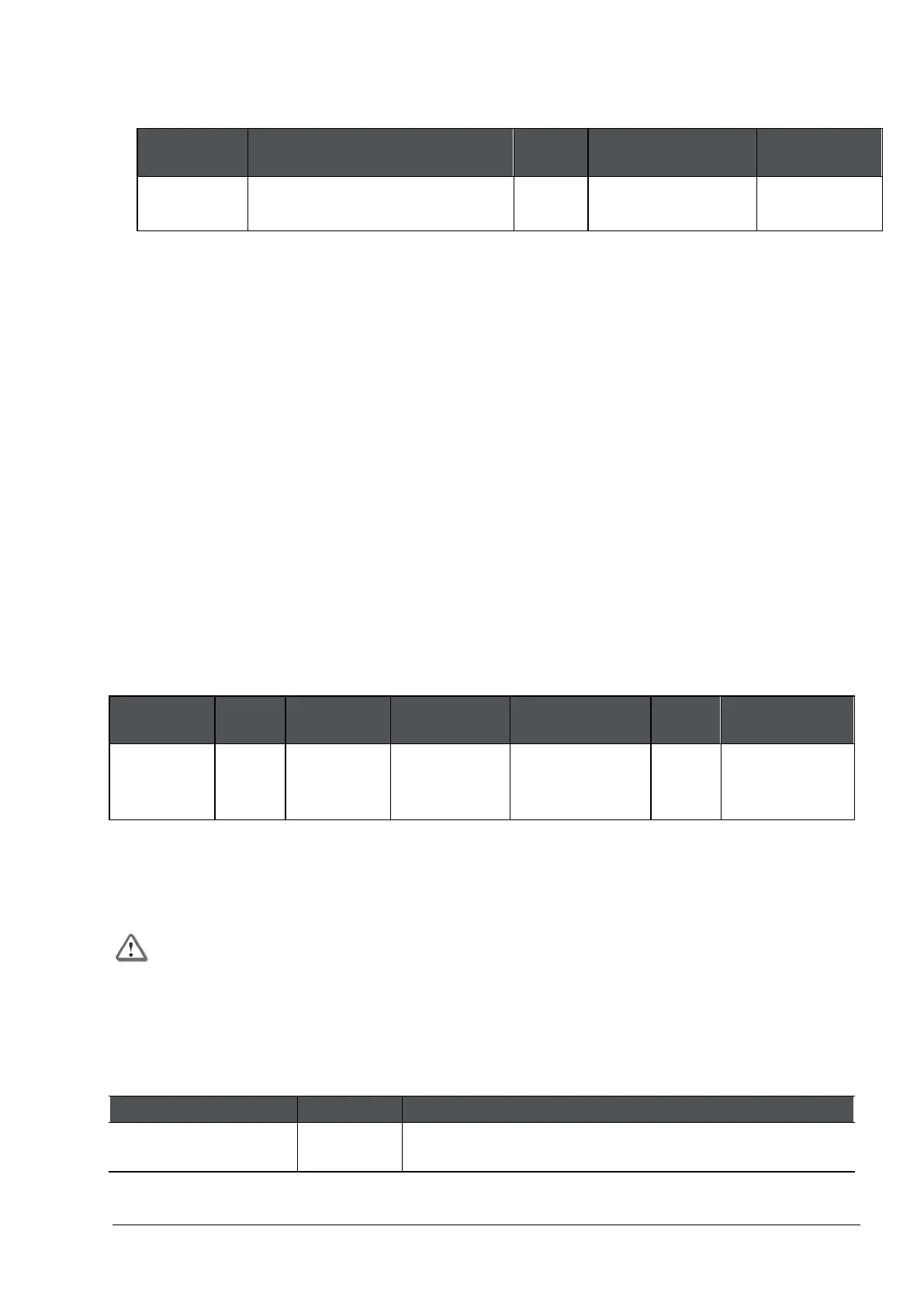
If there is encrypted traffic through an internal interface, add a new rule to the Firewall Layer
of the Access Control Policy. This is a sample rule:
Source Destination VPN Services &
Action
Any Security Gateway on which
UserCheck client is enabled
Any UserCheck Accept
Install the Access Control Policy.
Blocking Applications and Informing Users
Scenario: I want to block pornographic sites in my organization, and tell the user about the
violation. How can I do this?
To block an application or category of applications and tell the user about the policy
violation:
In the Security Policies view of SmartConsole, go to the Access Control Policy.
Choose a Layer with Applications and URL Filtering enabled.
Create a rule that includes these components:
• Services & Applications - Select the Pornography category.
• Action - Drop, and a UserCheck Blocked Message - Access Control
The message informs users that their actions are against company policy and can include a
link to report if the website is included in an incorrect category.
• Track - Log
Note - This Rule Base example contains only those columns that are applicable to this subject.
Name Source Destination Services &
Action Track Install On
Block Porn Any Internet Pornography
(category)
Drop
Blocked
Message
Log Policy Targets
The rule blocks traffic to pornographic sites and logs attempts to access those sites. Users who
violate the rule receive a UserCheck message that informs them that the application is blocked
according to company security policy. The message can include a link to report if the website is
included in an incorrect category.
Important - A rule that blocks traffic, with the Source and Destination parameters
defined as Any, also blocks traffic to and from the Captive Portal.
UserCheck for Access Control Default Messages
These are the default UserCheck messages in the Access Tools > UserCheck page of the Access
Control Policy:
Name Action Type Description
Access Approval Inform




 To Next Page