Simplifying Security for Private Clouds
Next Generation Security Gateway Guide R80.20 | 271
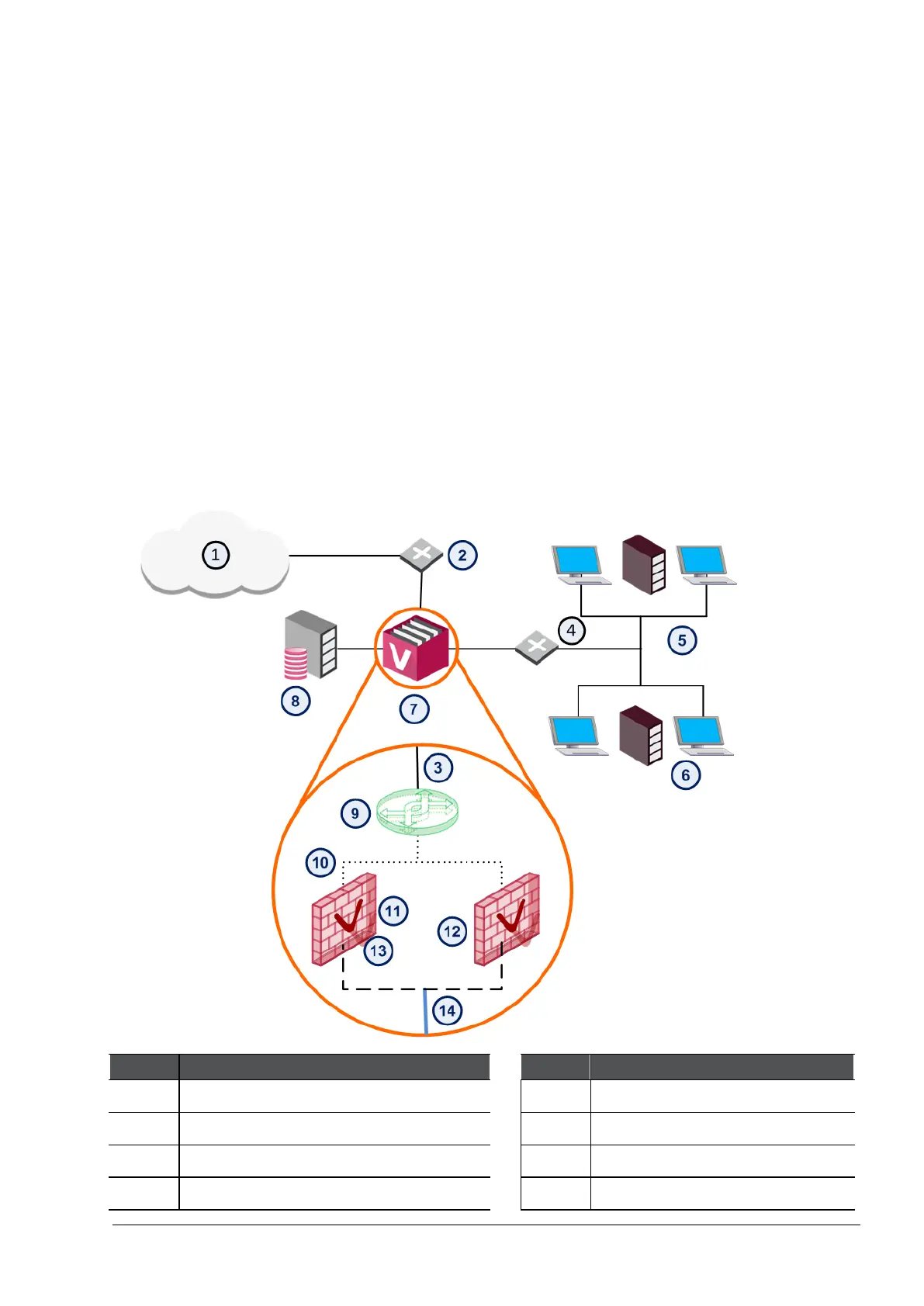
Virtual System in Bridge Mode
Many Enterprise environments are based on core networks. Situated adjacent to core network
backbone switches, VSX protects the internal network by providing security at layer-2, layer-3 or
both. VSX communicates with the core network using the existing infrastructure. With Virtual
Systems in the Bridge Mode, VSX can protect departmental networks, while simultaneously
preventing network segmentation. In this case, switches are located at the entrance to each
department's network.
VSX ensures connectivity between the core network and the Internet or external networks, while
providing perimeter security. Security can be configured on a per VLAN basis.
Interfaces
The main interface types in VSX are:
• Physical interface
• VLAN interface
• Warp Link
1 Internet
8 Security Management Server
2 Router
9 Virtual Switch
3 Physical interface
10 Warp Link
4 VLAN Switch
11 Virtual System 1








 To Next Page