4204
FLOW METER
TECHNICAL MANUAL P/N XXX-0000 Rev. 5 Ver. 3.4
33
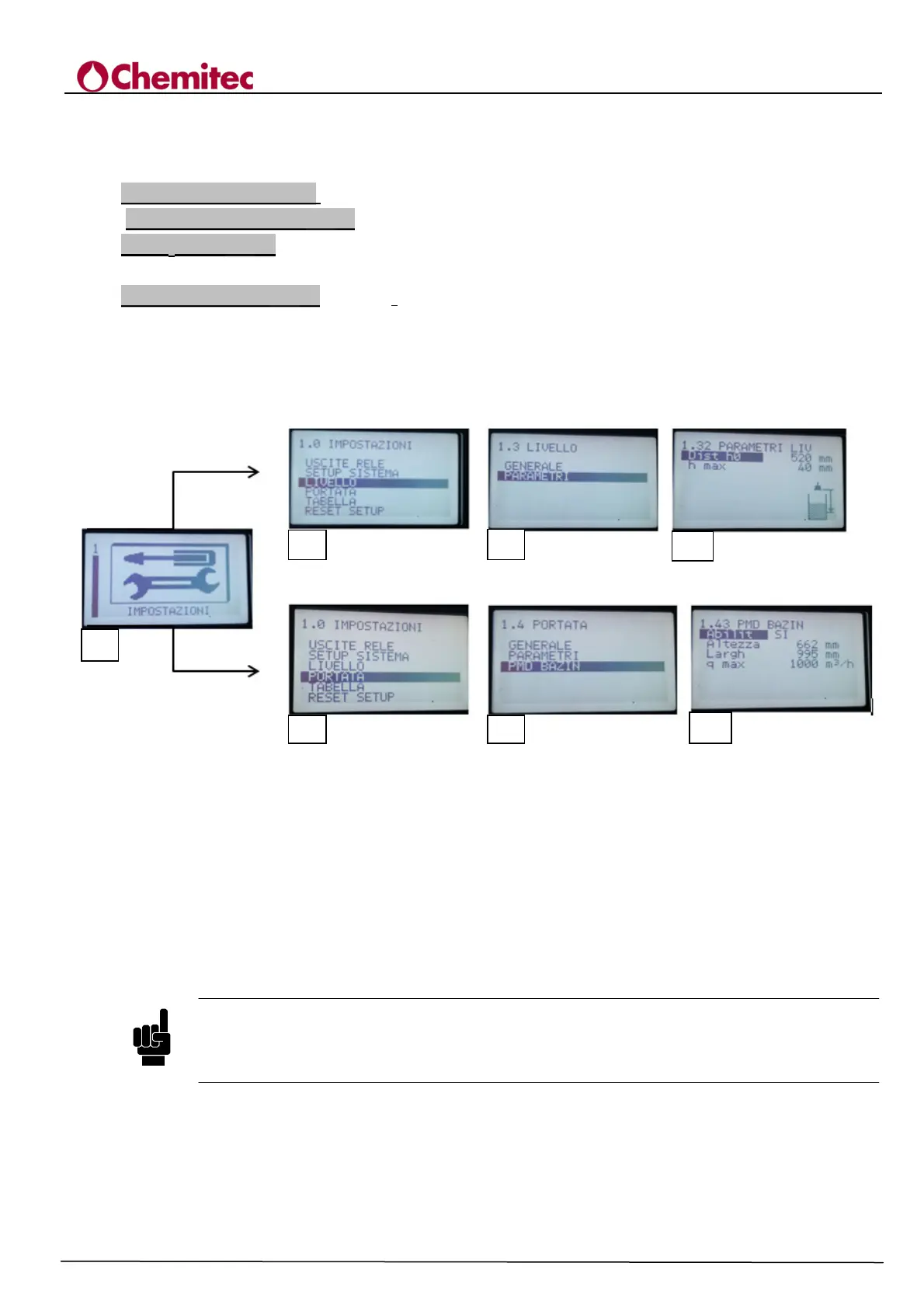
In order to set the flow measurement for a Bazin overflow you must enable this feature by 4204
instrument "Enable = Yes" (Figure 7-5) and set the following parameters specific to this overflow:
Bazin Height (Fig. 7-5 g) = mm (Height of the thin wall section).
Larghezza Bazin (Fig. 7-5 g)= mm (channel/wall width).
Dist h
0
( Fig. 7-5 d) = mm (this is the distance between the transducer face and the water head at
zero flow. The value in mm is given by h+h* (Fig. 7-4)
Qmax Bazin ( Fig. 7-5 g) = m^3/h (defines the maximum measurement threshold of flow rate by the
device, this value is only used to define the maximum value of the output current and the bargraph
on the display).
Follow this scheme to set these parameters:
Figure 7-5 Diagram for setting the parameters for a Bazin overflow
7.2.6 RESET SETUP [1.6]
Re-set of the set-up defines operation parameters at their default values. One single reset request is
carried out after which if YES is pressed, it will carry out the reset indicated by a message
"DEFAULT SETUP LOADED"; at this point all of the functions of the instrument are disabled
and must be programmed again.
NOTE
The current set-up parameters, after a reset, are not lost altogether: if the operator is asked
whether or not he wants to save the parameters, if he decides not to save them, the original
parameters will be reloaded (the value they had when programming began).
a
g)


 To Next Page