4204
FLOW METER
TECHNICAL MANUAL P/N XXX-0000 Rev. 5 Ver. 3.4
36
The field “INF LIM” defines the value of the size from 0
or 4 mA if it has been chosen, respectively:
“TYPE”= 0-20 mA or
“TYPE” = 4-20 mA.
The field “SUP LIM” defines the value of the size to: 20 mA
The field “NAMUR” is only important if:
and it undertakes the values “NO” or “YES”; in the
second case the current output is forced to:
“TYPE”=4-20 mA
2.40 mA in the
presence of an alarm
Everytime the field “FLOW” (par. 7.2.4.2.) is modified, the
default values are automatically reset for:
“INF LIM”
“SUP LIM”
7.5 ARCHIVE [4.0]
Item 4 of the main menu allows for display of the data included in the archive and in the flow
archive as well as their relative set-ups.
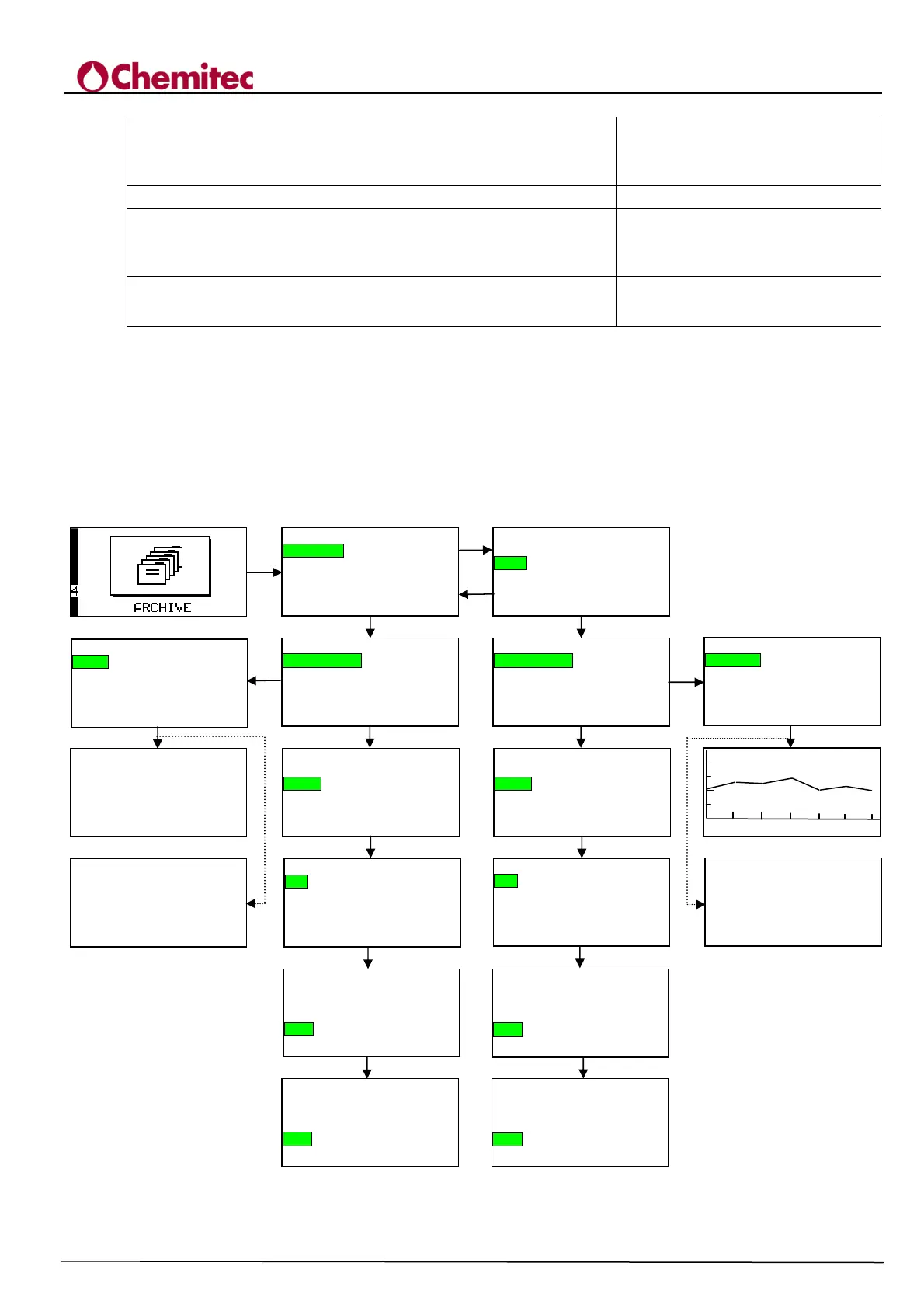
The following sub-menu is presented (see Figure 7-8):
“TOTALIZER” [4.1]
“FLOW” [4.2]
They can be selected according to the contents of paragraph 7.1 b).
7.5.1
9999 m
/h
14:38 26/04/05 15:38
ENTER
4.0 FILE
TOTALIZER
FLOW
4.0 FILE
TOTALIZER
FLOW
ENTER
UP
DOWN
4.1 TOTALIZER
DISPLAY DATA
SETUP
4.21 VIEW DATA
Display
Interval 1 h
Date 10/04/06
DOWN
ENTER
4.2 FLOW
DISPLAY DATA
SETUP
DOWN
4.22 FLOW FILE
Step 0 min
Type
Occupancy 5 %
Reset
4.22 FLOW FILE
Step 0 min
Type
Occupancy 5 %
Reset >>>>
ENTER
4.11 VIEW DATA
Display
Date 10/04/06
ENTER
TOTALIZER (m
)
1 0/ 04 / 0 6 0 4 :1 4
0 00 34 8 0 . 94
1 0/ 04 / 0 6 2 1 :0 3
0 00 34 8 1 . 54
1 0/ 04 / 0 6 0 4 :2 4
ENTER
4.12 TOTALIZER FILE
Step 0 min
Type
Occupancy 5 %
Reset >>>>
4.1 TOTALIZER
DISPLAY DATA
SETUP
ENTER
4.2 FLOW
DISPLAY DATA
SETUP
ENTER
3 DOWN
4.12 TOTALIZER FILE
Step 0 min
Type
Occupancy 5 %
Reset >>>>
ENTER
4.12 TOTALIZER FILE
Step 0 min
Type
Occupancy 0 *
Reset >>>>
ENTER
4.22 FLOW FILE
Step 0 min
Type
Occupancy 5 %
Reset >>>>
3 DOWN
ENTER
NO MEASURE
NO MEASURE
Figure 7-8 “ARCHIVE” menu


 To Next Page