
EasyManua.ls Logo

Chemtrac SCM2500XRD - User Manual

Chemtrac SCM2500XRD
58 pages
Print Icon
To Next Page IconTo Next Page
Loading...
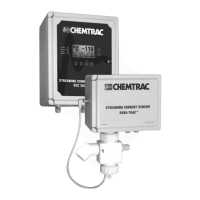
OPERATIONS MANUAL
Streaming Current Monitor &
Streaming Current Controller
with Dura-Trac
Remote Sensor
R 4 8/2/06 RA
SCM2500XRD
SCC3500XRD

Table of Contents

Questions and Answers

  • R
    Randy MillerAug 11, 2025
    Why does the Chemtrac Controller display not change with coagulant dosage?
    • M
      Melissa GregoryAug 11, 2025
      If the display on your Chemtrac Controller isn't responding to changes in coagulant dosage, first, try increasing the GAIN setting. Also, verify that you're using the correct sample point and that mixing is sufficient. Ensure the sample cell is clean. Finally, consider whether there's excessive lag time between the coagulant injection and the sensor; if so, move the sampling point closer to the coagulant feed or decrease the sample transport time.
  • U
    urossAug 21, 2025
    What to do if Chemtrac Controller display fluctuates rapidly?
    • S
      Scott HarveyAug 22, 2025
      If the display on your Chemtrac Controller fluctuates rapidly on a treated sample, it could be due to several reasons. First, check the stability of readings on raw or finished water; if stable, the issue is incomplete mixing, so move the sampling point further downstream or resolve mixing problems. Chemical feeders might be erratic or partially plugged, so fix them. Also, raw water flow or turbidity might be fluctuating, so check the flow controls and turbidity. Reducing the GAIN setting may help. Finally, ensure the cell bottom plug is tight and the O-ring is present.
  • K
    Kelly DouglasAug 31, 2025
    How to fix Chemtrac Controller display showing 0.00?
    • J
      Janice SmithSep 1, 2025
      If your Chemtrac Controller displays 0.00 and doesn't change with coagulant dosage adjustments, ensure there's a proper water sample flowing to the sensor. Check if the motor is running and turn it on if it's not. Inspect the probe for dirt or damage; clean or replace it as needed. Verify the opt switch alignment and adjust for maximum meter reading, tightening it securely. If the opt switch is inoperative, replace it. Check the sensor output connections and wiring. As a last resort, the circuit card component might be faulty, consider replacing the circuit card.

Chemtrac SCM2500XRD Specifications

General IconGeneral
ModelSCM2500XRD
TypeController
Input Voltage100-240V AC
Communication ProtocolModbus RTU
DisplayLCD
Operating Temperature0-50°C
Accuracy±1%
Outputs4-20mA
Power Supply100-240V AC, 50/60Hz
Enclosure RatingIP65