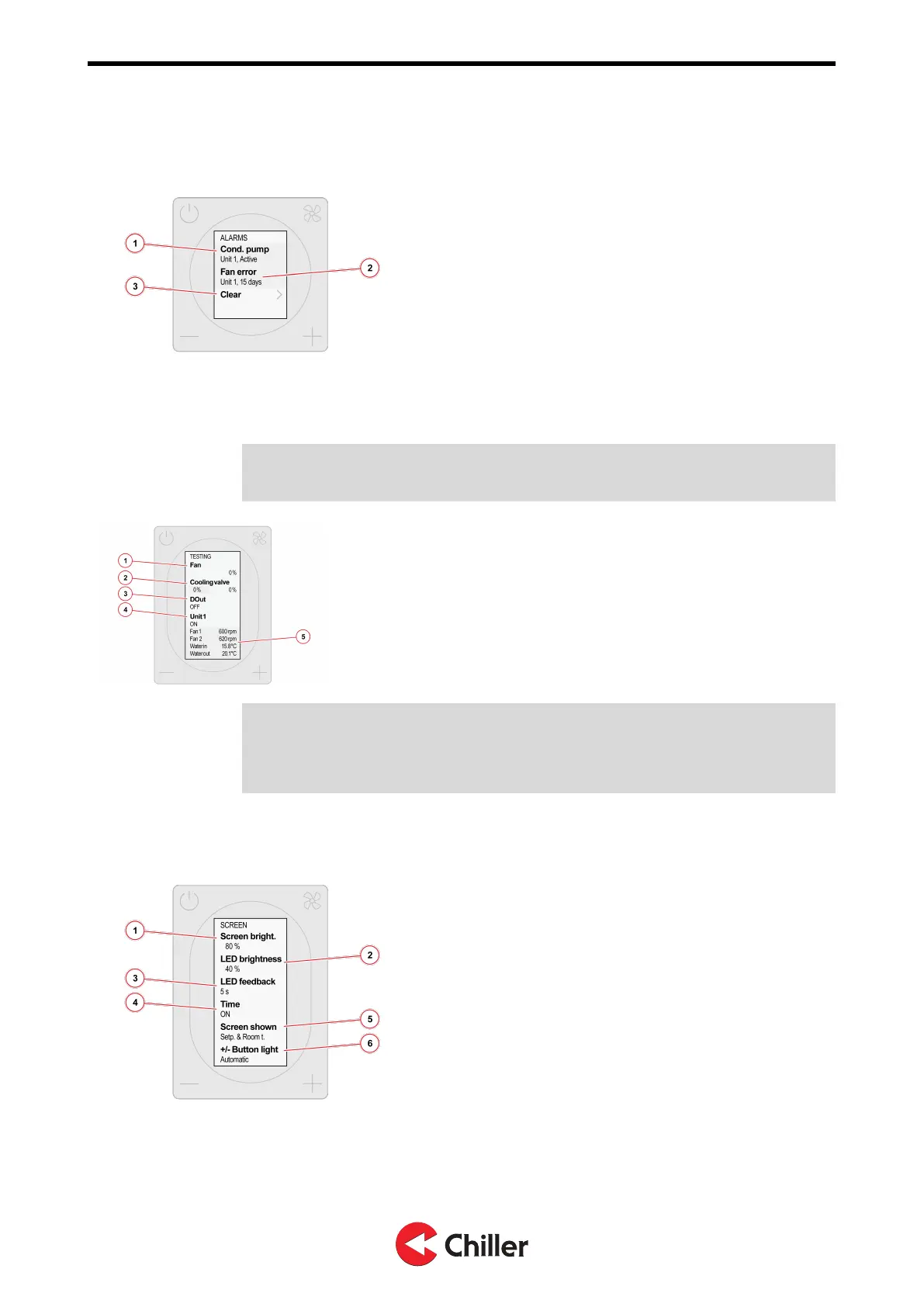
8.8 Alarms
1. Active alarm
2. Alarm history
3. Clear alarm history.
8.9 Testing
Note! Use theTesting menu to test individual components of the unit or to open the
valves during de-airing.
1. Set fan speed.
2. Set cooling valve control output.
3. Set digital output state.
4. Show the status of the unit.
5. Unit measurements
Note! The unit returns to normal operation when you exit the Testing menu. Any
manual settings made in the Testing menu are reverted within 24 hours, even if you
do not exit the Testing menu. For more information, see Section
10.1 Troubleshooting.
8.10 Screen
1. Set the brightness of the controller’s screen.
2. Set the brightness of the controller’s LED lights.
3. Set how long the LED ring remains lit (5s / 10s /
always on / always off)
4. Show the estimated time to reach the setpoint on
home screen (ON/OFF).
5. Home screen type (setpoint + current temp /
setpoint / symbols only)
6. Button lights (always on / automatic)
Copyright © 2021. All rights reserved.
29 (37)
N03104128 Rev. A VariPro Room controller – Installation and Operation Manual


 To Next Page