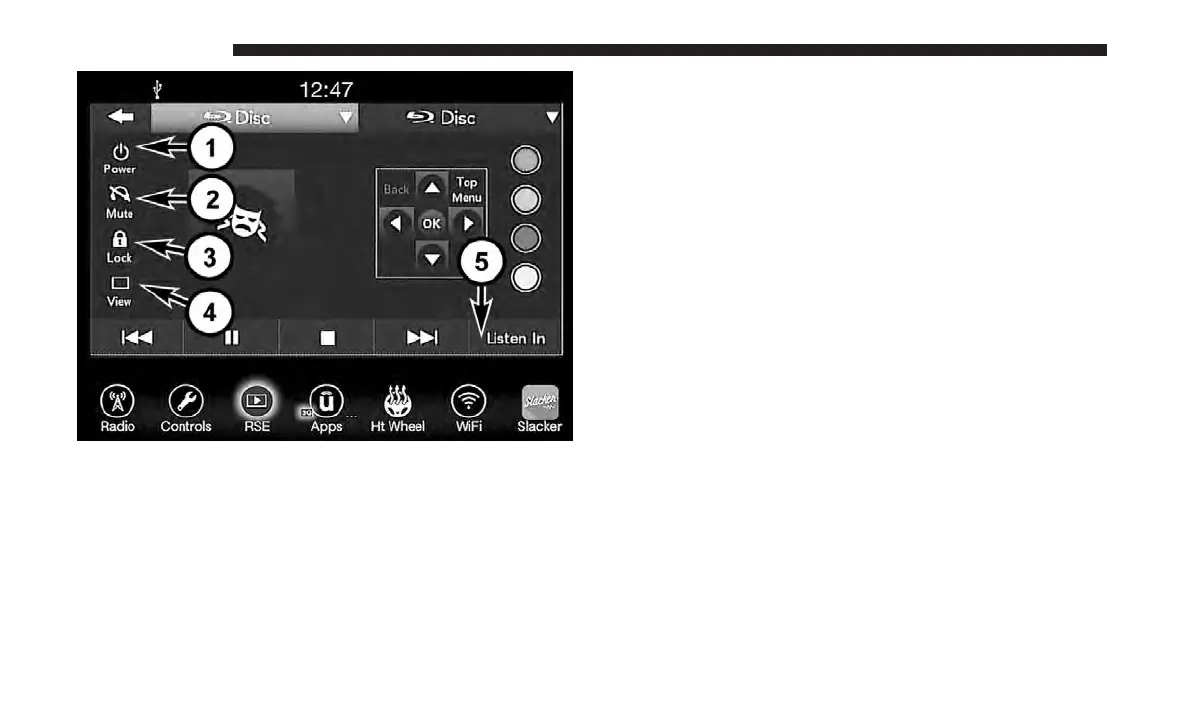
NOTE: Control functions apply to individual screen se-
lected displayed on touchscreen.
1. Power
Press to turn “Selected Screen” On/Off.
2. Mute
Mute rear headphones for selected source for the current
ignition cycle. Pressing mute again will unmute rear head-
phones.
3. Lock
Press to enable/disable Remote Control functions and
Touchscreen Controls for the selected source.
4. View
Select this button to view full screen video if vehicle is not
moving. Button is disabled when not viewing a video
source or when the vehicle is in motion.
5. Listen In
Select this button to play one of the rear screens audio over
the vehicle’s audio system.
To view a Blu-ray disc on the Uconnect radio, select the
Disc source from drop down menu, and then select the
“View” button while in the selected screen controls.
NOTE: To view video content on the radio screen, bring the
vehicle to a stop.
Media Control Screen
638 MULTIMEDIA















 To Next Page