52
Enter Setup
1662 L/1664 Barcode Scanner User Guide
3) Read the “Validate” barcode on the same page to complete this setting.
1.16.3 DATE FORMAT
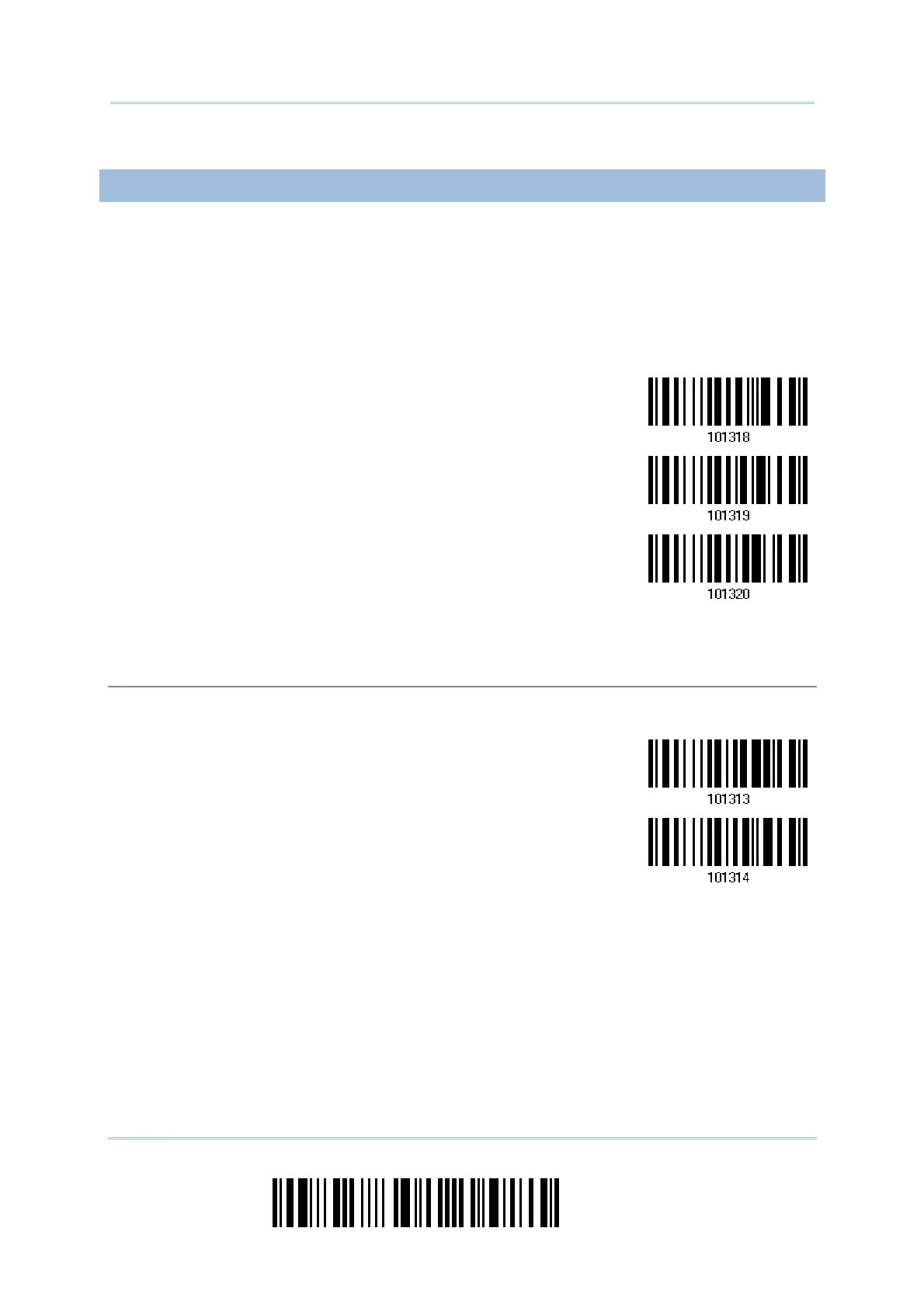
The date format includes year, month and day. There are three kinds of combinations
can be configured to specify Year, Month and Day:
Year/Month/Day (YYYY/MM/DD) or (YY/MM/DD)
Month/Day/Year (MM/DD/YYYY) or (MM/DD/YY)
Day/Month/Year (DD/MM/YYYY) or (DD/MM/YY)
*Year/Month/Day
Month/Day/Year
Day/Month/Year
About Year Format:
Year format can be pre-selected as 2-digit or 4-digit. For example, if year format is YYYY, the
output year is 2011 for 4-digit, alternatively is 11 for 2-digit.
*Year for 4-digit
Year for 2-digit



 To Next Page