2-18
Cisco Aironet 1240AG Series Access Point Hardware Installation Guide
OL-8371-05
Chapter 2 Installing the Access Point
Securing the Access Point
Securing the Access Point to the Mounting Plate
The security hasp enables you to use a padlock to secure the access point to the mounting plate. Known
compatible padlocks are Master Lock models 120T or 121T.
To install the security hasp, follow these steps:
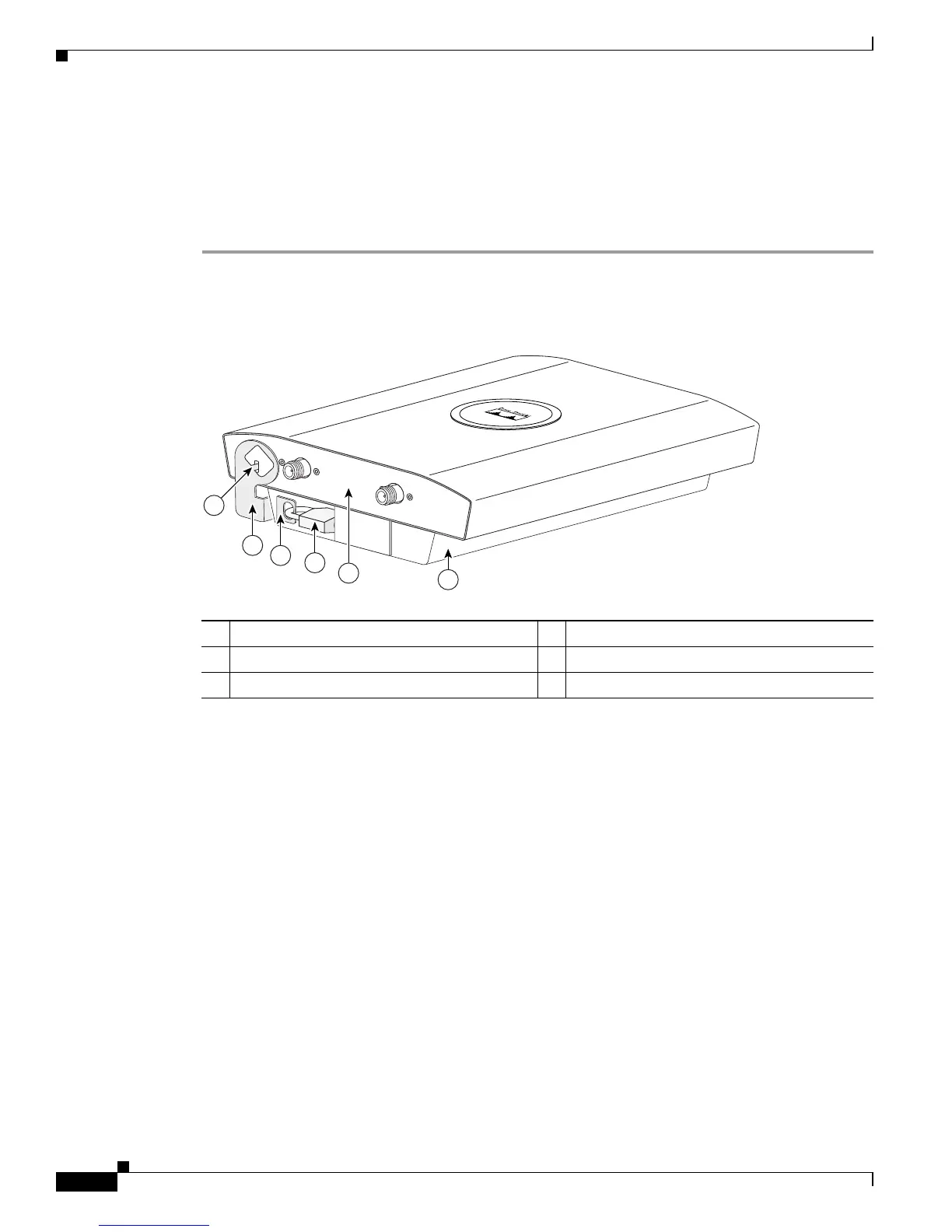
Step 1 Insert the security hasp’s key pin (see Figure 2-10) into the key slot on the access point (see Figure 2-2)
and rotate counterclockwise towards the mounting plate.
Figure 2-10 Security Hasp
Step 2 Push the security hasp’s padlock flange through the mounting plate’s security slot.
1 Key pin 4 Padlock
2 Security hasp 5 5-GHz access point end
3 Mounting plate security slot 6 Mounting plate
135491
2.4 GHz RIGHT / PRIMARY
2.4 GHz LEFT
2
3
1
4
6
5


 To Next Page
 Loading...