ci5000 Series Printer Operation Guide
Version 1.0 2-4
Printer Status and Controls: 喷码机状态和控制:
喷码机状态和控制:喷码机状态和控制:
喷码机状态和控制:
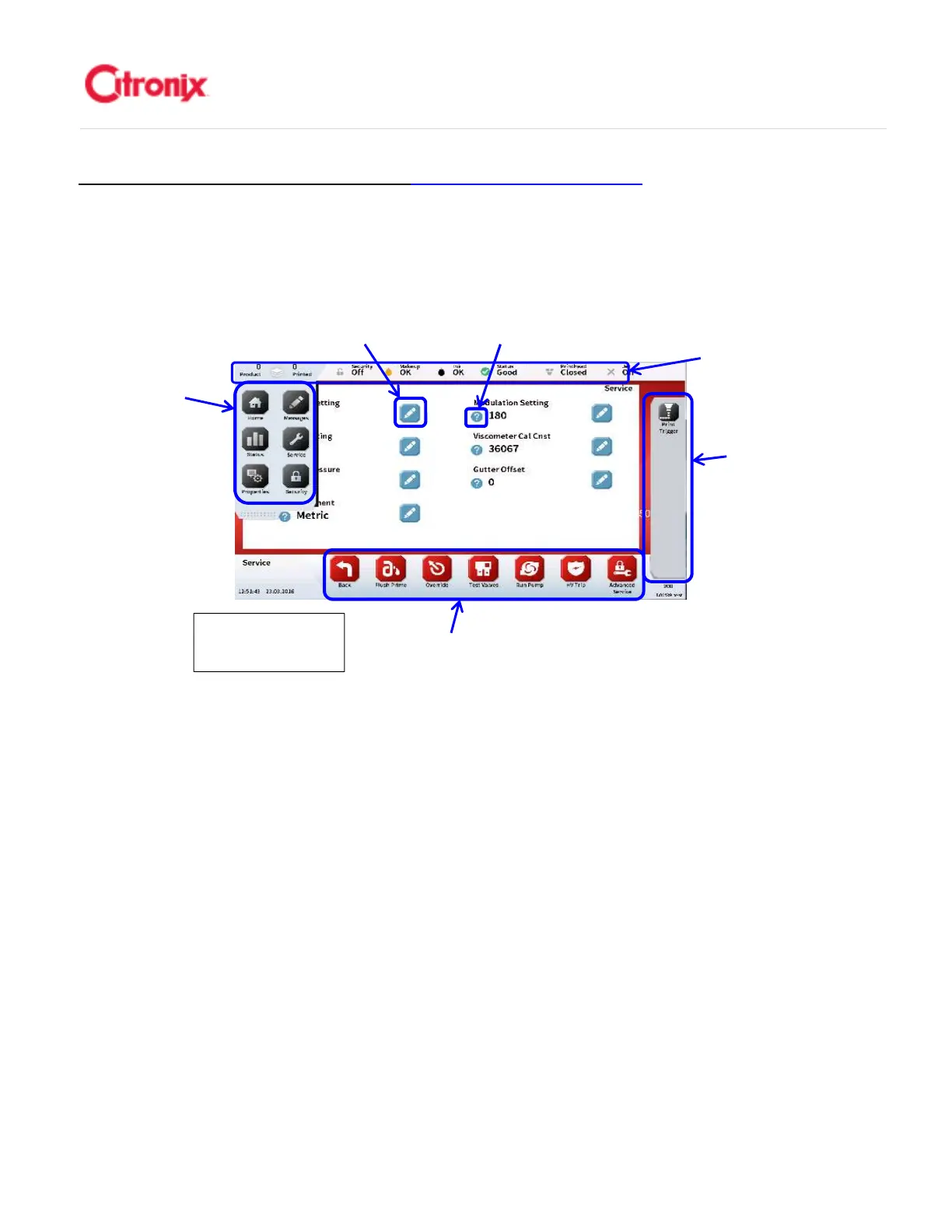
As you navigate through the GUI, a number of different toolbars and control options become available.
These consist of the status bar, menu tab, navigation toolbar, function toolbar, edit button and help
button which are described below. These are used to change or edit the various fields depending on the
task being undertaken. 在操作界面上,可以找到一些不同功能的菜单区和控制选项。这些区域有状态栏,
菜单栏,编辑键和帮助键,详见下图。根据即将实现的不同任务,它们被修改或编辑成多个区域。
Status Bar 状态栏
Important status information (listed below) on the health of the printer is provided in the summary
status bar. Additional information can be found in Section 4. 涉及喷码机运行状态的主要状态信息
(列举如下)显示在状态栏中。更多的信息可以在第四章中查找。
1. Print Quantity 喷印质量状态
2. Security 登录状态
3. Fluid Levels 液位状态
4. System Health 机器状态
5. Printhead 打印头状态
6. Ink System 墨水系统
(2) Menus Tab 菜单栏
The ci5000 Series Printer has 6 icons (listed below) that give the user quick access to each of the
6 task focused menu screens. The menu tab does not change and is available from the majority
of the printer screens. These are described in more detail starting on page 2.5 Ci5000 系列喷码机
菜单栏中有 6 个键(列举如下)。它们可以使用户快速进入 6 个不同的功能区。菜单栏内容固定并
且可以在绝大多数屏幕上找到。从 2-5 页开始将详细描述这些菜单的功能
Edit Button 编辑键
Help Button 帮助键
Function Tool Bar 功能键
Navigation Tool Bar 快捷键
Status Bar 状态菜单栏
Service screen
维修菜单



 To Next Page