ci5000 Series Printer Operation Guide
Version 1.0 3-42
更深或更粗。较小的墨滴可以使打印速度更快。利用喷印调整的墨点大小设置可以使墨滴在常规点和大点
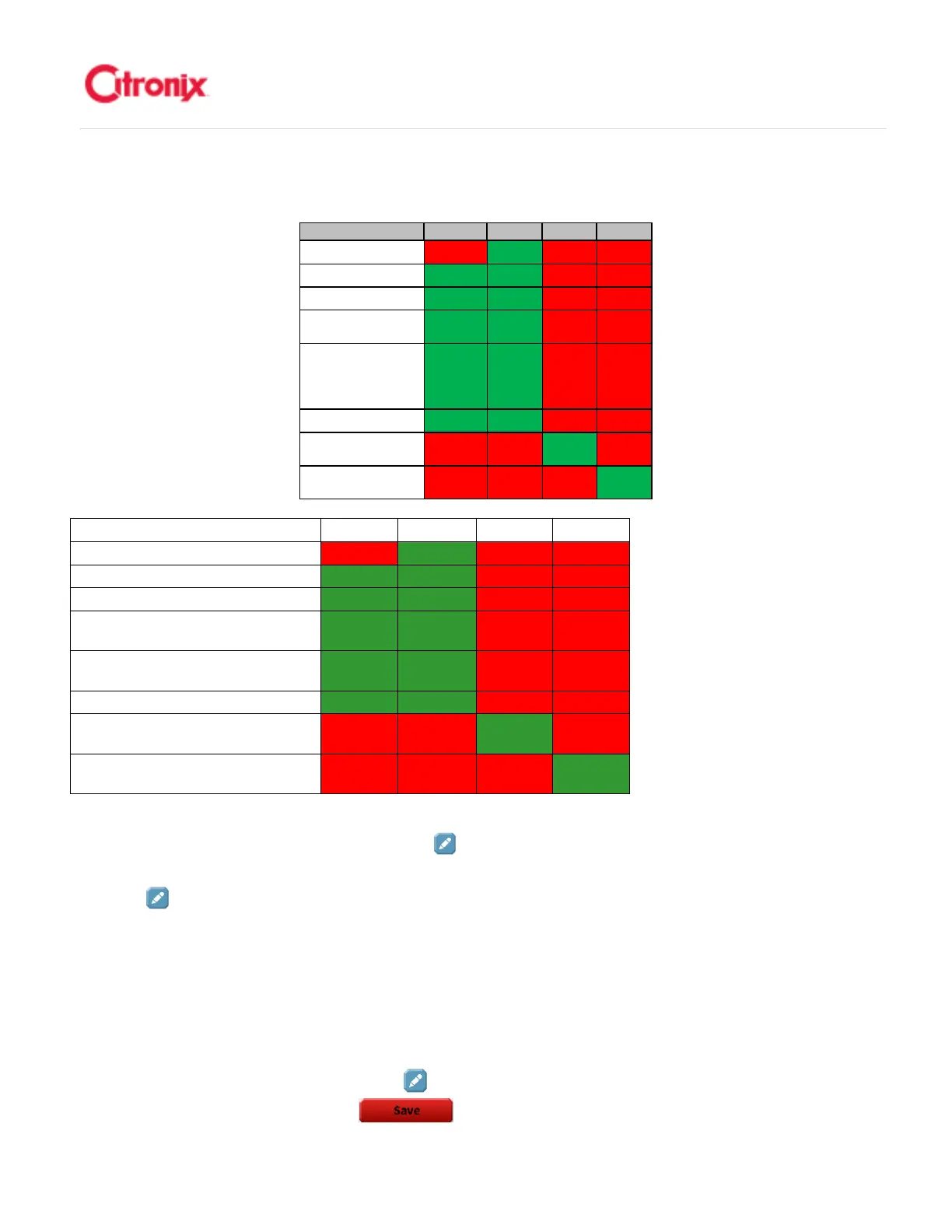
之间切换。下面的表格显示墨点大小和可用机型。
机器型号 常规 大点 微字
HS50
Ci5200 X
√
√√
√
X X
Ci5300
√
√√
√
√
√√
√
X X
Ci5500
√
√√
√
√
√√
√
X X
Ci5500 pigment
Ci5650 pigment
√
√√
√
√
√√
√
X X
Ci5500 heavy pigment
Ci5650 heavy pigment
√
√√
√
√
√√
√
X X
Ci5650
√
√√
√
√
√√
√
X X
Ci5500 micro
Ci5650 micro
X X
√
√√
√
X
Ci5500 HS50
Ci5650 HS50
X X
√
√√
√
You can select drop size by pressing the [Edit] button and choosing the required drop size from the
list. Only the allowed Drop Sizes will be displayed in the selection list.
想要选择墨点大小,可以通过按
“编辑” 键并从列表里选择需要的墨点大小。只有可以选择的墨点大小才会显示在选择列表中。
Print Quality (ciPrecisionPlus) 喷印质量(
喷印质量(喷印质量(
喷印质量(ciPrecisionPlus 精美控)
精美控)精美控)
精美控)
ciPrecisionPlus allows you to optimize print speed vs print quality. A precision plus value of 0 optimizes
speed while a value of 300 optimizes print quality. The value increments in steps of 20.
To adjust the Print Quality, press the [Edit] button to the right side of the Print Quality number. Then
select from the list then press [Save] .喷印质量可以优化打印速度和打印质量的组合。喷印质
Printer Type Normal Macro Micro HS50
ci5200
X √ X X
ci5300
√ √ X X
ci5500
√ √ X X
ci5650 Pigment
√ √ X X
ci5500 Heavy
Pigment
ci5650 Heavy
Pigment
√ √ X X
ci5650
√ √ X X
ci5500 Micro
ci5650 Micro
X X √ X
ci5500 HS50
ci5650 HS50
X X X √



 To Next Page