EasyManua.ls Logo

Citronix ci5300 - Messages

Default Icon
133 pages
Print Icon
To Next Page IconTo Next Page
To Previous Page IconTo Previous Page
Loading...
ci5000 Series Printer Operation Guide
Version 1.0 2-8
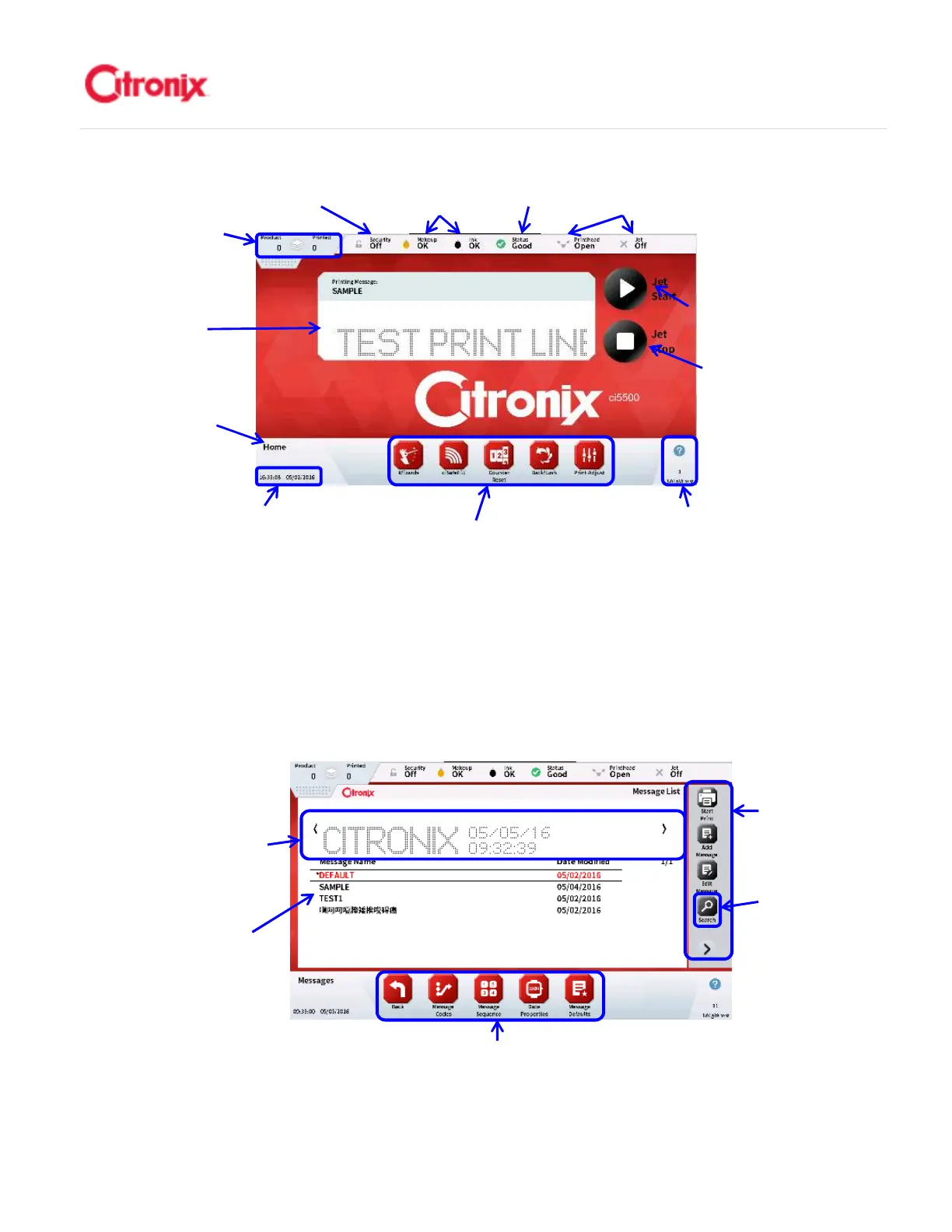
(2) Messages 信息菜单
The message edit screen is used for creating and editing messages by adding fixed and variable
fields and formatting to a WYSIWYG message window. 信息菜单用于创建和编辑信息。它通过添
加固定和可变字段并在窗口中生成信息的所见即所得内容。
Firmware Revision
Screen Number
Help Button
软件版本
屏幕号
帮助键
Date & Time
时间和日期
Navigational Tool Bar 快
捷键
Current
Printing
Message 当前
喷印信息
Jet Stop
Button 墨线关
闭键
Product &
Printed
Counts 产品/
喷印计数
Security
登录状态
Fluid Level
Indicators 耗材
液位状态
Printer
Status 喷
码机状态
Printhead
Status 打印
头状态
Jet Start & Pause
Printing Button 开
墨线以及喷印暂
停键
Screen
Name 菜单名
称
Navigational Tool Bar 快捷键
WYSIWYG of
Highlighted Message
被选中的信息所见即所得显示
Message Storage
List 已保存信息列表
Function Tool
Bar 功能键
Message Search
Button 信息检索键

Table of Contents