ci5000 Series Printer Operation Guide
Version 1.0 4-4
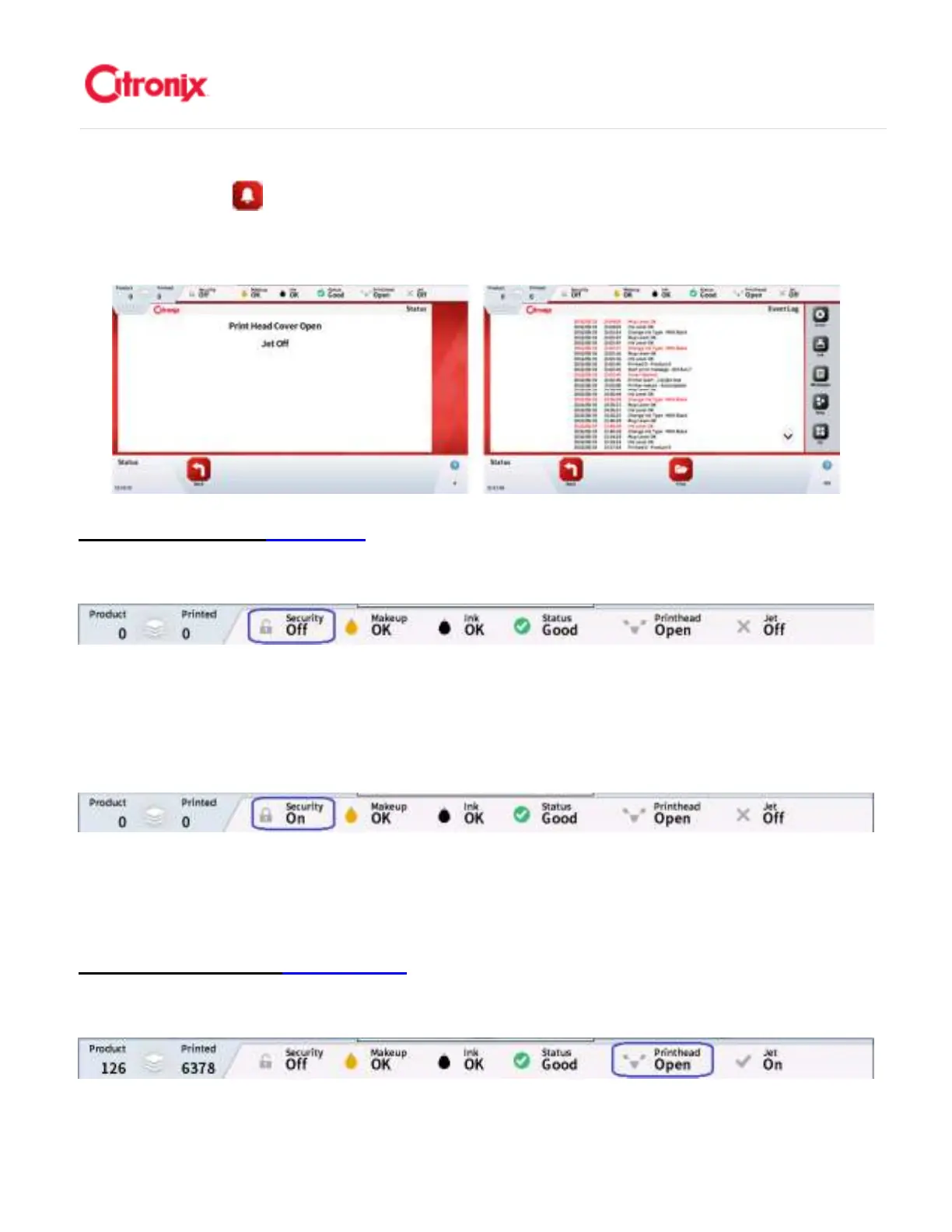
with times of acknowledgement and repair. 根据报警类型,当故障排除以后,某些报警内容会自动消失,
尽管在“当前报警” 列表里还会保留,直到使用者处理,如下图显示。可以在状态菜单的快捷菜单栏
中找到当前报警列表。如果处理以后报警信息不从列表里消失,意味着问题依然存在。如果同时存在 2 种
或以上报警,会显示最高优先级的报警信息。所有报警记录在事件记录种,同时保存处理和维修的时间。
Security Status 登录状态
登录状态登录状态
登录状态
Status: Security Off 状态:登录禁用
状态:登录禁用状态:登录禁用
状态:登录禁用
The Security Status icon indicates that Security has not been enabled allowing full access to all Menus.
该登录状态图标显示安全功能禁用,允许进入所有的菜单
Status: Security On 状态:登录可用
状态:登录可用状态:登录可用
状态:登录可用
The Security Status icon indicates that Security is enabled and users will need to log in to allow pre-set
access to Menus. 该登录状态图标显示安全功能可用用户需要登录进入相应权限的菜单。
Printhead Status 打印头状态
打印头状态打印头状态
打印头状态
Status: Printhead Open 状态:打印头盖开
状态:打印头盖开状态:打印头盖开
状态:打印头盖开



 To Next Page