ci5000 Series Printer Operation Guide
Version 1.0 3-8
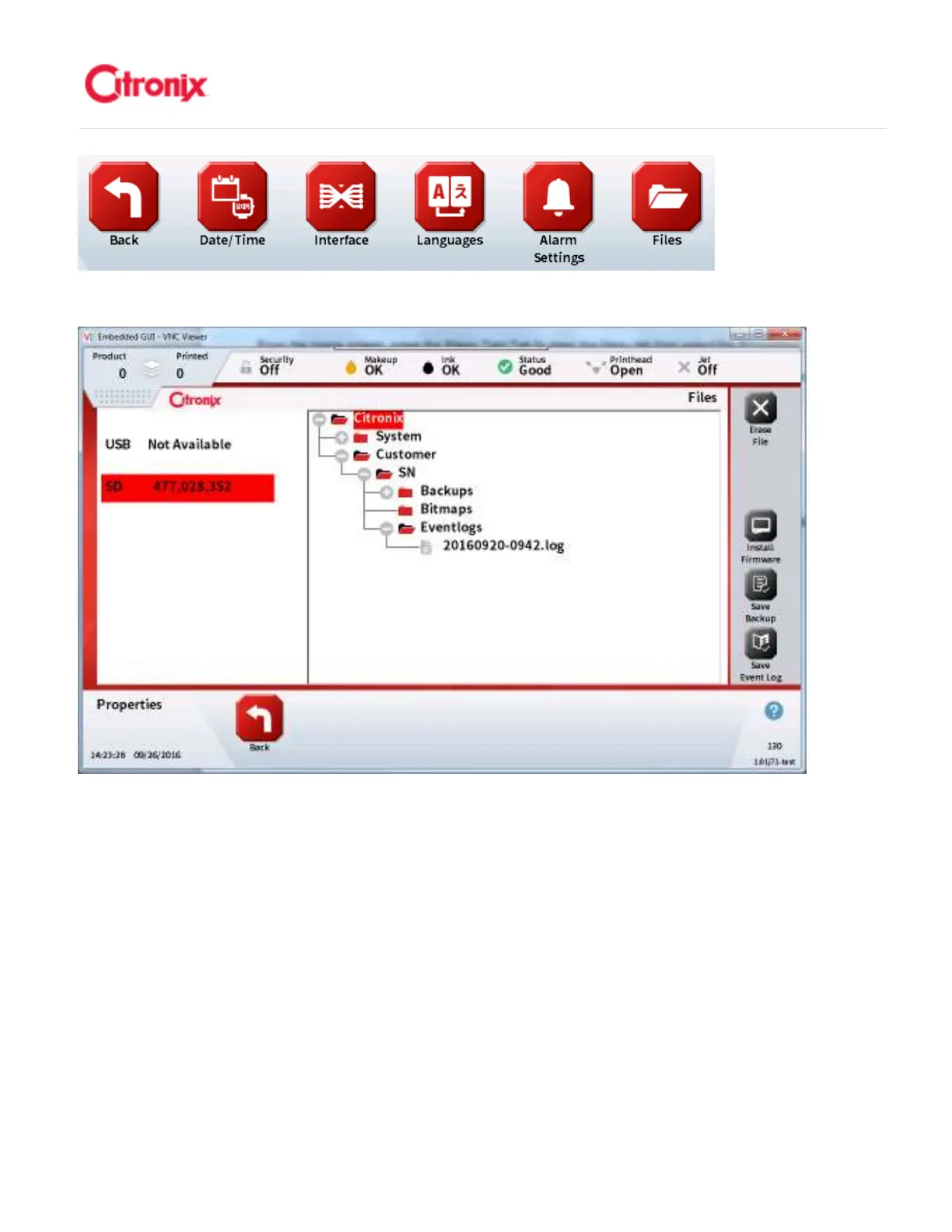
Navigate to a specific folder by pressing the ‘+’ or ‘-‘ icons next to the folders. To save a backup file,
navigate to the Backups folder and press [Save Backup] icon on the functional toolbar. The printer will
then store a copy of all of the system settings and messages in the Backup folder. 按文件夹旁边的“+”
或“-”找到相应的文件夹。如需保存备份文件,在功能菜单区找到备份文件夹并按“保存备份文件”图标。
喷码机将在备份文件夹里保存一个含有机器设置和信息的文件。
To save an event log file, navigate to the Eventlogs folder and press [Save Event Log] icon on the
functional toolbar. The printer will save a copy of all the events in the event log. 如需保存事件记录文件,
找到事件记录文件夹并按功能菜单区的“保存事件记录”图标。
To install firmware, navigate to the System folder then the Firmware folder and select which firmware file
and press [Install Firmware] icon from the functional toolbar. The printer will then update the firmware
and reboot. 如需升级软件,找到“系统”文件夹 “软件”文件夹需要升级的软件,并按功能菜单区
的“升级软件”图标。喷码机将升级软件并重新启动



 To Next Page