ci5000 Series Printer Operation Guide
Version 1.0 5-11
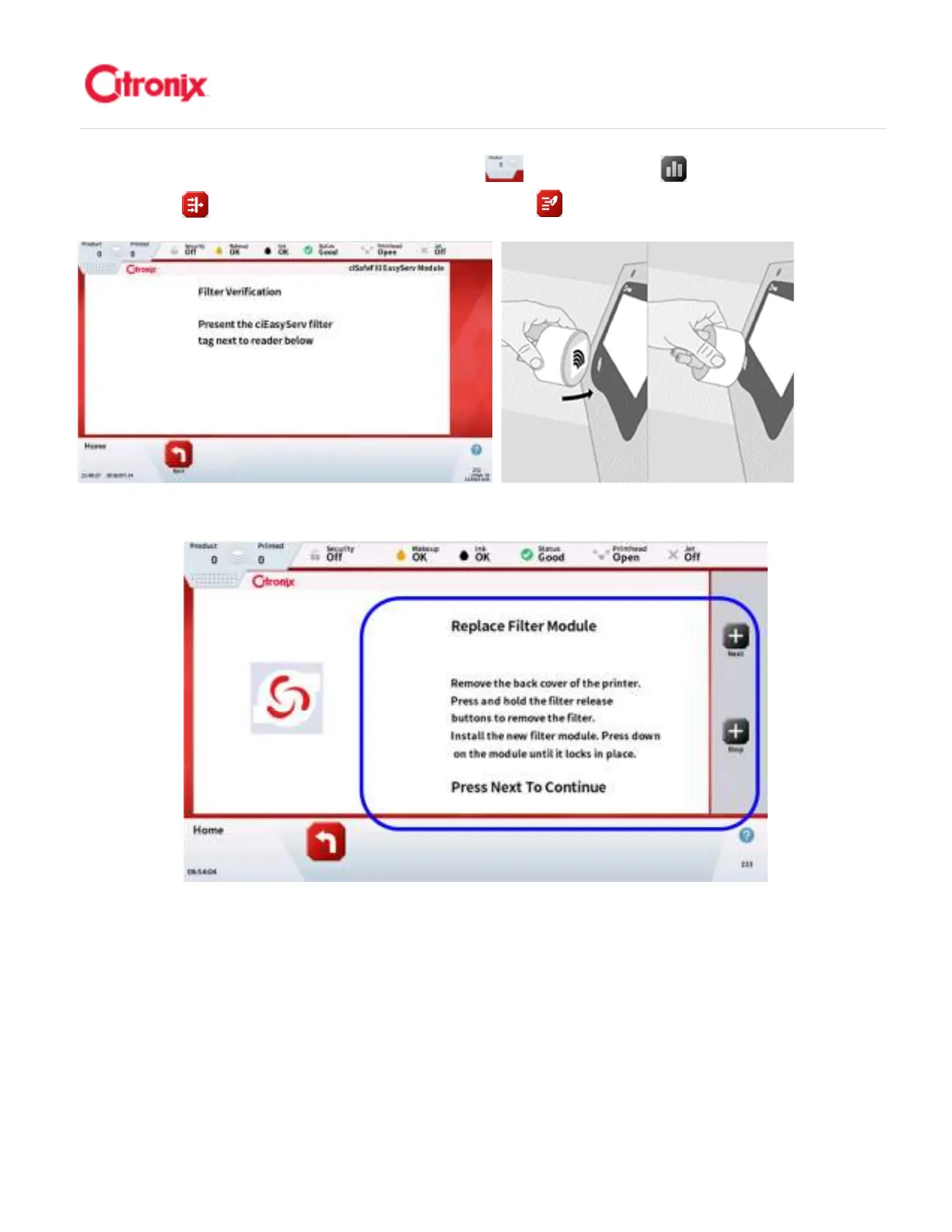
reader symbol on the Touch Panel. 按“菜单”下拉栏 ,然后按“状态” 键,再按快捷菜单栏中
的“过滤器” 键。然后按快捷菜单栏中的“更换过滤器” ,并将标签靠近触摸屏的读取器符号位置。
When the Tag is approved the following screen will appear. 当标签被验证并读取以后,屏幕上会显示
Follow the instructions seen on this screen. 下方是屏幕上显示内容的介绍
Changing the Service Module 更换过滤器模块
更换过滤器模块更换过滤器模块
更换过滤器模块
Depress the 2 release buttons on the module base. This will release the old module. Lift up on the
Service Module to remove. 按压过滤器组件上的两个释放按钮。这样可以取下原来的过滤器组件。



 To Next Page