ci5000 Series Printer Operation Guide
Version 1.0 4-2
Troubleshooting ..................................................................................................................... 4-9
Print Quality Faults .............................................................................................................. 4-13
Introduction 介绍
介绍介绍
介绍
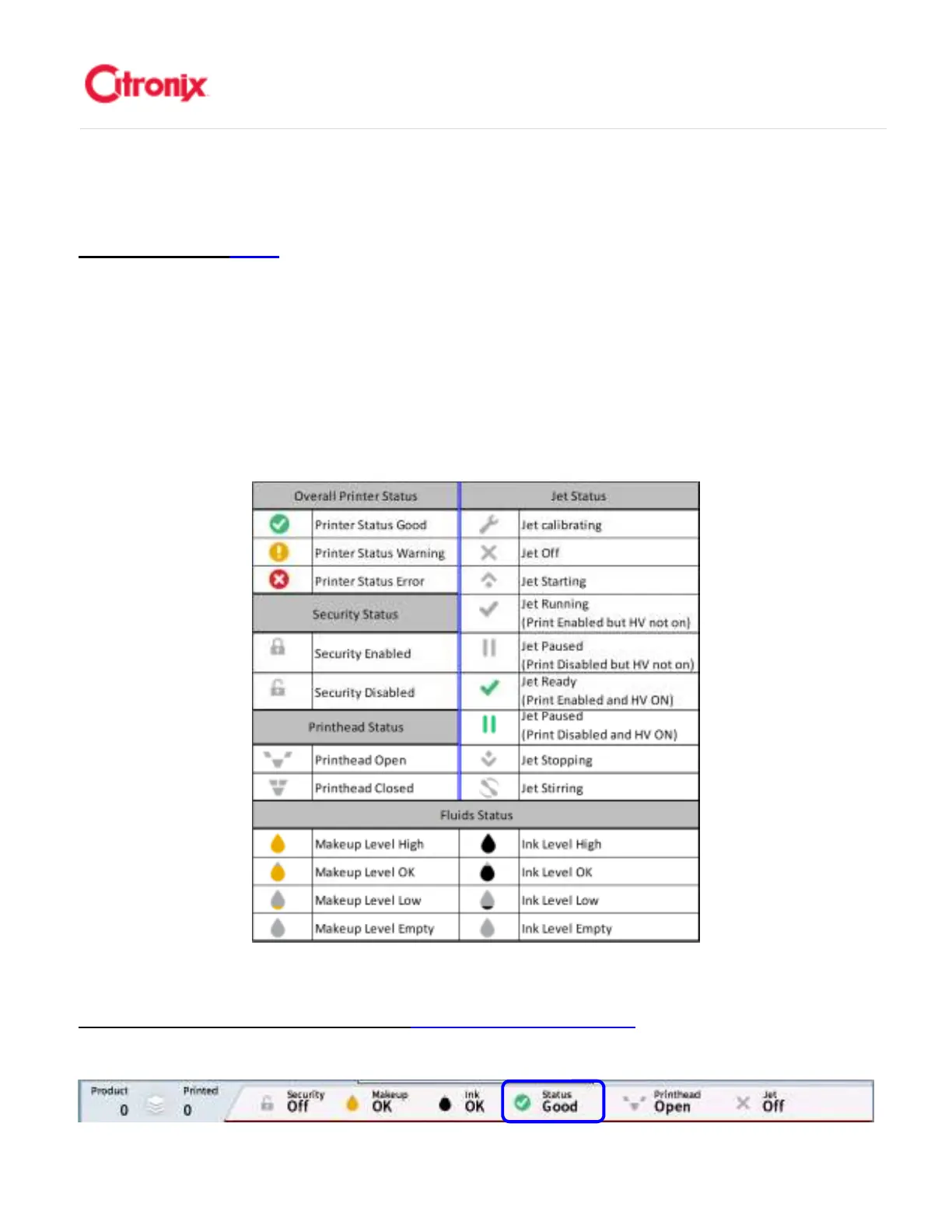
Citronix printers display the most frequently used and important information on the Status Bar shown
below. This section describes the significance of these icons, their behavior and the troubleshooting
techniques required for the most common issues. The table below provides a summary status Icons
which are discussed in more detail below. 喜多力喷码机在状态提示栏里显示最常用和最重要的信息,如
下。这个章节阐述这些图标的各自含义,它们的作用以及最常见故障诊断所需的技术手段。下表显示了本
章节将详细描述的状态图标集合。
Overall Printer Status Icons 喷码机
喷码机喷码机
喷码机整体
整体整体
整体状态图标
状态图标状态图标
状态图标
Status: Green, Good 状态:绿色,良好
状态:绿色,良好状态:绿色,良好
状态:绿色,良好



 To Next Page