ci5000 Series Printer Operation Guide
Version 1.0 3-21
To select any message to print, just touch and highlight the message and press [Start Print] button
in the Function Toolbar. 如果需要选择信息进行打印,触摸选中信息,并在快捷键栏,按“开始喷印”
键
Message Search 信息检索
信息检索信息检索
信息检索
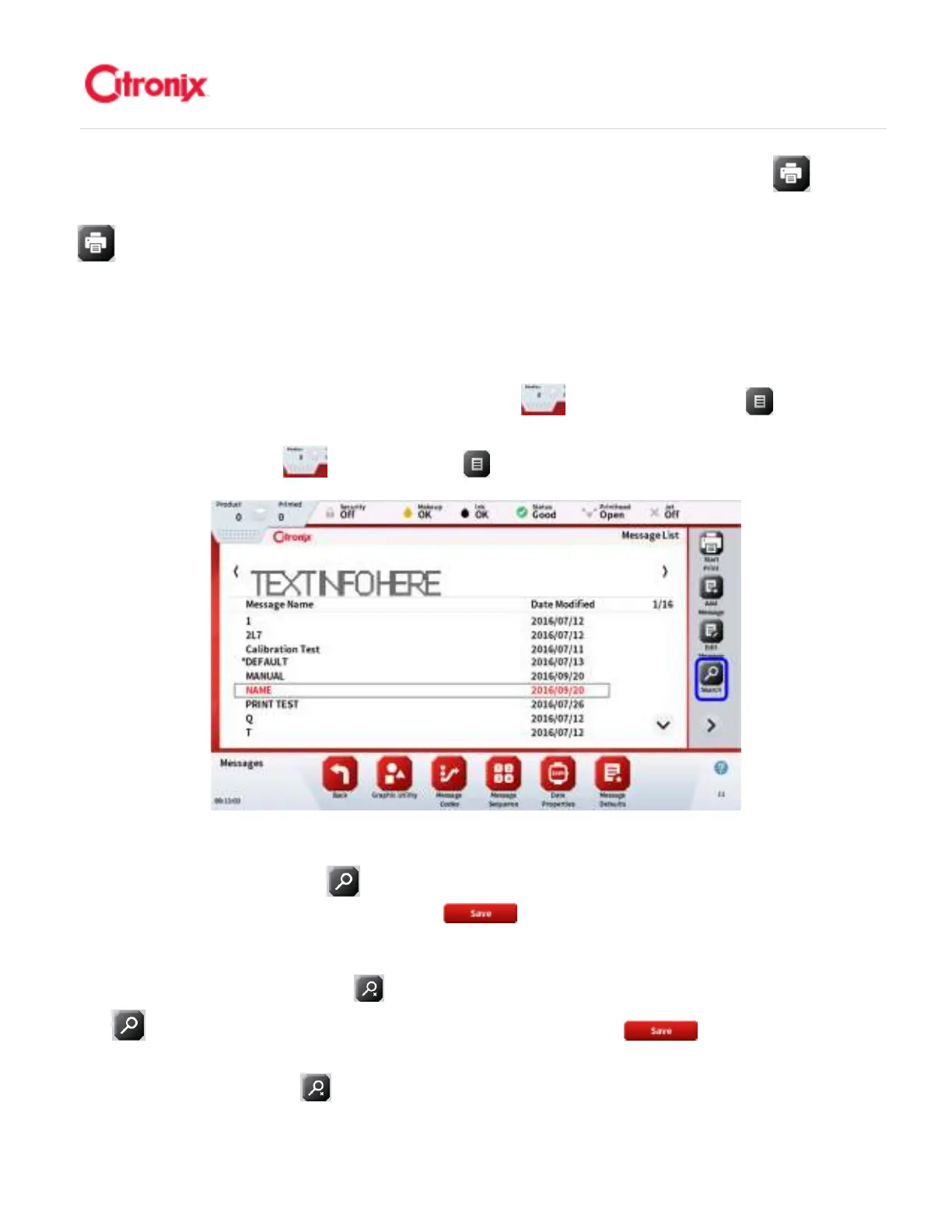
Previously created messages are easily searchable using the easy to use message search function. To
access the message search function, press the Menu Tab then press [Messages] button to
bring up the Message List (shown below). 运用信息检索功能,很方便就能找到之前创建的信息。使用信
息检索功能,按菜单下拉条 ,然后按“信息” 键调出信息列表(如下所示)。
Search by pressing the [Search] button in the Function Toolbar. Use the on-screen keyboard to
enter the message name, then press the [Save] button. The message will then appear in the
new Message list as shown below and can be touch selected. The selected message can then be
selected for printing, editing, deleting, or copying by pressing the appropriate button on the function
toolbar. Pressing the [Clear Search] button will display the whole message list. 按功能键栏中的“搜
索” 键开始搜索。使用屏幕显示键盘输入信息名称,然后按“保存” 键。信息将显示在新的
信息列表上,如下图所示,可以触摸选择。通过功能键栏中的相关键,选中的信息可以付诸喷印,编辑,
删除或复制。按“清空搜索” 键,页面会显示整个信息列表。



 To Next Page