ci5000 Series Printer Operation Guide
Version 1.0 4-5
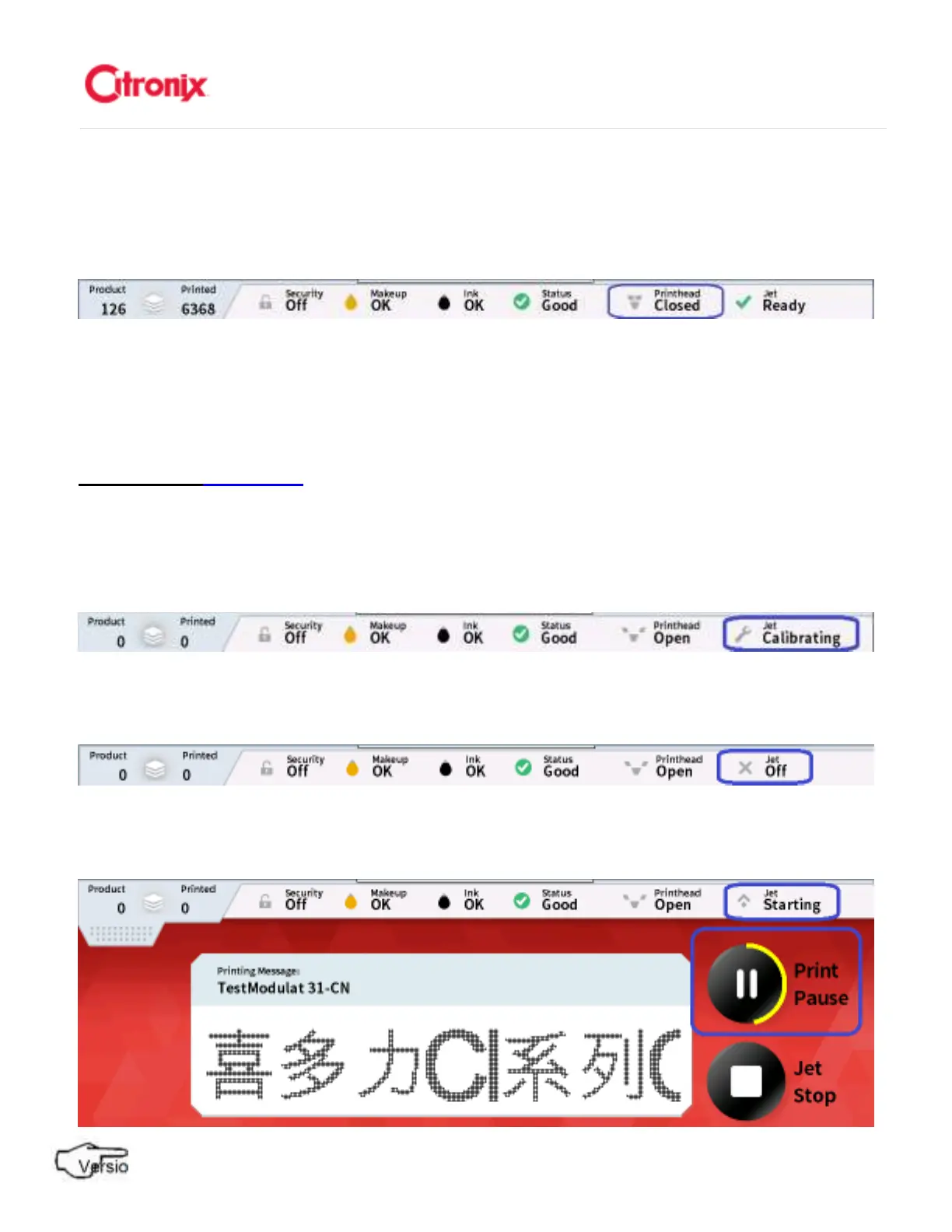
The Printhead Status icon indicates that the printhead cover has not been installed preventing the printer
from printing. 打印头状态图标显示打印头保护罩没有安装到位,阻止喷码机喷印。
Status: Printhead Closed 状态:打印头盖关
状态:打印头盖关状态:打印头盖关
状态:打印头盖关状态
状态状态
状态
The Printhead Status icon indicates that the printhead cover has been installed and the printer will print
at the next print signal. 打印头状态图标显示打印头保护罩已经安装好,喷码机在收到下一个打印信号后可
以打印。
Jet Status 墨
墨墨
墨线状态
线状态线状态
线状态
Shown below are some of the more common printer states, these will be shown in the status bar at the
top of the screen: 下面显示的是一些最普通的喷码机状态,他们会在屏幕上方的状态菜单中显示。
Status: Jet Calibrating 状态:机器校准
状态:机器校准状态:机器校准
状态:机器校准
Status: Jet Off 状态:墨线关
状态:墨线关状态:墨线关
状态:墨线关
Status: Jet Starting 状态:墨线开
状态:墨线开状态:墨线开
状态:墨线开



 To Next Page