ci5000 Series Printer Operation Guide
Version 1.0 3-37
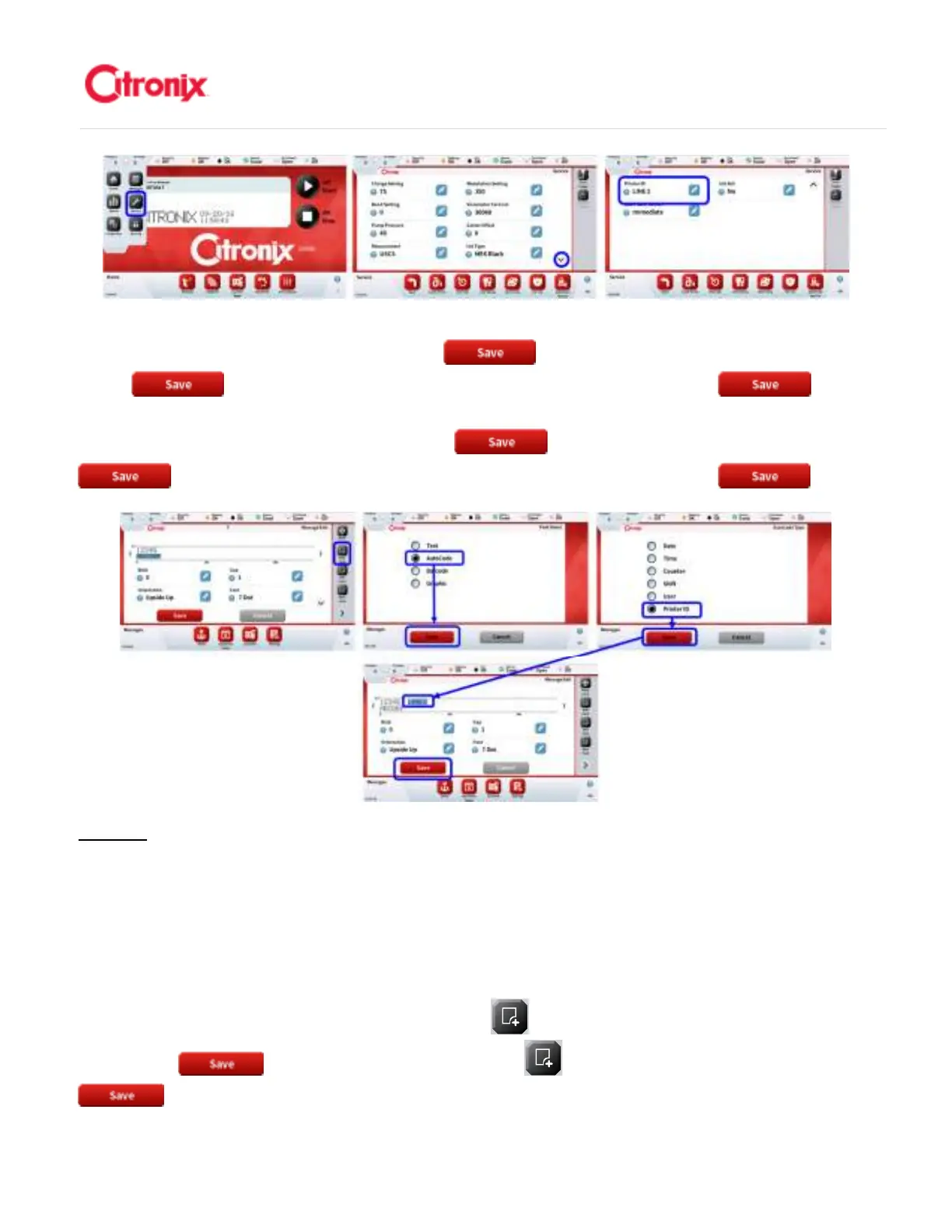
To add this to the message, simply add a field to an existing message or while creating a new message.
Select the Autocode field, then press the [Save] Button. Select [Printer ID] then press the
[Save] button. This will add the Printer ID to the message. Press [Save] when
editing/creating is completed. 如需添加这个信息,只要在已经编辑好的信息中简单增加一个字段或在编辑
新信息的时候选择自动编码字段,然后按“保存” 键。选择“喷码机编号”,然后按“保存”
键。这个操作将在信息中添加喷码机编号。信息编辑完成后,按“保存” 。
Barcode: 条码
Barcodes are machine-readable codes which are used to identify products using barcode scanners.
Citronix printers are capable of printing all commonly used industry standard barcode formats. Additional
information on how to add a barcode is provided below. 条码是机器读取编码,用于使用条码扫描器读取
产品信息。喜多力喷码机可以喷印常用的工业标准格式条码。关于如何添加条码的更多信息在下文中详细
描述。
To add a barcode to a message, press the [Add Field] button, select the barcode from the list and
press [Save] .信息中添加条码,按“添加字段” 键,在列表中选择条码,并按“保存”



 To Next Page