CLA-VAL D35
Communicating Valve Controller
CLA-VAL Europe www.cla-val.ch cla-val@cla-val.ch 13 - D35001UE - 08/22
© Copyright CLA-VAL Europe - Specifications subject to change without notice - no contractual illustrations. Reduce your waste - Sort your rubbish
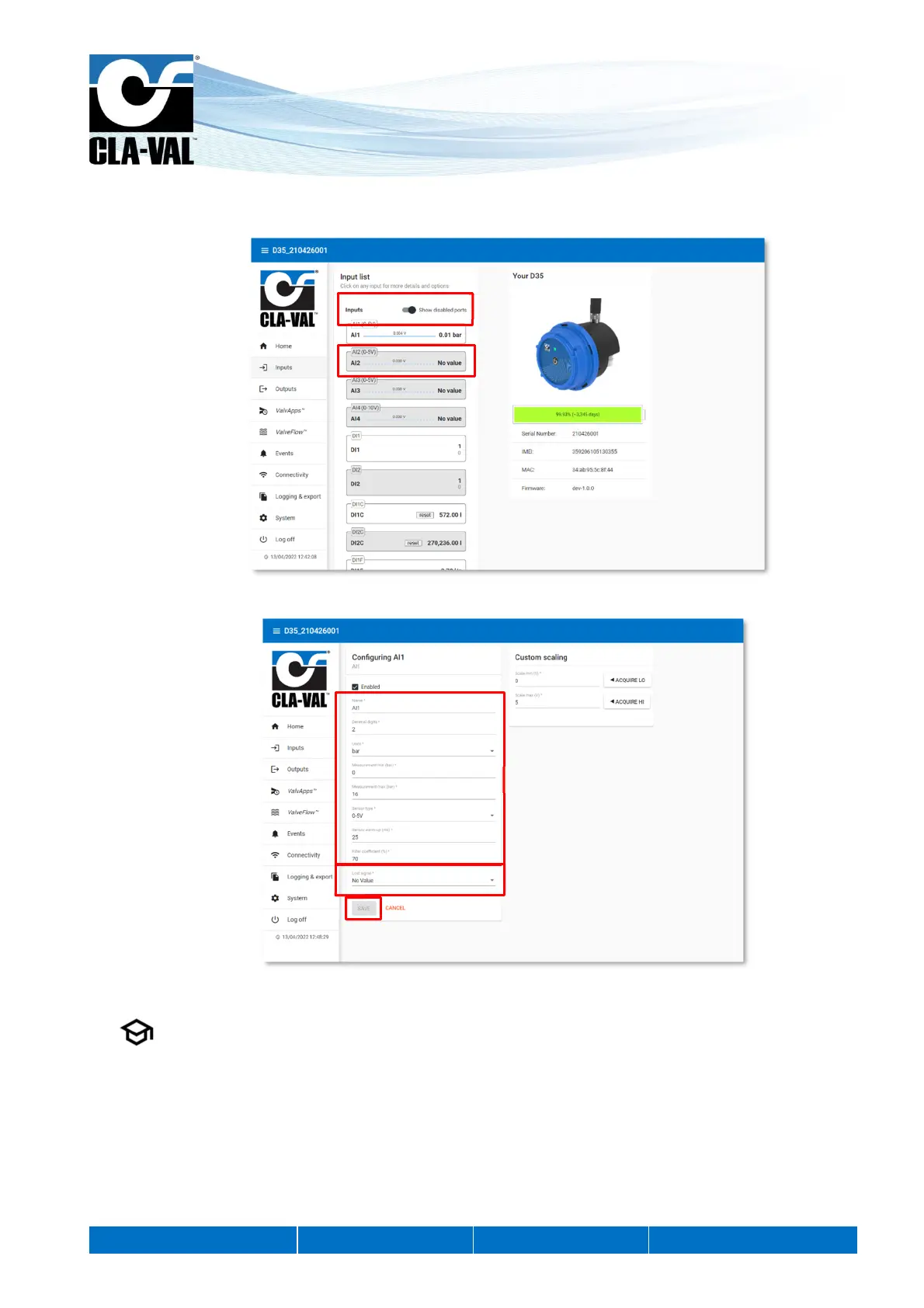
2. To activate an input that is not displayed on the list, select "Show disabled ports".
The list will show disabled inputs
with a gray background.
3. Click on an input to reach its configuration page.
4. On the configuration page of the desired input, you can change the name and configure the sensor settings.
5. , "Lost Signal" drop-down menu allows to configure an action when the sensor signal is lost. For example, when
the ratiometric sensor voltage is less than 0.5 V.
You have the choice between:
- No Value
- A default Value
- The last Value
6. When done, click "SAVE" to apply your changes.
5.
4.
6.
2.
3.


 To Next Page