CLA-VAL D35
Communicating Valve Controller
CLA-VAL Europe www.cla-val.ch cla-val@cla-val.ch 27 - D35001UE - 08/22
© Copyright CLA-VAL Europe - Specifications subject to change without notice - no contractual illustrations. Reduce your waste - Sort your rubbish
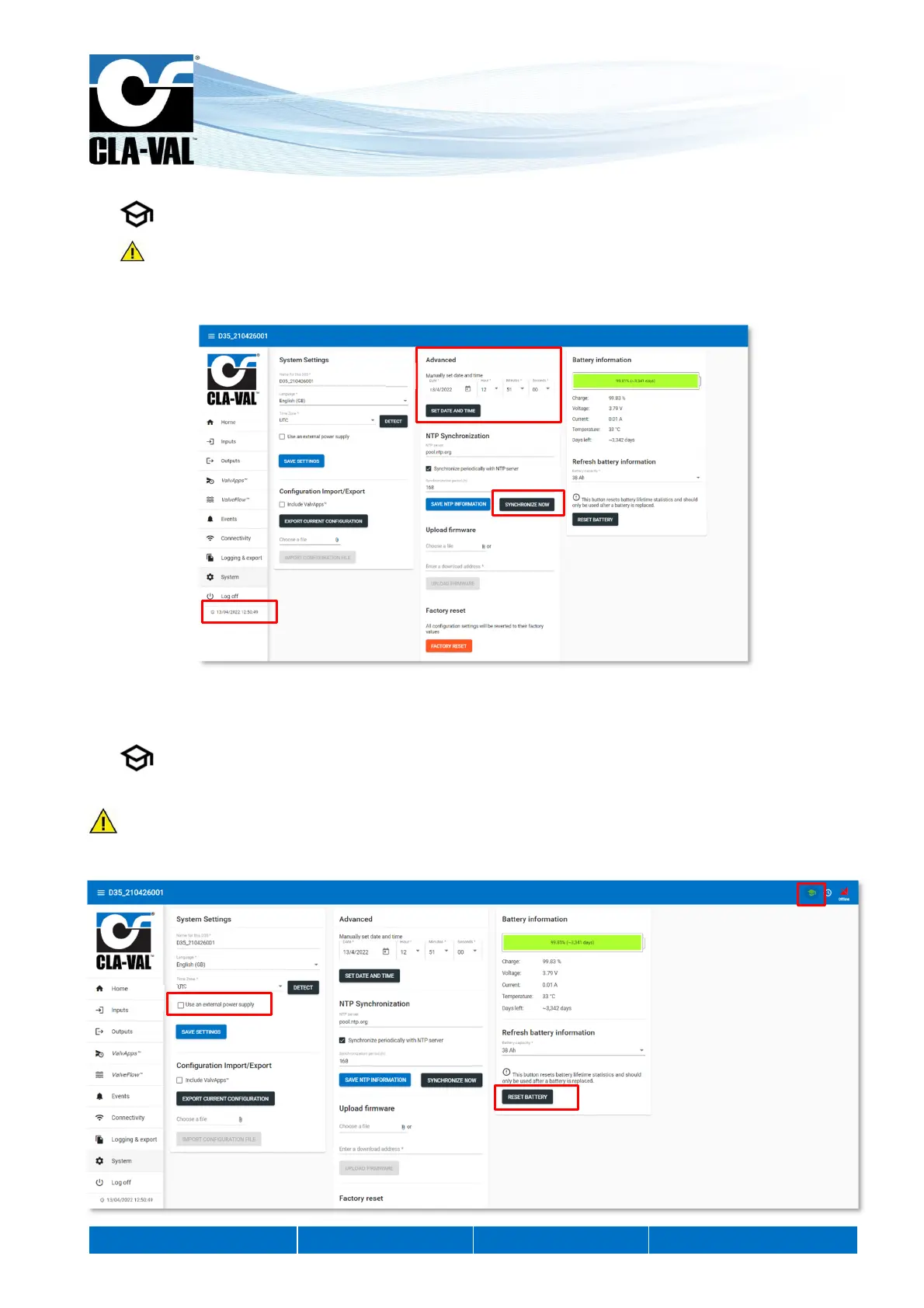
7. Click on "SYNCHRONIZE NOW" to update your unit's clock immediately.
This operation can only be performed if the D35 is connected to the cellular network (option). If not, go directly to
step 8.
8. Check that the time displayed on the clock below the navigation menu is correct. If not, you can set the time manually in
"Manually set date and time". Click on "SET DATE AND TIME" to have the change applied.
9.14 BATTERY CONTROL
The battery display allows to estimate the remaining life of the product.
1. During battery replacement.
2. Click on the "RESET BATTERY" button to reset the battery display.
This button resets the battery life statistics and should only be used after a battery has been replaced.
3. If you are not using a battery, you can disable the battery display by clicking on the "Use an external power supply"
button.
8.
7.
8.
1.
3.
2.


 To Next Page