CLA-VAL D35
Communicating Valve Controller
CLA-VAL Europe www.cla-val.ch cla-val@cla-val.ch 15 - D35001UE - 08/22
© Copyright CLA-VAL Europe - Specifications subject to change without notice - no contractual illustrations. Reduce your waste - Sort your rubbish
9.5 SETTING THE PARAMETERS OF A SOLENOID VALVE
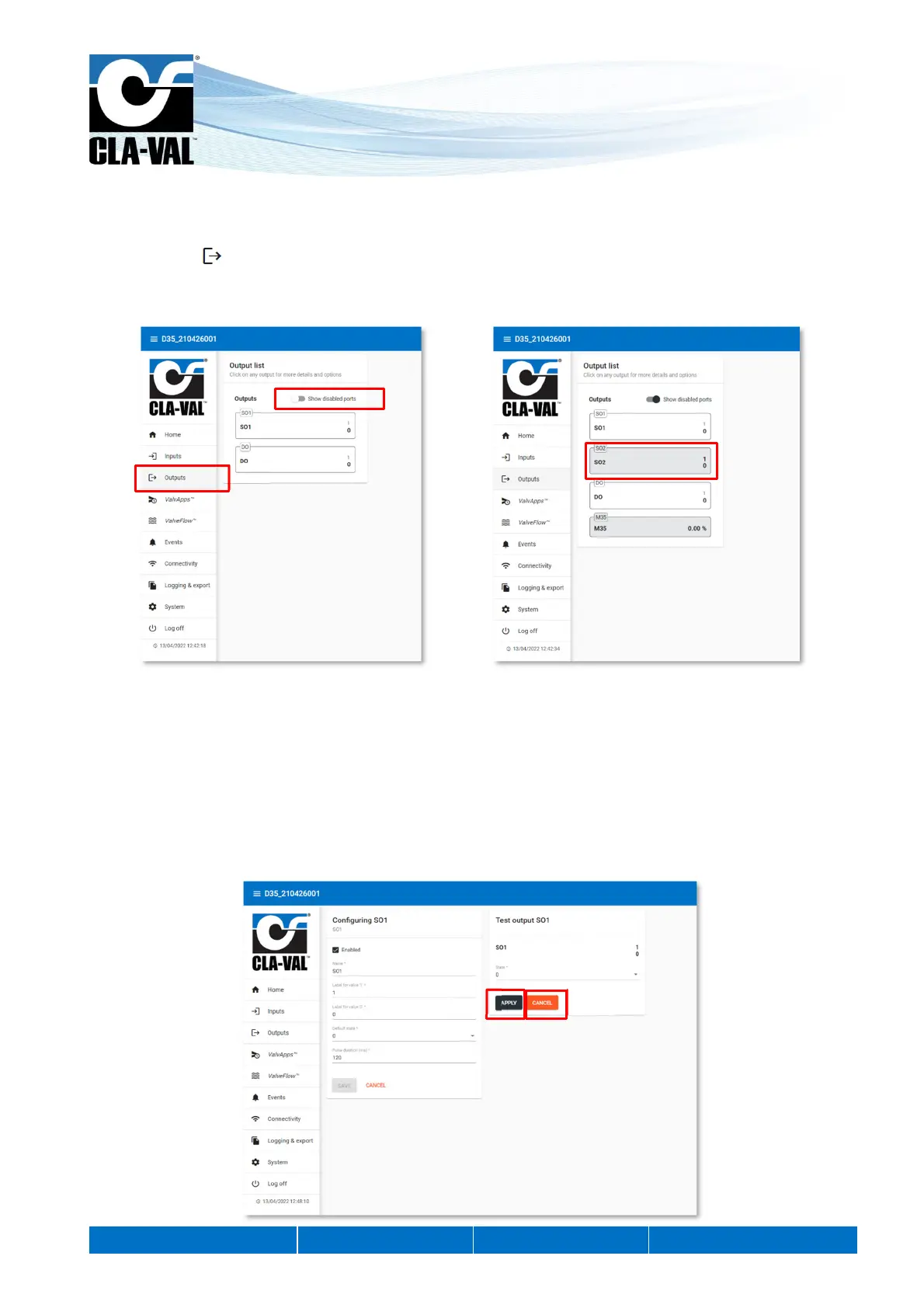
The outputs identified by SO1 and SO2 are solenoid outputs.
1. Click on the " Outputs" menu to display the output configuration page.
2. To activate an output that is not displayed in the list, click on "Show disabled ports". The list will show the deactivated
outputs with a grey background.
3. Click on an output to access its configuration page.
4. On the configuration page of the desired output, you have the possibility to change the name, the activation label, the
deactivation label and the default value.
9.5.1 OUTPUT TEST
To test the correct functioning of a solenoid valve, you can force the state of the valve:
1. After selecting the desired state, click on "APPLY", the forced state has priority over the output.
2. To cancel the forcing of an output, click on "CANCEL".
When you exit the "Configuration" mode all outputs that have been forced are automatically released.
2.
1.
2.
1.
2.


 To Next Page