CLA-VAL D35
Communicating Valve Controller
CLA-VAL Europe www.cla-val.ch cla-val@cla-val.ch 17 - D35001UE - 08/22
© Copyright CLA-VAL Europe - Specifications subject to change without notice - no contractual illustrations. Reduce your waste - Sort your rubbish
9.7 VALVEFLOW™ SETTING (OPTION)
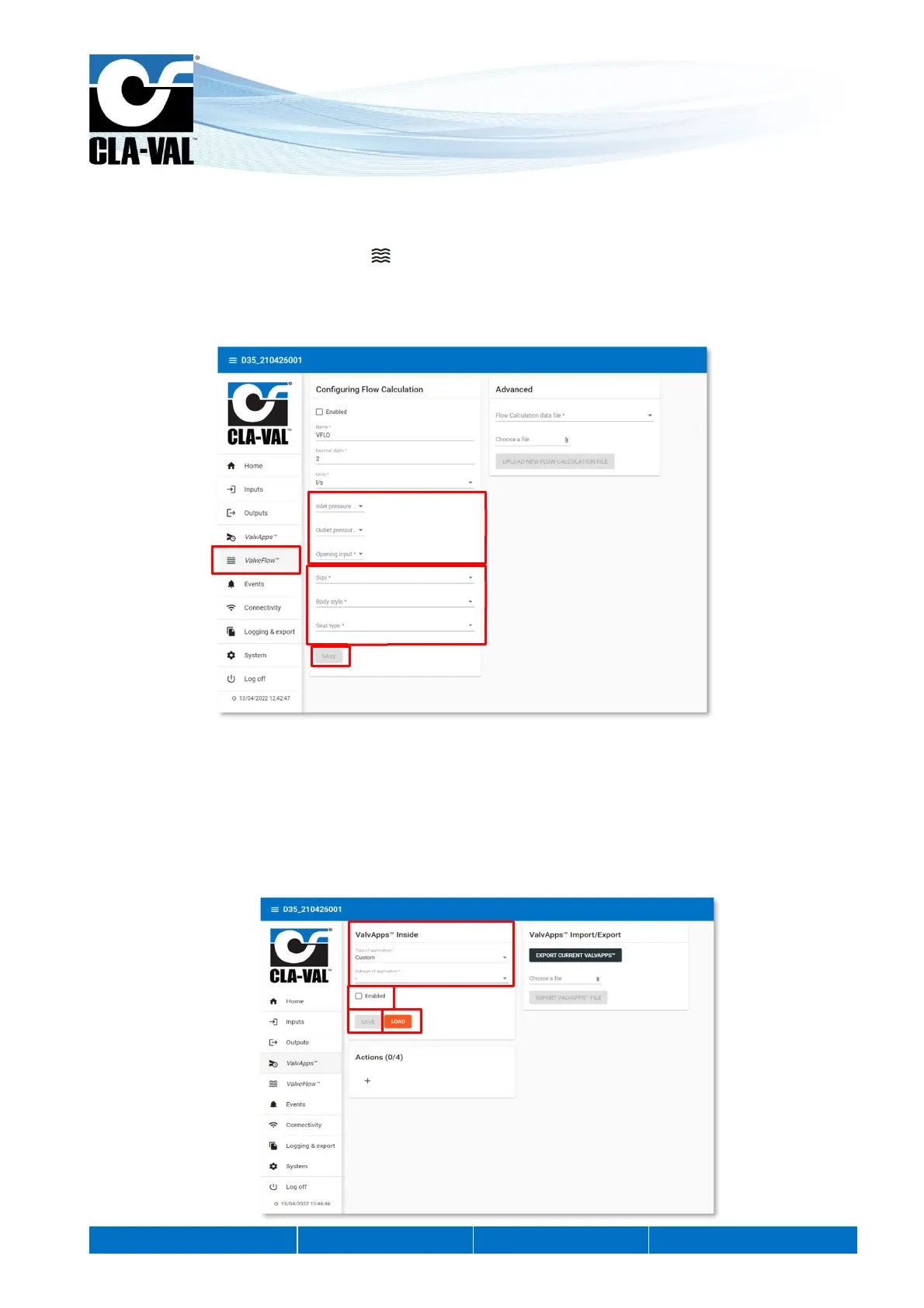
The ValveFlow
TM
allows calculating the flow througt the valve, thanks to inlet pressure, outlet pressure, and valve opening.
1. Configure the ValveFlow by clicking on " ValveFlow
TM
" menu.
2. Select the inputs corresponding to the inlet/outlet pressure, as well as the opening.
3. Select the type of valve installed.
4. Click "SAVE" to apply the changes.
9.8 VALVAPPS™
9.8.1 VALVAPPS™ INSIDE
ValvApps™ Inside provides a catalogue of predefined hydraulic applications.
1. Select the "Type of application" and the "Subtype of application" that corresponds to your need.
2. Once selected, click on "LOAD". Now you can customize the predefined settings.
3. To activate the operation of the ValvApps, check the "Enabled" box.
4. Click on "SAVE".
1.
2.
3.
4.
1.
3.
4. 2.


 To Next Page