CLA-VAL D35
Communicating Valve Controller
CLA-VAL Europe www.cla-val.ch cla-val@cla-val.ch 12 - D35001UE - 08/22
© Copyright CLA-VAL Europe - Specifications subject to change without notice - no contractual illustrations. Reduce your waste - Sort your rubbish
9.2 SIMPLIFIED / ADVANCED MODE
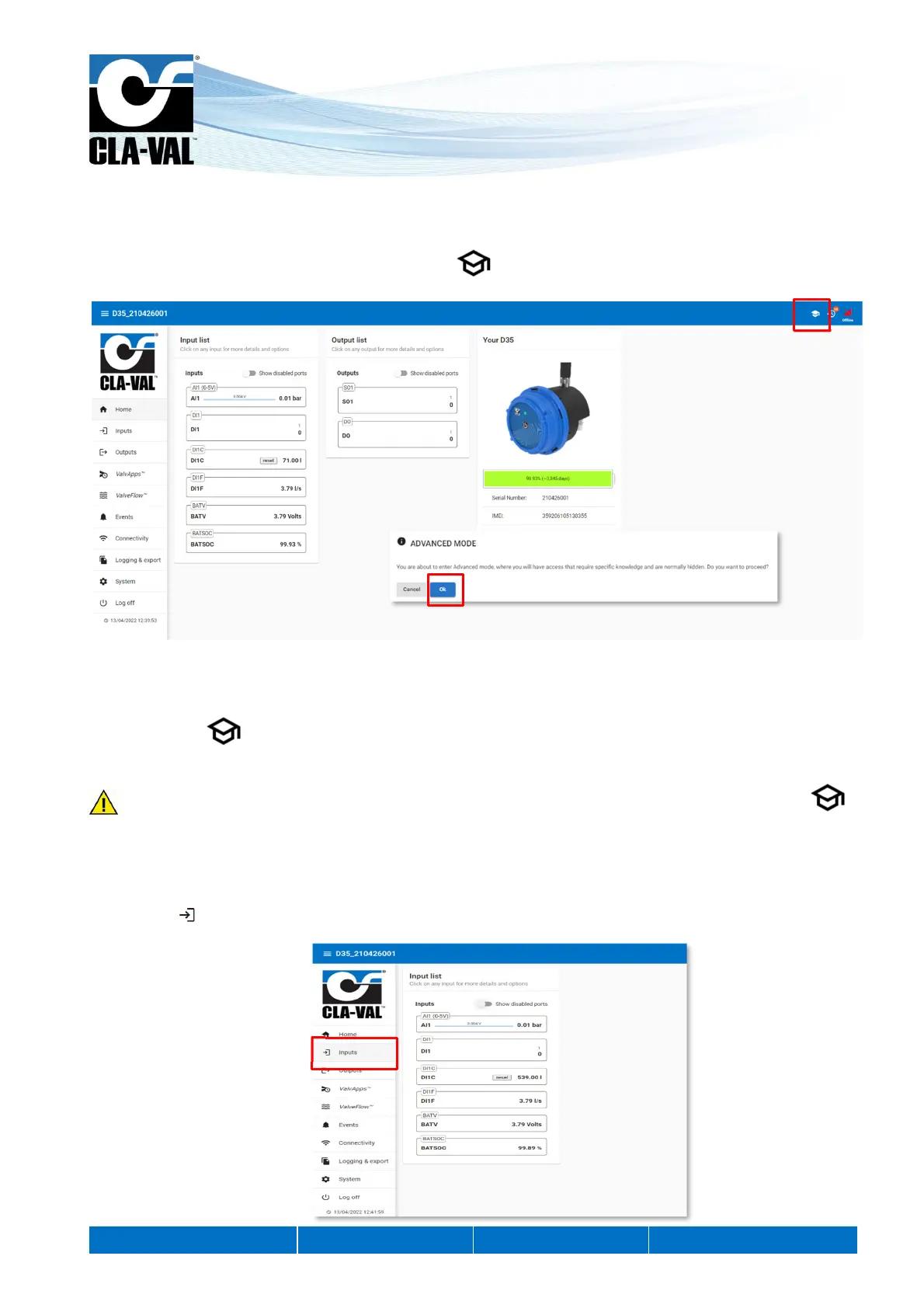
The advanced mode allows access to parameters requiring specific knowledge.
1. To access the "ADVANCED MODE", click on the icon at the top right of the interface.
2. A pop-up will open to confirm your choice.
3. Click on the "OK" button. You now have access to the advanced settings.
4. Click the icon again to exit the advanced mode.
At the end of your session, you will automatically exit the advanced mode.
Some parameters require to switch to "ADVANCED MODE". These settings are indicated by the following icon: .
9.3 ANALOGUE INPUT SETTINGS
The inputs identified by AI1, AI2, AI3 and AI4 are analogue inputs.
1. Click on " Inputs" to display the input configuration page.
1.
3.
1.


 To Next Page