CLA-VAL D35
Communicating Valve Controller
CLA-VAL Europe www.cla-val.ch cla-val@cla-val.ch 28 - D35001UE - 08/22
© Copyright CLA-VAL Europe - Specifications subject to change without notice - no contractual illustrations. Reduce your waste - Sort your rubbish
9.15 FIRMWARE UPDATE
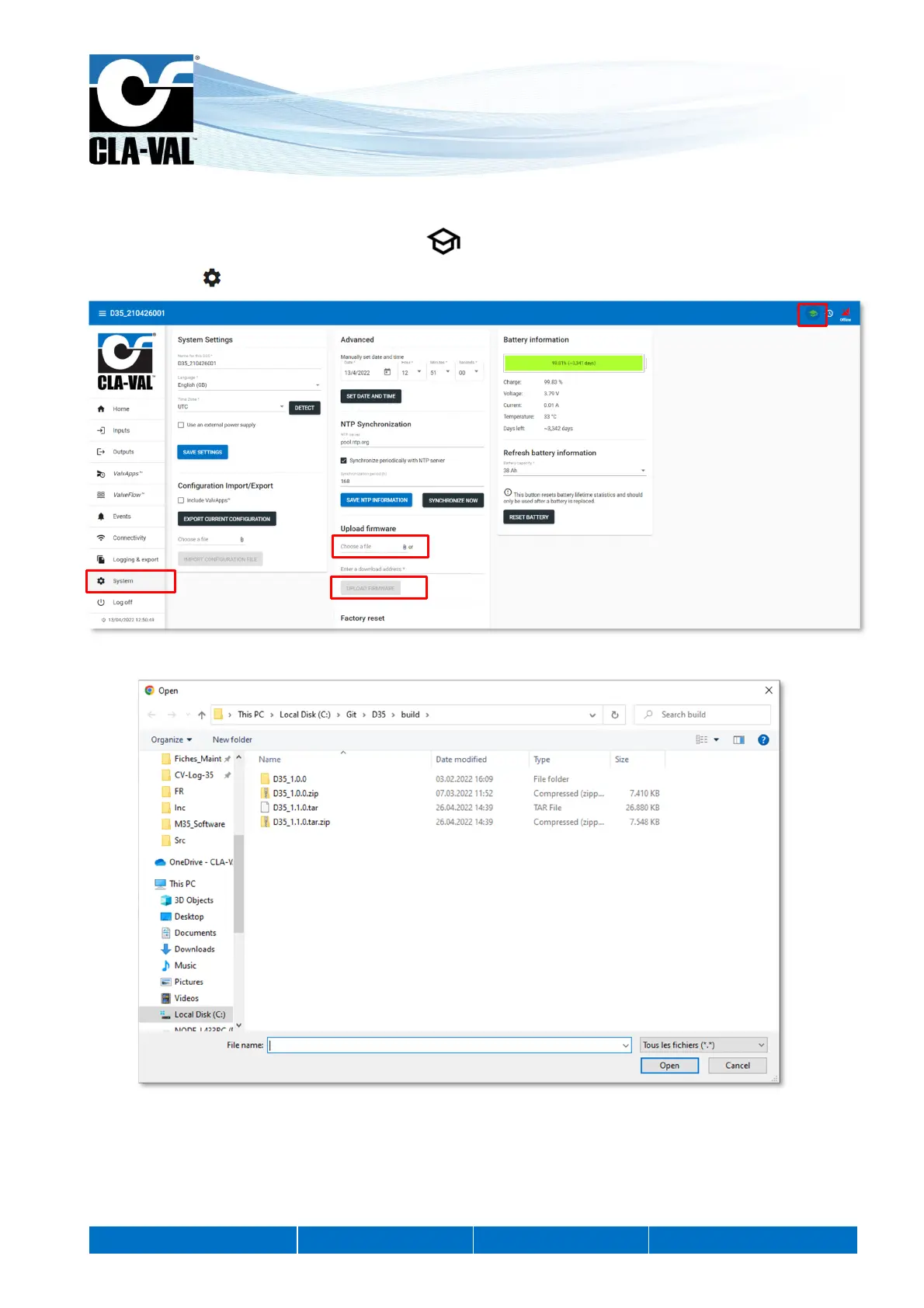
1. This chapter must be in advanced mode, click on .
2. Click on the " System" menu.
3. In the «Upload firmware» submenu, locate and select the distribution ZIP file for example "CVLOG35_1.0.2.zip".
4. Click on the "UPLOAD FIRMWARE" button and wait a few minutes.
5. Completely power off the D35 to apply the update. To do so, press the product button for 5 seconds to turn off the WiFi.
6. Make sure the LED flashes green every 10 seconds, indicating that the product is in "Acquisition" mode Then press the
main button for 10 seconds to completely switch off the D35 (a red flash appears after 10 seconds)
2.
3.
1.
4.


 To Next Page