CLA-VAL D35
Communicating Valve Controller
CLA-VAL Europe www.cla-val.ch cla-val@cla-val.ch 26 - D35001UE - 08/22
© Copyright CLA-VAL Europe - Specifications subject to change without notice - no contractual illustrations. Reduce your waste - Sort your rubbish
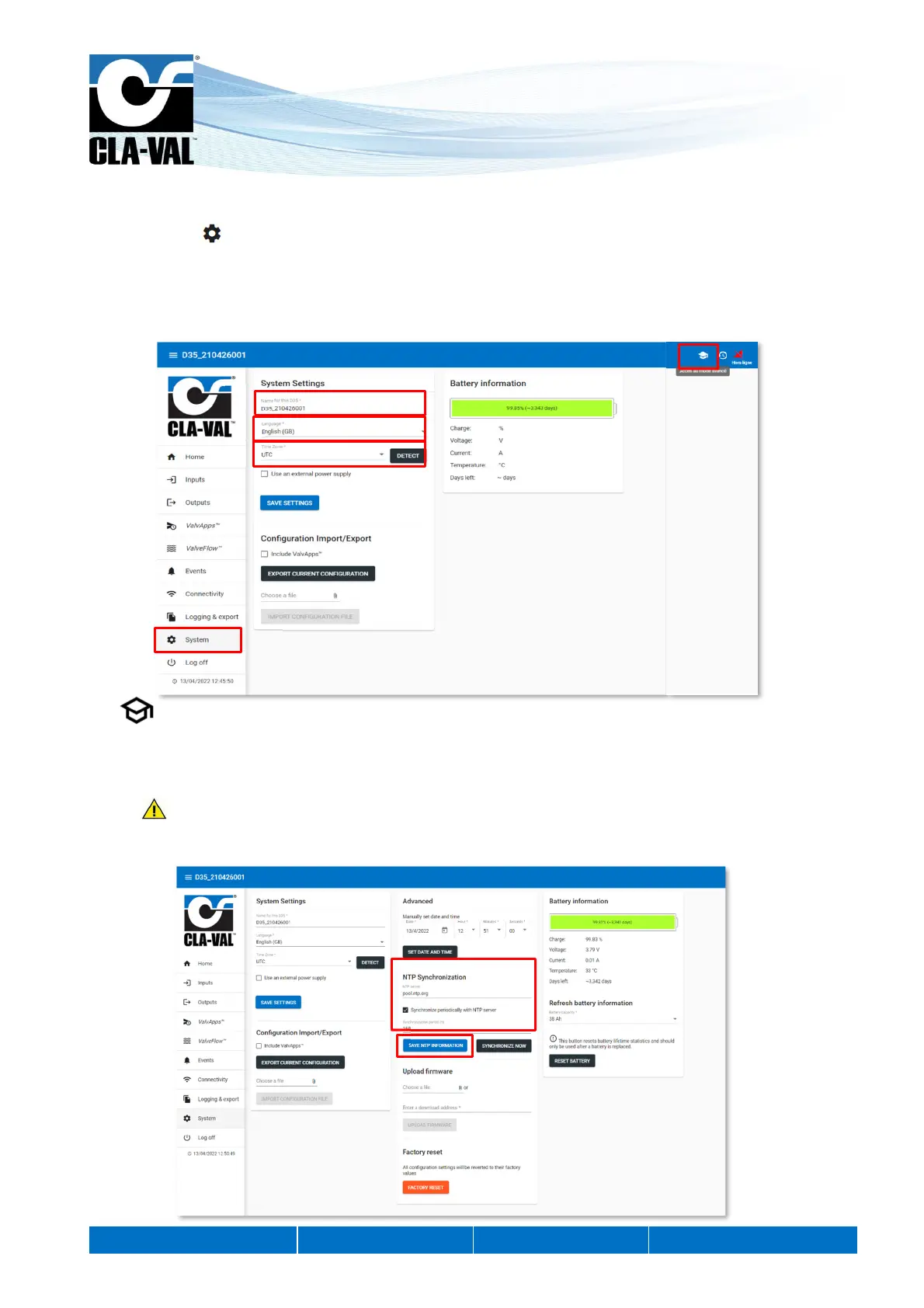
9.13 BASIC SYSTEM SETTINGS
1. Click on the " System" menu.
2. Give your D35 a name.
3. Select the language.
4. Select your time zone using the "DETECT" button. If the time zone is not detected correctly, you can choose it manually
with the "Time Zone" drop-down menu.
5. Optional: Set the automatic synchronization of the unit's internal clock.
a. Choose a time synchronization server (NTP server). The address pool.ntp.org, corresponding to a publicly
accessible server, can be used if you do not know an alternative.
b. Periodic synchronization is recommended.
This operation can only be performed if the D35 is connected to the cellular network (option). If not, go directly
to step 8.
6. Click on "SAVE NTP INFORMATION" to apply the changes.
5.
6.
2.
3.
4.
1.
5.


 To Next Page