CLA-VAL D35
Communicating Valve Controller
CLA-VAL Europe www.cla-val.ch cla-val@cla-val.ch 14 - D35001UE - 08/22
© Copyright CLA-VAL Europe - Specifications subject to change without notice - no contractual illustrations. Reduce your waste - Sort your rubbish
9.4 SETTING UP A FLOWMETER
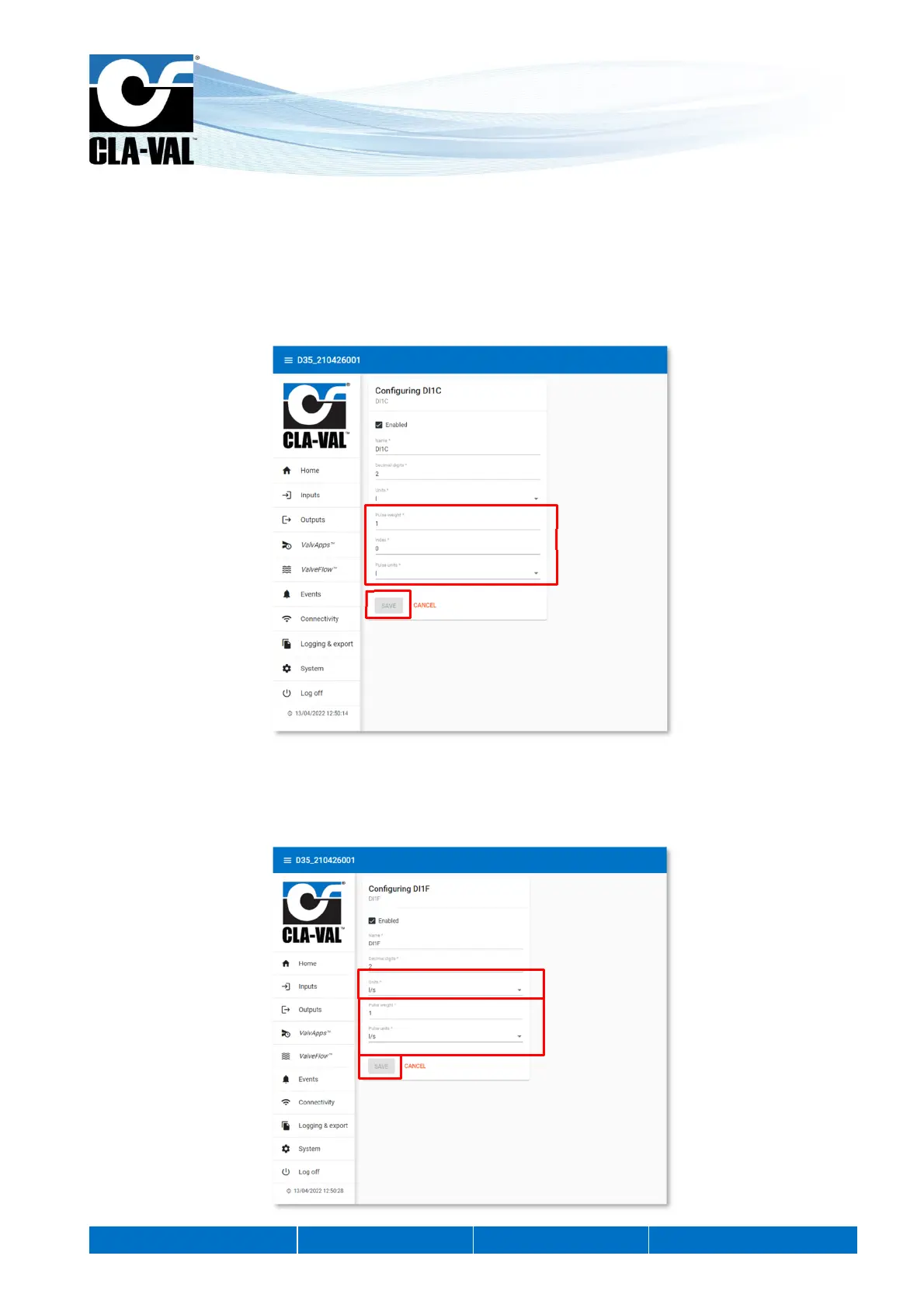
Pulse meters must be connected to digital inputs (DI1 or DI2). The configuration of these inputs DI... is broken down into two
sub-inputs:
The input DI...C controls the display of the volume measurement.
1. Select the "pulse weight" for the flow meter and its units.
2. Click "SAVE" to apply the changes.
The input DI...F controls the flow rate display
1. Choose the pulse weight and its units. These options must match the connected flowmeter.
2. Choose the units in which the flow rate is displayed.
3. Click "SAVE" to apply the changes.
1.
2.
2.
1.
3.


 To Next Page