Page 11
For Cometa Evolution 4 Zone (p/n): 8014
For Cometa Evolution 6 Zone (p/n): 8016
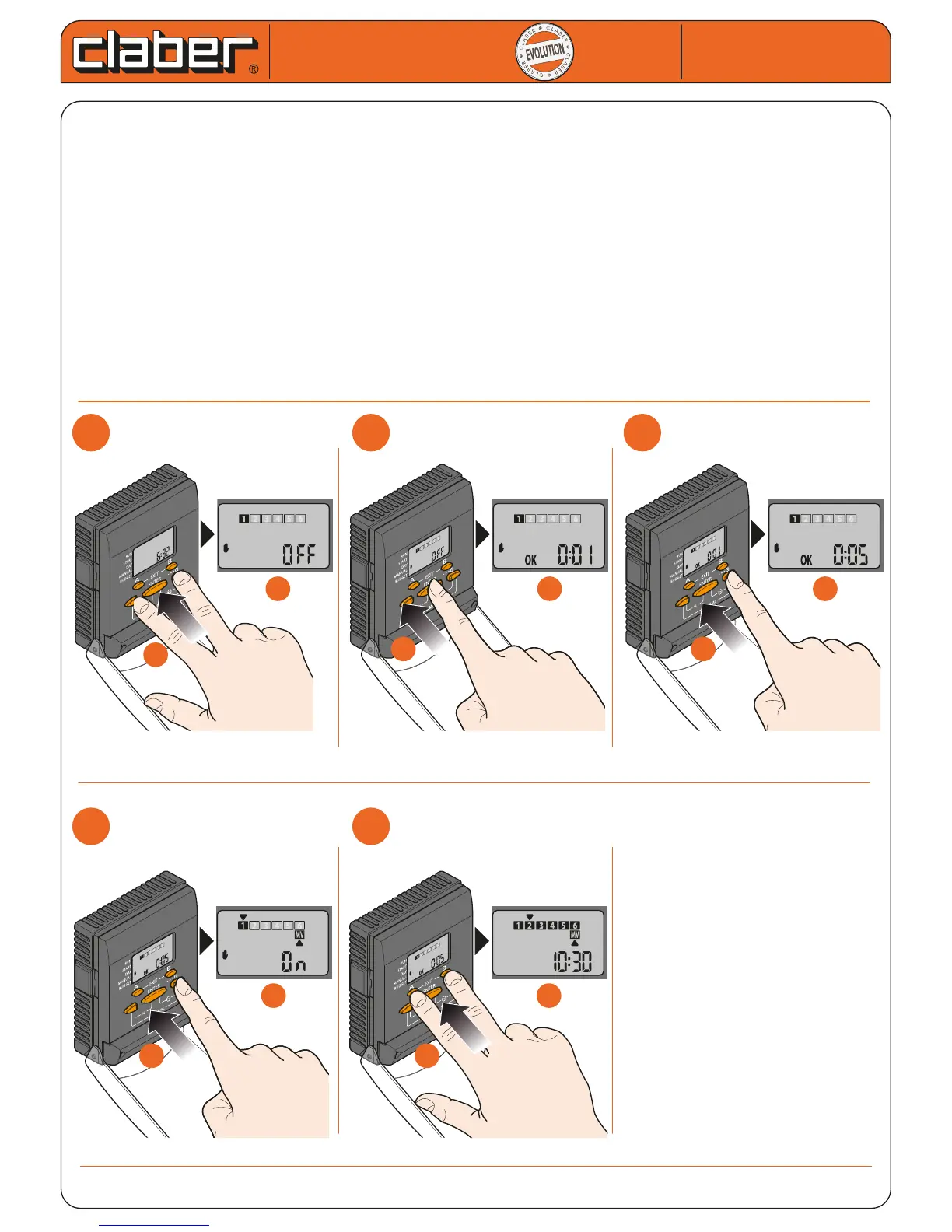
TEST MODE
The TEST mode is particularly useful during installation or system maintenance as it allows all the valves to be
activated in sequence by the user; this way it is possible to check operation of the each part of the system.
- press the arrows a number of times together until TEST can be selected; the valve numbers are in a cycle.
- to activate the setting, press ENTER, appears OK
- press the arrows together to set the run time
- Press ENTER to conrm the setting; watering begins immediately.
- Press A and B at the same time to exit the function (by carrying out this operation, the watering test in
progress is NOT interrupted)
To stop watering after exiting the function ( A and B pressed at the same time), repeat the step 1 and then press
ENTER.
TEST mode takes priority: if it is activated, all other modes are interrupted (for example, MANUAL, AUTOMATIC,
SEMI-AUTOMATIC, etc.).
Cometa
Cometa
User manual
User manual
1
1
2
2
3
3
4
4
5
5
a
a
a
a
b
b
b
b
a
a
b
b
a
a
b
b
a
a
b
b


 To Next Page