Page 7
For Cometa Evolution 4 Zone (p/n): 8014
For Cometa Evolution 6 Zone (p/n): 8016
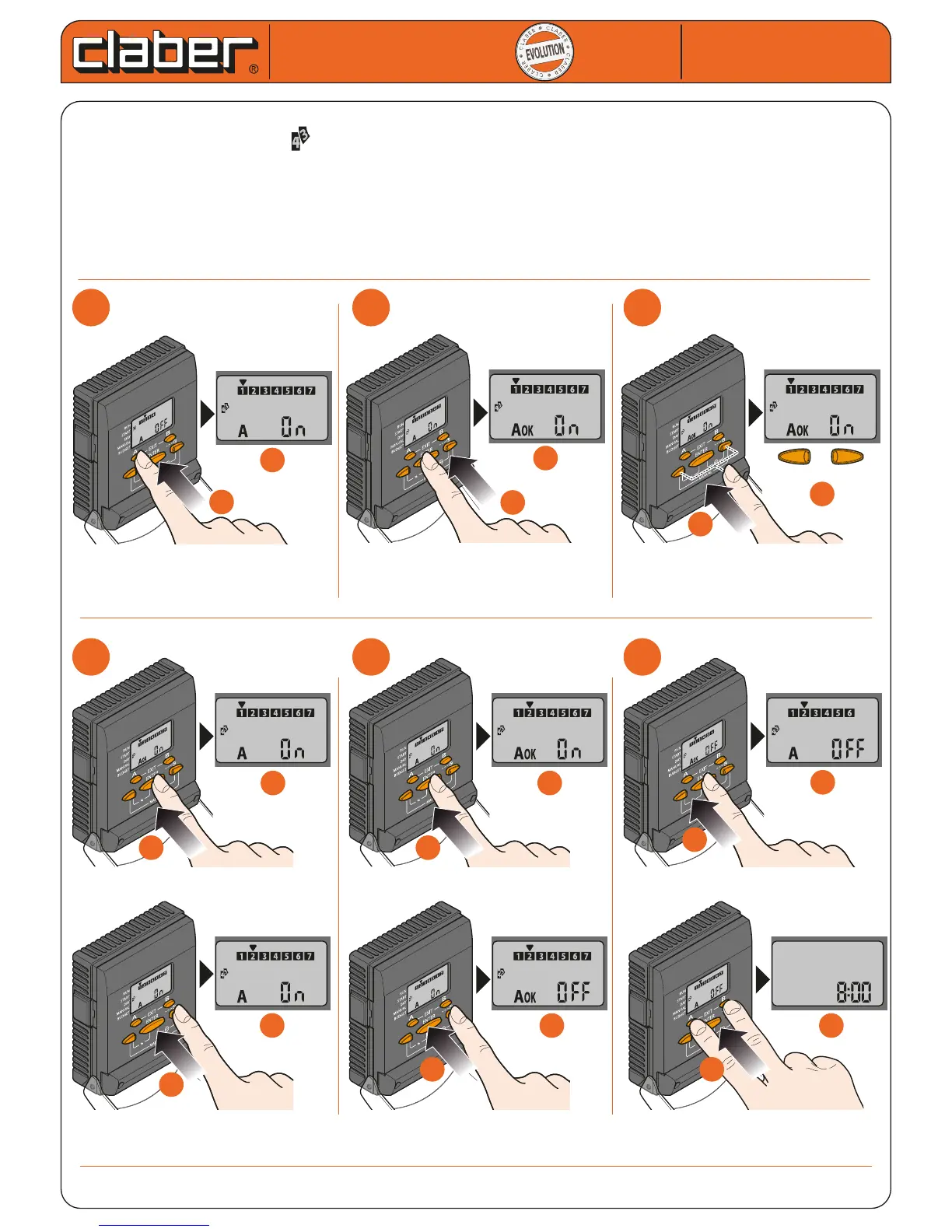
SETTING PROGRAMME A - WATERING DAYS
- press button A once: the symbol appears and the cursor blinks on the rst day of the week (number 1
denotes Sunday)
- press ENTER to activate the setting procedure
- use to the arrows to select ON (watering active) or OFF (no watering)
- press ENTER to conrm the setting
- select another day using the arrows, and repeat the same steps for all the days of the week
- press EXIT (buttons A and B) to quit the programming function
Cometa
Cometa
User manual
User manual
1
1
2
2
3
3
a
a
b
b
b
b
a
a
b
b
a
a
on
o
4
4
5
5
6
6
d
d
c
c
d
d
b
b
a
a
b
b
a
a
b
b
a
a
c
c
d
d
c
c
Repeat the same sequence of steps for programme B


 To Next Page