Page 8
For Cometa Evolution 4 Zone (p/n): 8014
For Cometa Evolution 6 Zone (p/n): 8016
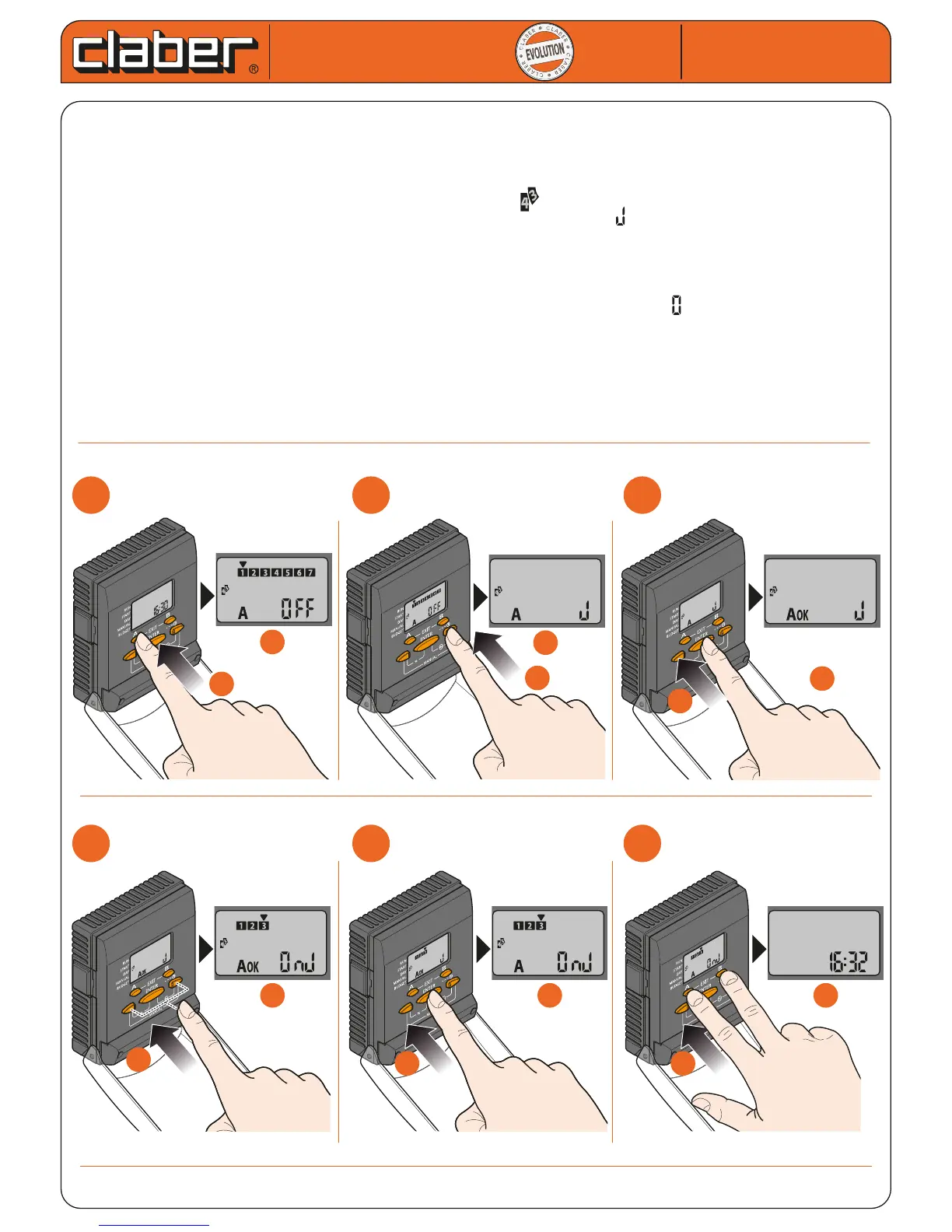
CYCLICAL SCHEDULE
The CYCLICAL SCHEDULE function allows Programme A or B to be repeated at time intervals equal to the number of set
days. This type of programming is carried out as an alternative to the weekly schedule but programmes A and B are
independent:this means that Programme A can be associated with a WEEKLY SCHEDULE while Programme B can be associa-
ted with a CYCLICAL SCHEDULE.
- repeatedly press A or B until the watering day settingis reached
- press a number of times right arrow until the cyclical schedule symbol appears
- press ENTER, appears OK
- to set the number of days in the interval (from 1 to 12), press the arrows
- press ENTER to conrm the setting; the rst watering operation will take place on the same day as the setting
- press A and B at the same time to exit the programming
- to cancel the CYCLICAL SCHEDULE, repeat the steps and set the day interval duration to .
Example. If Programme B is carried out EVERY THURSDAY, therefore every 7 DAYS (WEEKLY SCHEDULE) but needs to be carri-
ed out more frequently, it can be set to every 3 DAYS (for example, SATURDAY 1 March....MONDAY 3 March....THURSDAY 6
March... and soon..) using the CYCLICAL SCHEDULE function.
If the CYCLICAL SCHEDULE is cancelled, the water timer suggests the previous WEEKLY SCHEDULE associated with the
programme (Programme B is once again associated with THURSDAY).
Cometa
Cometa
User manual
User manual
1
1
2
2
3
3
a
a
b
b
b
b
a
a
b
b
a
a
b
b
a
a
4
4
5
5
6
6
b
b
a
a
b
b
a
a


 To Next Page