EasyManua.ls Logo

Clark NPR17 - Page 72

Clark NPR17
110 pages
Print Icon
To Next Page IconTo Next Page
To Previous Page IconTo Previous Page
Loading...
Stacking
To
put a
load
on a
stack:
Approach
slowly
and
align
the
lift truck
and
load squarely with
the
stack.
Raise
(elevate)
the
load
as the
lift truck
is
nearing
the
stack. Move
forward,
slowly,
until
the
load
is
almost touching
the
stack.
The
leading
edge
and
sides
of the
load pallet should
be
lined
up
exactly
with
the
near
edge
and
side
of the
load
or
rack
on
which
you are
stacking.
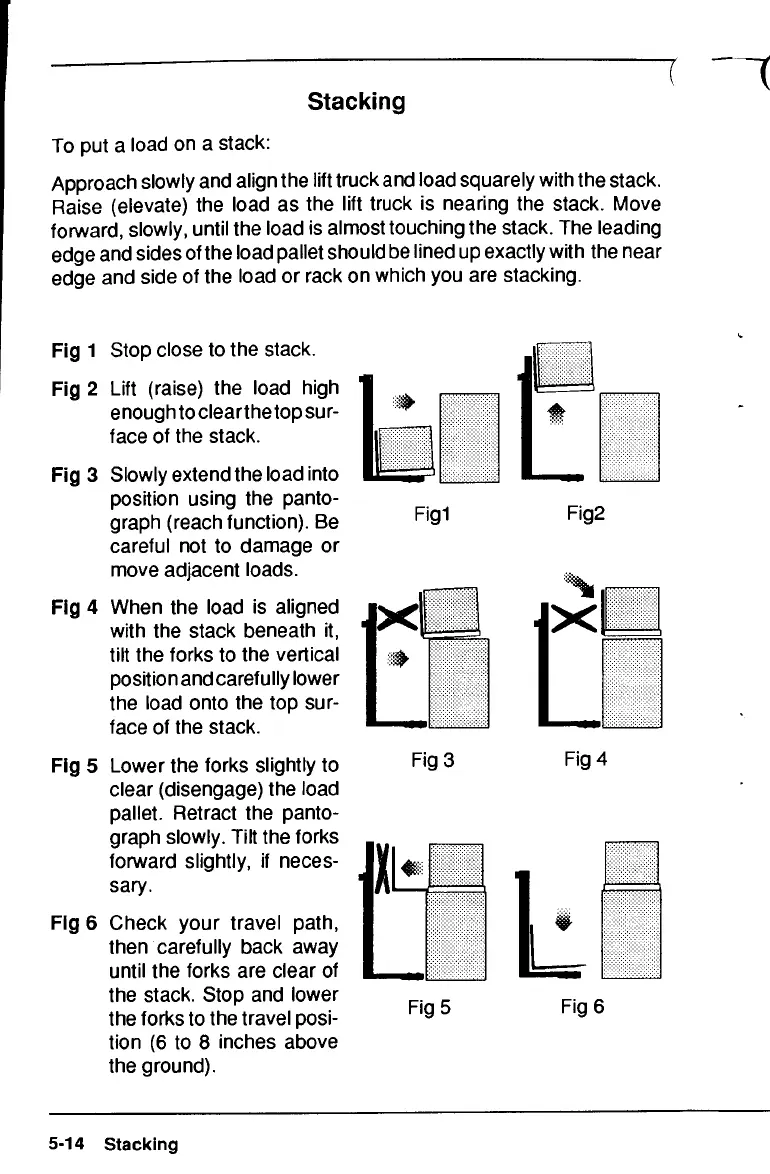
Fig 1
Stop close
to the
stack.
Fig 2
Lift
(raise)
the
load high
enough
to
clearthe
top
sur-
face
of the
stack.
Fig 3
Slowly extend
the
load
into
position using
the
panto-
graph
(reach function).
Be
careful
not to
damage
or
move
adjacent loads.
Fig 4
When
the
load
is
aligned
with
the
stack beneath
it,
tilt
the
forks
to the
vertical
position
and
carefully lower
the
load onto
the top
sur-
face
of the
stack.
Fig 5
Lower
the
forks slightly
to
clear
(disengage)
the
load
pallet. Retract
the
panto-
graph slowly. Tilt
the
forks
forward
slightly,
if
neces-
sary.
Fig 6
Check your travel path,
then carefully back away
until
the
forks
are
clear
of
the
stack. Stop
and
lower
the
forks
to the
travel posi-
tion
(6 to 8
inches above
the
ground).
Figl
Fig2
Fig3
Fig
4
X
Fig
5
Fig
6
5-14 Stacking

Related product manuals