2-4 750-166
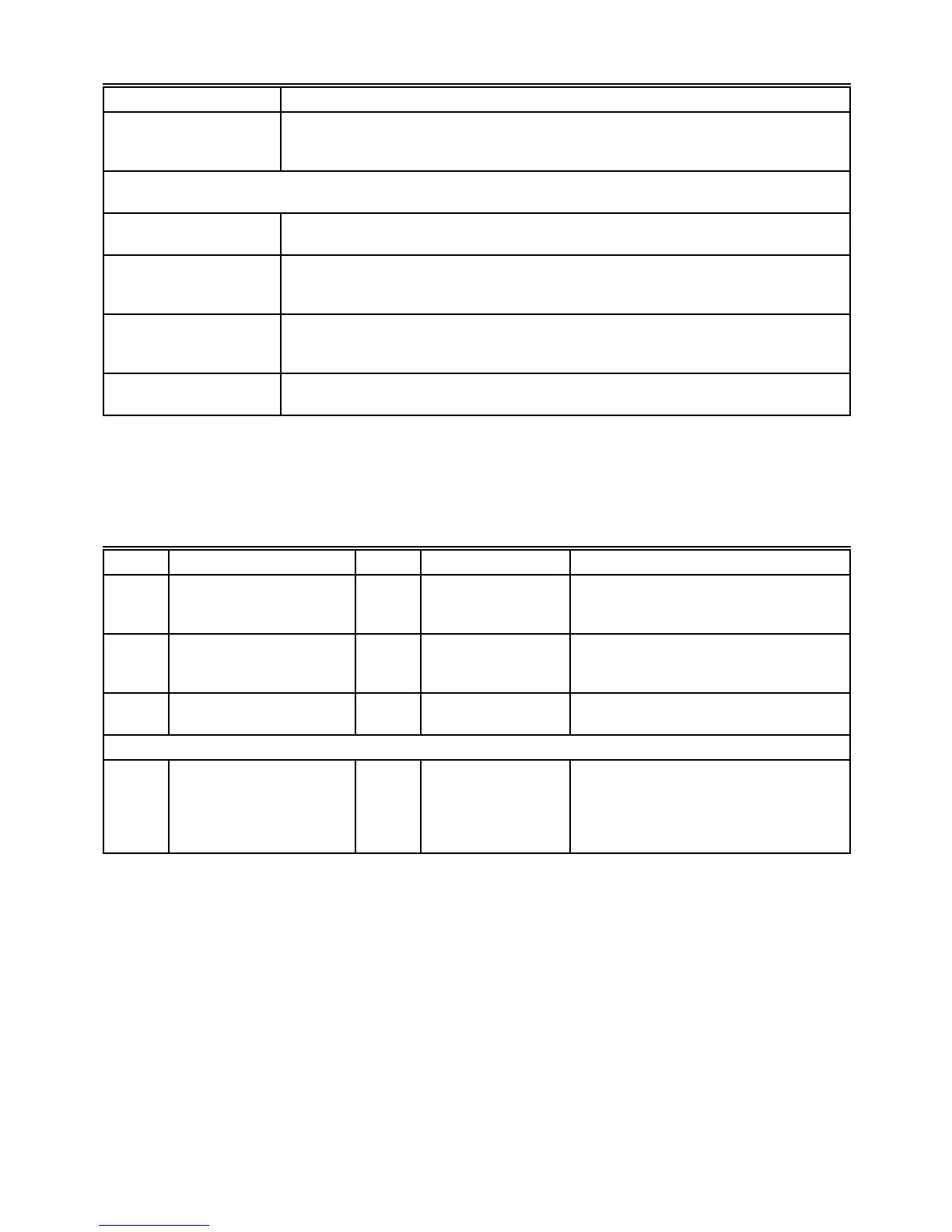
TABLE 1—SEQUENCE AND STATUS HOLD MESSAGES FOR ALL CB780/CB784 CONTROLS (Continued).
Sequence Burner Control Status
RESET/ALARM TEST The KDM indicates the burner status, RESET/ALARM TEST. This display indicates
that the reset button is pressed. If it is held for more than four seconds, the alarm output
is energized. The alarm output will be deenergized when the reset button is released.
ADDITIONAL SEQUENCE STATUS INFORMATION IF AN EXPANDED ANNUNCIATOR IS
CONNECTED TO THE RELAY MODULE.
BURNER OFF: T6
(Burner Switch)
The KDM indicates the Burner Switch is not closed. The burner sequence will not
advance to PREPURGE until the Burner Switch closes.
STANDBY The KDM indicates the burner status, STANDBY, and the Operating Control is not
closed. The burner sequence will not advance to PREPURGE until the Operating Control
closes.
STANDBY HOLD: T6
(EA Hold Message)
The KDM indicates the burner status, STANDBY, and a limit is not closed. The burner
sequence will not advance to PREPURGE until one or all limits close downstream from
the Operating Control.
STANDBY HOLD: T6
(Circuit Fault)
The KDM indicates the burner status, STANDBY, and the control input is not closed.
The burner sequence will not advance to PREPURGE until the control input closes.
Step Operation Press Display Comments
1. Press scroll key to access
Diagnostic Information
(↕) STANDBY
Diagnostic Info>
Use the down/up scroll keys to access the
selectable message. The second line will
display Diagnostic Information.
2. Press change level key to
access Diagnostic
Information
(↔) STANDBY
Diagnostic Info>
Use the change key to access the
Diagnostic Information.
3. Continue display of
Diagnostic Information.
(↕) STANDBY⁄DI
Device RM7800<
Push the (↕) scroll key to scroll to the next
Diagnostic message.
4. Continue through remaining Diagnostic Information display following step 3 as required.
5. Press change level key to
return to the first level of
Diagnostic Information
data prompt or to other
selectable messages.
(↔) STANDBY
Diagnostic Info>
Another display can be selected or
discontinue accessing Diagnostic
Information review.
TABLE 2—ACCESSING HISTORICAL AND DIAGNOSTIC SELECTABLE MESSAGES.
NOTE: Historical Files may be selected similarly.


 To Next Page