Tranquility
®
22
(
TY
)
Series
Rev.: July 8, 2021
ClimateMaster Water-Source Heat Pumps
30
CLIMATEMASTER WATER-SOURCE HEAT PUMPS
DXM2 Controls, Cont’d.
the compressor is not used and the control goes into
emergency heat mode, staging on EH1 and EH2 to
provide heating.
On = normal. Off = Boilerless operation.
1.8 – Boilerless changeover temperature: DIP 1.8 provides
selection of boilerless changeover temperature setpoint.
Note that the LT1 thermistor is sensing refrigerant
temperature between the coaxial heat exchanger and
the expansion device (TXV). Therefore, the 50°F [10°C]
setting is not 50°F [10°C] water, but approximately 60°F
[16°C] EWT.
On = 50°F [10°C]. Off = 40°F [16°C].
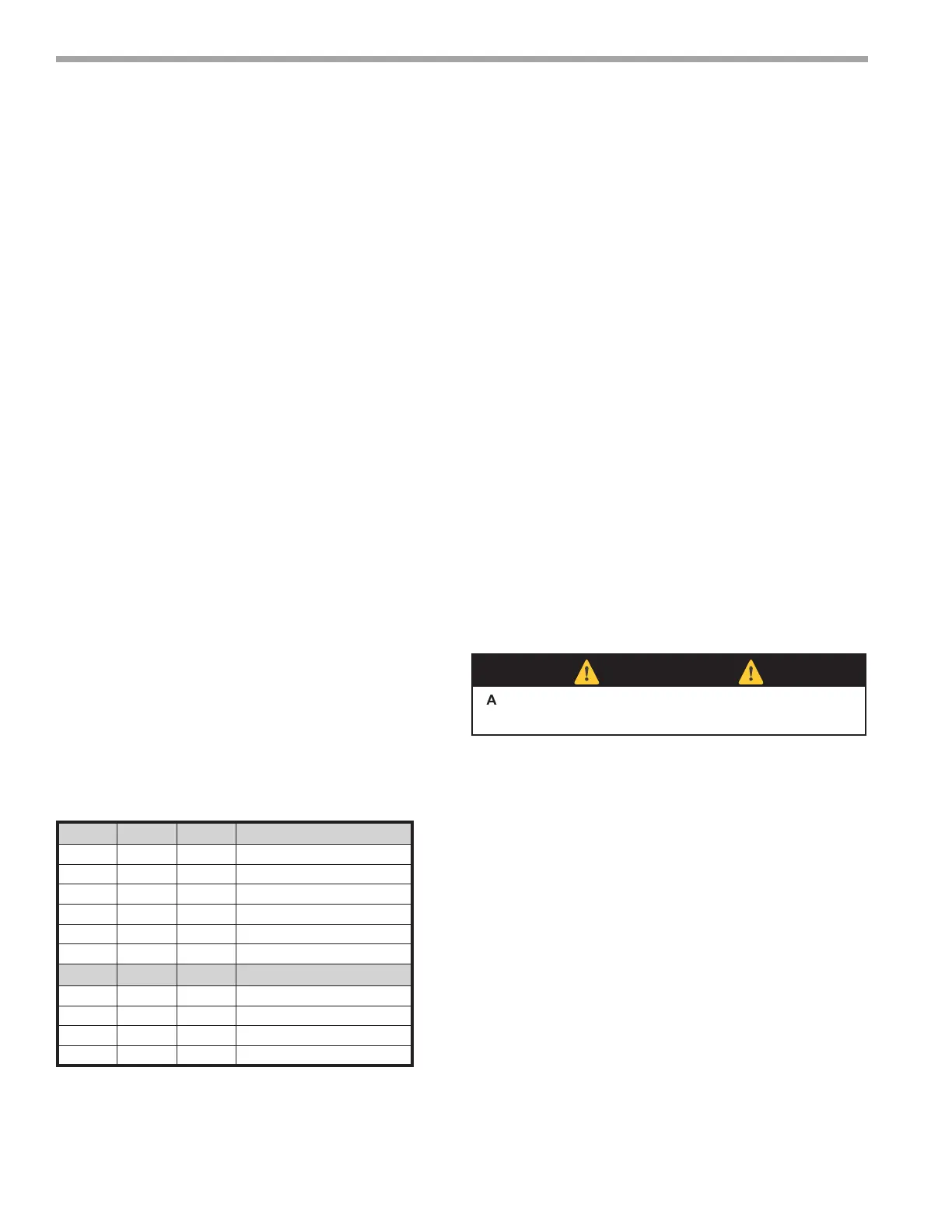
DIP Package #2 (S2) – A combination of dip switches
2.1, 2.2, 2.3, and 2.4, 2.5, 2.6 deliver conguration of
ACC1 and ACC2 relay options respectively. See Table 7a
for description and functionality.
2.7 – Auto dehumidication fan mode or high fan mode:
DIP 2.7 provides selection of auto dehumidication fan
mode or high fan mode. In auto dehumidication mode,
the fan speed relay will remain off during cooling stage 2
IF the H input is active. In high fan mode, the fan enable
and fan speed relays will turn on when the H input is
active.
On = Auto dehumidication mode (default). Off = High fan
mode.
2.8 – Special factory selection: DIP 2.8 provides special
factory selection. Normal position is “On”. Do not change
selection unless instructed to do so by the factory.
DIP Package #3 (S3)
– DIP Package #3 has 4 switches and provides the
following setup and operating selections:
3.1 – Communications conguration: DIP 3.1 provides
selection of the DXM2 operation in a communicating
system. The DXM2 may operate as the Master of certain
network congurations. In most congurations the DXM2
will operate as a master device.
On = Communicating Master device (default). Off =
communicating Slave device.
3.2 – HWG Test Mode: DIP 3.2 provides forced operation
of the HWG pump output, activating the HWG pump
output for up to ve minutes.
On = HWG test mode. Off = Normal HWG mode (default).
3.3 – HWG Temperature: DIP 3.3 provides the selection of
the HWG operating setpoint.
On = 150°F [66°C]. Off = 125°F [52°C] (default).
3.4 – HWG Status: DIP 3.4 provides HWG operation
control.
On = HWG mode enabled. Off = HWG mode disabled
(default).
Table 7a: Accessory DIP Switch Settings
DIP 2.1 DIP 2.2 DIP 2.3 ACC1 Relay Option
On On On Cycle with fan
Off On On Digital NSB
On Off On Water Valve - slow opening
On On Off OAD
Off Off Off Reheat Option - Humidistat
Off On Off Reheat Option - Dehumidistat
DIP 2.4 DIP 2.5 DIP 2.6 ACC2 Relay Option
On On On Cycle with compressor
Off On On Digital NSB
On Off On Water Valve - slow opening
On On Off OAD
AllÊotherÊDIPÊcombinationsÊa
reÊinvalid
⚠
CAUTION!
⚠
CAUTION! Do not restart units without inspection and remedy
of faulting condition. Equipment damage may occur.



 To Next Page