39
7 - CONTROL
1
display
press
+
PAr
press
PAr
select Cr
/
Cr
press
Cr..
select Cr00
enable ambient probe
/
Cr00
confirm
0
select 2
/
2
confirm
2
back to the previous level
select Cr30
temperature display
/
Cr30
confirm
0
select 16
/
16
confirm
16
back to the previous level
3
display
press 3 sec.
select Air1
/
Air1
press
Air1
2
display
press
+
PAr
press
PAr
select Ui
/
Ui
press
Ui..
select Ui22
/
Ui22
confirm
0
select 1
/
1
confirm
1
back to the previous level
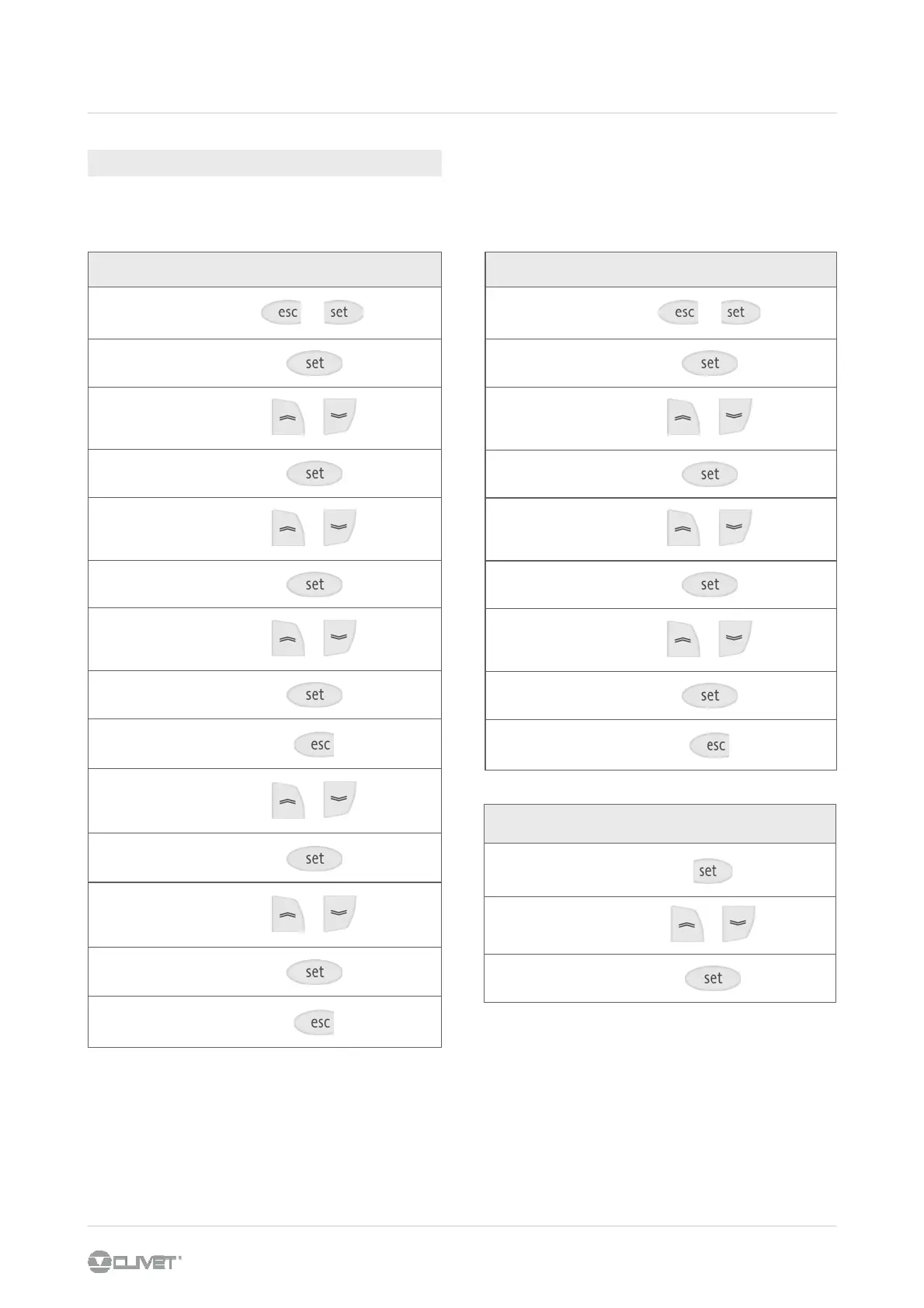
It is possible to set the keypad to display the ambient temperature.
The probe is not used to perform the ambient thermoregulation.
Follow these steps:
AMBIENT TEMPERATURE DISPLAY
Is it possible to disable the ambient keyboard :
Cr00 = 0
Cr30 = 0
To enable water setpoint compensation with ambient
temperature set :
par Cr 30 = 10 (see pag 20)



 To Next Page