CNC 6040 Router / Engraver System
CNCDIY CNC Routing Machines System User’s Manual
43
Step 3 Find the original location
Turning on the drive power switch of the CNC control box and using the software manual
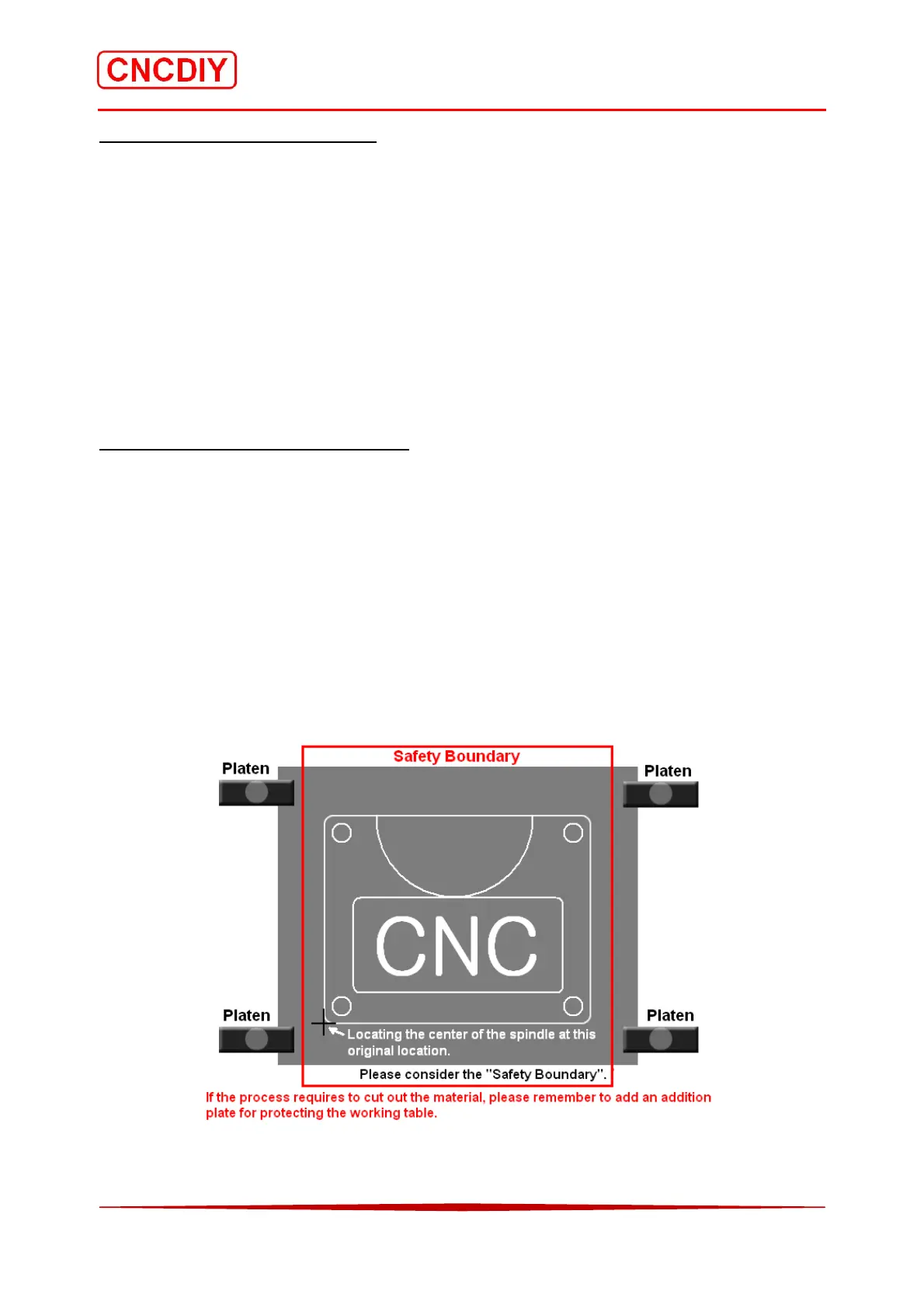
control function to move all axes to the start point as the below image.
The red area is the “Safety Boundary”(excluding the space occupied by the platen). The black
point “+”is the original location of the tool path. Place the center point of the spindle (without
loading a tooling) at the original location on the material.
User must rise up the Z axis part to avoid the spindle crashing the screws and the plate during
running. And then, set “Zero” for all axes in your software.
Step 4 Start running without tooling
User can start running the G code file now. If the running path is not correct, please push the
E-Stop button and switch off the power of the CNC control box immediately. Please check
again the setting in your software carefully.
During the running operation without loading cutting tool, please observe the tool path whether
will be crashing the screws and platens carefully. If the cutting tool crashed the screws or platen,
the tooling maybe broken or the routing machine system may also be damaged in serious.



 To Next Page