Chapter 4: Setup and verification
System app 23
44444
Setup and verification
Reset
Applications
Tap Applications to install or un-install applications. This section has two
tabs: Available, showing the apps that are available to the SAILOR 6004
Control Panel on the current network, and Installed, showing which apps
are already installed.
To install an app, do as follows:
1. To install an app, do as follows: Tap Available to display the apps that
are available on this SAILOR 6004 Control Panel.
2. Tap the app you want to install.
For each app following items are shown:
• App name and version, e.g. GNSS Version 1.0.
• Install to install this app on the SAILOR 6004 Control Panel.
3. Enter the password for Admin level and tap OK.
To manage an already installed app, do as follows:
1. Tap Installed to display the apps that are installed on this SAILOR
6004 Control Panel.
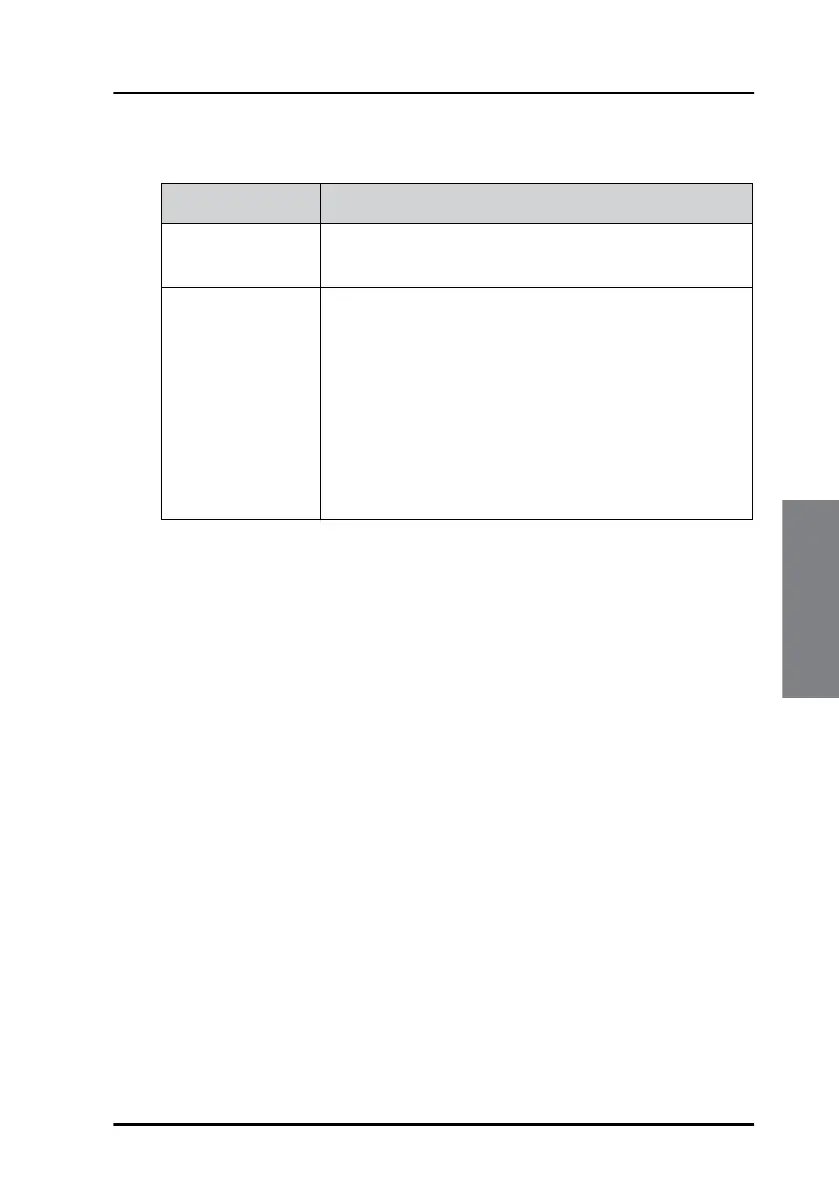
Reset Description
Reset Admin
Password
For internal use only.
Factory reset A Factory reset removes all installed apps,
reboots the Control Panel and resets all settings to
factory default.
Factory reset is protected by password and an
additional confirmation in a dialogue box before
proceeding. The System app is not removed by
performing a factory reset.
To install an app again see the section below.


 To Next Page