22
After Sales Support
Telephone: 1300 663 907
Internet: www.winplus.com.au
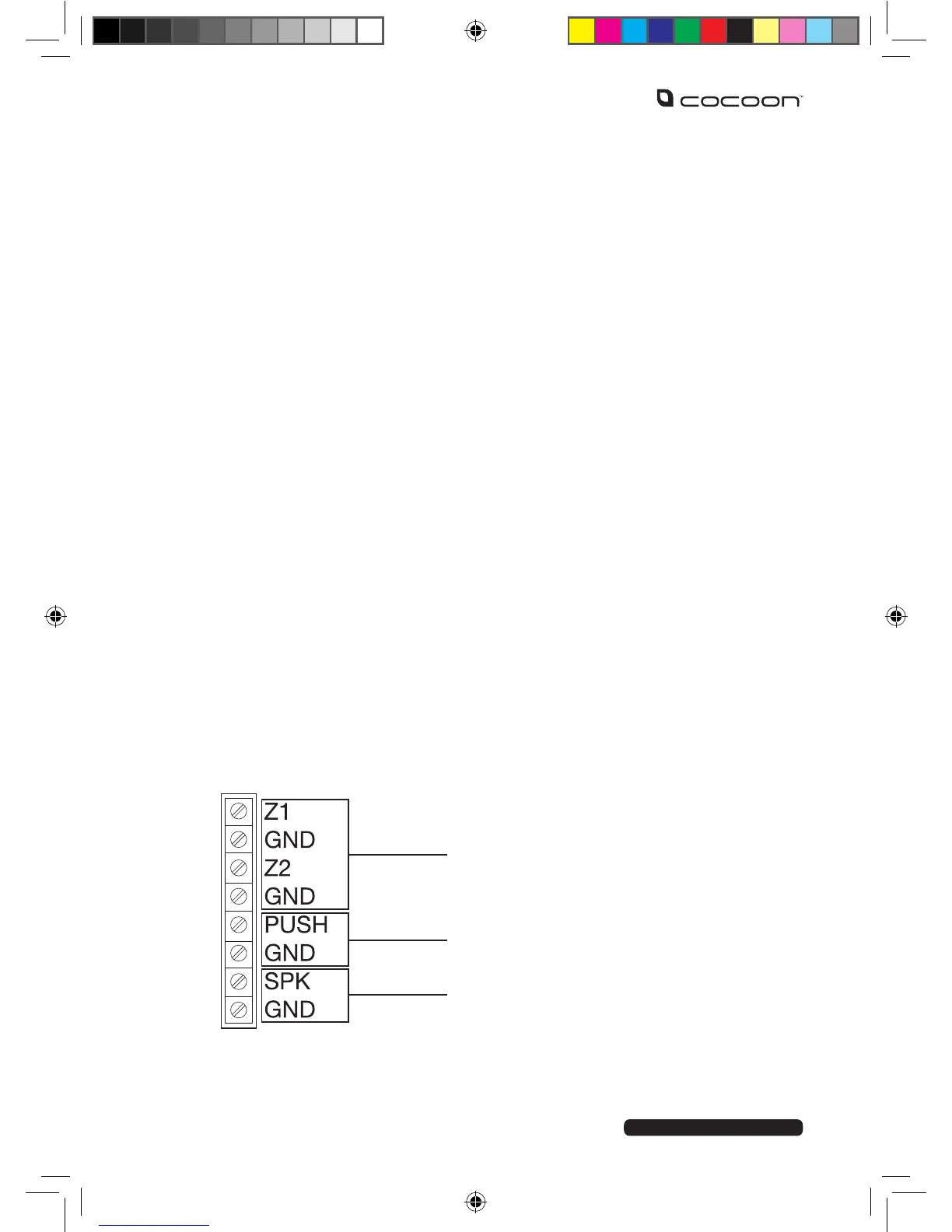
WIRED INPUTS
The Wireless Alarm System supports extra sensors such as smoke or gas detectors to be wired
into the system, these operate in an always-on mode, regardless of the Armed or Disarmed
mode on the Control Panel. A wired siren and an electronically controlled lock may be added
to the system too, (these are not included and need to be purchased separately).
Tip: This wiring is intended to be performed by a capable person who is knowledgeable
in home security.
1. Remove the Control Panel from the wall and remove the rear cover panel.
2. Switch o the alarm using the switch inside the cover panel.
3. Remove the power cord and backup batteries before attempting to connect any
wired components.
4. Locate the connection terminals, and take note of the markings – refer to the below
layout.
5. Refer to your wired device’s installation instructions for the to nd the correct
connection terminals to use.
6. Use a screwdriver to loosen the terminal required.
7. Insert the cable, and tighten the terminal.
8. Once you have connected your wired devices, replace the batteries, power cable,
and the cover panel.
9. Test the function of your wired devices.
Advanced Settings
2 INPUTS FOR WIRED SENSORS
24 HOUR ZONE
OUTPUT FOR ELECTRONIC LOCK
OUTPUT FOR WIRED SIREN ≤ 500mA



 To Next Page